An automated SMS reply is a pre‑written text message that sends itself the moment a trigger fires, whether that’s a missed call, a keyword, or the clock striking 6pm. You have three real routes to get one running. A phone app works in minutes for a sole trader. An SMS platform with a virtual number scales across a team and connects to a CRM. A managed AI text‑back service hands the whole thing over to specialists, which suits any business that can’t afford a missed enquiry. If you’re a single-person operation testing the waters, start with an app. If you’re growing and juggling volume, a platform earns its subscription. If leads are your business and downtime costs you money, a managed service like Semlocal is the option worth booking a call about.
- Phone app — quickest to set up, free or low-cost, best for solo operators.
- SMS platform / virtual number — scalable, integrates with a CRM, suits growing teams.
- Managed AI text-back service — hands-off, trained replies, best for businesses that can’t afford a missed lead.
Key Takeaways
Automated SMS replies work best when the trigger, message, and compliance basics are all handled correctly from day one.
| Point | Details |
|---|---|
| Pick the right path | Phone apps suit solo owners; platforms suit growing teams; managed services suit high-volume or lead-critical businesses. |
| Triggers drive everything | Keywords, schedules, webhooks, and missed calls each need their own tested rule before going live. |
| Templates should stay short | Clear, action-focused messages with an opt-out line convert better than long or vague ones. |
| Compliance isn’t optional | Explicit opt-in, retained records, and a visible opt-out protect deliverability and reputation. |
| Semlocal handles the heavy lifting | Semlocal’s managed AI text-back service covers onboarding, CRM integration, and ongoing optimisation for service businesses that need reliable 24/7 replies. |
Table of Contents
- How does automated SMS reply technology actually work?
- Which setup path gets you live fastest?
- What message templates work best for automated replies?
- Where do automated SMS replies deliver the most value?
- How much does it cost and how long does it take to launch?
- What compliance rules apply to automated text replies?
- When does a managed AI text-back service make more sense?
- Get your SMS replies managed properly
- Frequently asked questions
- Sources
How does automated SMS reply technology actually work?
Automated replies run on triggers and rules, not magic. Something happens, a rule checks the conditions, and a pre-written or dynamically generated message goes out within seconds. The mechanics are simple once you see the parts.
Common triggers include:
- Keywords — a customer texts “BOOK” or “HOURS” and gets a matching reply.
- Time-based schedules — after-hours or weekend messages that switch on automatically.
- Webhook or API events — an appointment gets cancelled and a system fires a follow-up text.
- Missed-call text-back — an unanswered call triggers an instant SMS asking what the caller needed.
Beyond triggers, look for a feature checklist that includes templates, conditional logic (if the customer says “yes”, branch one way; “no”, branch another), dynamic fields for names and dates, CRM routing, a choice of number types, and delivery receipts you can actually audit. Platforms like Sinch and RingCentral build much of this into no-code workflow builders.
Limitations matter too: SMS caps out around 160 characters per segment, carrier delays happen during peak hours, and most consumer regulations require a clear opt-in before you send anything commercial.
Pro Tip: Test your after-hours trigger by texting your own business number at 11pm on a Sunday. If the reply doesn’t land within a minute, something in your schedule logic is wrong.
Which setup path gets you live fastest?
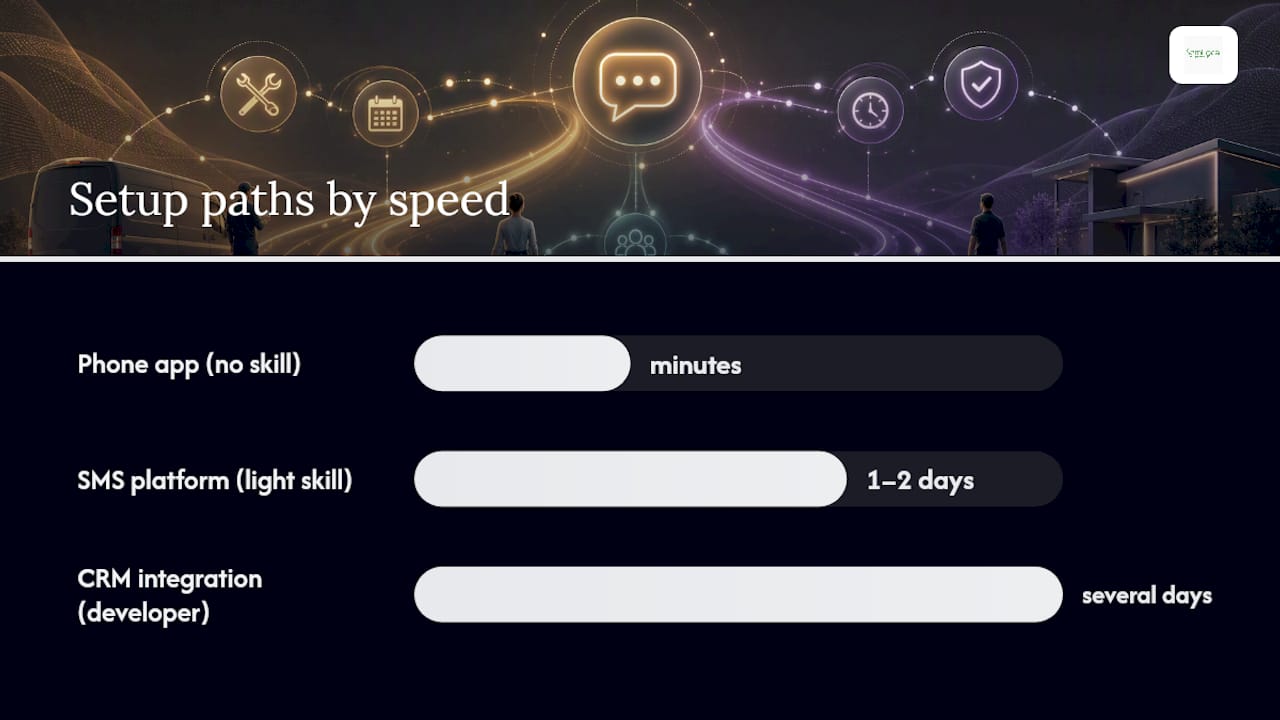
Pick the path that matches your technical comfort, not the one that looks most impressive.
1. Phone app path (minutes, no technical skill required)
Install an auto-reply app on the phone your business already uses, set your templates and rules, then test from a second device or ask a friend to text you. Check the reply arrives correctly formatted and within a reasonable window.
2. SMS platform path (a day or two, light technical skill)
Buy a virtual number, configure keyword or schedule-based rules in the platform dashboard, and connect it to a basic CRM or even a shared spreadsheet. Send test messages and monitor delivery receipts before rolling it out to customers.
3. CRM/integration path (several days, developer involved)
Use webhooks or built-in automations to map incoming SMS straight to contact records. Developers commonly build this handling layer using Node.js, which has become a standard runtime for receiving inbound webhooks and firing outbound replies programmatically.
Before going live on any path, run this troubleshooting checklist:
- Confirm you’re using the right number type (long code vs short code) for your message volume.
- Check delivery status logs, not just “sent” confirmations.
- Look for keyword collisions where two rules could both fire.
- Check rate limits so a burst of messages doesn’t get throttled or blocked.
What message templates work best for automated replies?
Short, clear, action-focused messages outperform anything clever. A reply that tells the customer exactly what happens next beats one that tries to sound friendly.
- Out-of-office: “Thanks for texting [Business Name]. We’re closed until 9am tomorrow and will reply then. For urgent matters, call [number].”
- Booking confirmation: “You’re confirmed for [service] on [date] at [time]. Reply CHANGE to reschedule.”
- After-hours: “We’ve received your message outside office hours (Mon to Fri, 9 to 5). We’ll respond first thing.”
- Keyword-triggered info: Customer texts “PRICES” → “Here’s our current price list: [link]. Text HELP for a human.”
- Lead-capture text-back: “Sorry we missed your call. What can we help with? Reply here and we’ll get back to you shortly.”
Personalise fields like name, appointment time, and service type, but keep the tone consistent with how your business actually talks. The most common pitfalls are messages that ramble past two sentences and replies that forget to include an opt-out line.
Pro Tip: Set an honest response-window expectation in your template (“we’ll reply within 2 hours”) rather than promising instant human contact you can’t deliver.
Where do automated SMS replies deliver the most value?
Automated replies handle appointments, lead capture, confirmations, and support triage without anyone touching a phone.
- Appointment reminders — a text 24 hours before a booking cuts no-shows.
- Missed-call text-back — turns a hang-up into a captured enquiry within seconds.
- Cart recovery prompts — timely, given that cart abandonment rates remain high across online retail, a follow-up SMS can win back business that would otherwise vanish.
- After-hours routing — keeps customers informed even when the office is shut.
- FAQ triage — keyword replies answer “what are your hours” a hundred times so a person doesn’t have to.
Simple one-way auto-replies suit reminders and FAQs. Two-way automations, where the system asks a follow-up question and routes the answer, suit lead capture and booking changes.
How much does it cost and how long does it take to launch?
A phone-app proof of concept can be free and running within minutes. Anything involving a platform subscription or managed service brings monthly costs and a longer build.
- Virtual number rental — typically a small monthly fee per number.
- Message volume — most platforms charge per SMS segment sent above a bundled allowance.
- Platform subscription tiers — vary by feature set, from basic auto-reply to full workflow automation, as reflected across the wide range of SMS marketing vendors on G2.
- Development or integration time — hours for a spreadsheet link, days to weeks for full CRM mapping.
- Managed service retainers — a monthly fee that covers ongoing optimisation and support.
Expect minutes for a phone app, a few days for a platform rollout, and one to two weeks for a fully integrated managed deployment.
What compliance rules apply to automated text replies?
Always collect explicit opt-in before sending anything commercial, and put a clear opt-out in every message. This isn’t optional politeness. It’s the baseline that keeps you off spam blocklists.
Run through this checklist before sending your first batch:
- Confirm consent was collected and recorded, with a timestamp.
- Retain records of opt-ins and opt-outs for as long as your data policy requires.
- Include opt-out language such as “Reply STOP to unsubscribe” in every commercial text.
- Set realistic frequency expectations so customers aren’t surprised by volume.
- Check whether your market requires template pre-registration; some regulated regions demand it before you send OTPs, alerts, or reminders at scale.
For deliverability, use a long code for two-way conversations and a short code for high-volume broadcasts, avoid content that trips spam filters, and watch your delivery receipts and complaint rates weekly.
Sample opt-out message: “You’re subscribed to updates from [Business Name]. Reply STOP anytime to unsubscribe.”
Pro Tip: Review your complaint rate monthly. A rising number usually means you’re sending too often, not that your message content is wrong.
This is general guidance, not legal advice. Check the rules that apply in your own market before sending commercial texts.
When does a managed AI text-back service make more sense?
Choose a managed service when you need reliable 24/7 two-way handling, calendar booking, CRM integration, and someone else doing quality control on every reply.
- Hands-off lead capture — every missed call or inbound text gets answered without anyone watching a dashboard.
- Higher reply quality — trained AI handles nuance better than a static template ever will.
- Calendar and CRM integration — bookings land straight into your existing systems.
- Reporting and service-level accountability — you see what’s working, not just that messages went out.
A managed setup typically includes onboarding, integration with your existing number and CRM, ongoing optimisation as conversations reveal gaps, and regular reporting. For local service businesses juggling calls, texts, and bookings across a small team, that oversight often matters more than any single feature. You can book a discovery call to see how it fits your business.
Field notes on automated SMS replies
Geoff has spent years watching local service businesses bolt on automation and then wonder why it didn’t help. The pattern is consistent: businesses treat a simple auto-reply as the finish line, when the real win is text-back automation that turns a missed call into a live conversation. Three tips worth following: start with one acknowledgement template before building anything complex, test under a realistic load rather than a single message, and wire your analytics into whatever CRM you already trust for handover. The most common mistakes are over-automating every interaction, forgetting the opt-out line, and skipping end-to-end testing before customers ever see it.
Get your SMS replies managed properly
Running your own auto-reply app or platform gets you started, but every hour you spend fiddling with keyword rules and delivery logs is an hour not spent running your business. Semlocal builds and manages AI-driven SMS text-back agents that handle missed calls, bookings, and after-hours enquiries without you touching a dashboard.
The offer is straightforward: onboarding, integration with your existing number and CRM, ongoing optimisation as real conversations reveal what customers actually ask, and reporting that shows what’s converting. It’s built for service businesses where a missed enquiry means a lost customer, not a minor inconvenience. If you’d rather have this handled properly than half-configured, book a discovery call and find out what a managed setup looks like for your business.
Frequently asked questions
What is the fastest way to get an automated SMS reply working?
A phone app is fastest. Install it, set your templates, and test with a second device within minutes.
Can automated text replies handle two-way conversations?
Yes, if you use conditional logic or a platform built for it. Simple auto-replies only send one message per trigger, while two-way automations can ask follow-up questions and route answers to a CRM.
Do I need consent before sending automated SMS replies?
Yes. Explicit opt-in is required before sending commercial messages, and every message needs a clear opt-out option.
What’s the difference between an SMS platform and a managed SMS service?
A platform gives you the tools and you configure everything yourself. A managed service like Semlocal handles setup, integration, and ongoing optimisation on your behalf.
How do I test my auto-reply before customers see it?
Send test messages from a separate device, check delivery receipts, and simulate different triggers, including after-hours and keyword replies, before going live.
Sources
Recommended
- Why automate call answering for your small business – AI Management Agency
- How to automate calls and boost customer satisfaction – AI Management Agency
- Automate call answering to streamline your hotel – AI Management Agency
- Step by step AI receptionist guide for UK small businesses – AI Management Agency