Add one JSON‑LD LocalBusiness block to your website today, using the most specific subtype your business supports, with your exact name, address, telephone number and URL. That single block, placed correctly and tested properly, does more for how search engines and AI tools understand your business than most site owners realise.
Here is the deploy checklist:
- Pick your subtype. Use
LocalBusinessonly if nothing more specific fits. A dentist should useDentist, a solicitorLegalService, a caféCafeOrCoffeeShop. - Paste the block into the page
<head>or before</body>on your homepage, and repeat with a unique block on every individual location page. - Include the non-negotiables:
name,address(as aPostalAddressobject),telephone, andurl. - Give the entity a stable
@idso other markup (breadcrumbs, reviews, services) can reference the same business without creating a duplicate entity. - Test it in Google’s Rich Results Test before you consider the job done, then check the structured data report in Search Console a few days after publishing.
Pro Tip: Copy your business name, address and phone number directly from your Google Business Profile into your JSON‑LD, character for character. Even a missing comma or a “St” versus “Street” mismatch can weaken how confidently Google links your website to your listing.
Key Takeaways
Local business schema works because it gives search engines and AI assistants one consistent, machine-readable record of who you are and where you operate, provided that record matches your visible site content and your Google Business Profile exactly.
| Point | Details |
|---|---|
| Start with one JSON‑LD block | Use the most specific LocalBusiness subtype you can justify, with a stable @id. |
| Four properties are non-negotiable | name, address as PostalAddress, telephone and url must all be present and accurate. |
| NAP consistency beats extra properties | A mismatch between your schema and your Google Business Profile weakens entity confidence more than a missing optional field. |
| Test before and after publishing | Run the Rich Results Test pre-launch and check Search Console’s structured data report afterwards. |
| Schema needs ongoing upkeep | Semlocal offers managed schema and Google Business Profile alignment for businesses that would rather delegate the audit cycle. |
Table of Contents
- What is local business schema and when should you use it?
- Which properties are required and which are just recommended?
- How do you add LocalBusiness JSON‑LD to your website?
- What Google guidelines commonly catch people out?
- How do you test and troubleshoot LocalBusiness schema?
- How do you keep local business schema accurate over time?
- What do practical local SEO engagements actually reveal about schema?
- Want your schema and Google Business Profile managed for you?
- Where should you go next to implement and validate this?
- Sources
What is local business schema and when should you use it?
Local business schema is structured data, usually written in JSON‑LD, that tells search engines the concrete facts about a physical business location: its name, where it is, how to contact it, and when it is open. It sits inside your website’s code, invisible to visitors, but readable by Google, Bing and increasingly by AI systems like ChatGPT and Gemini when they summarise businesses in response to local queries.
The type comes from Schema, which sets out the expected properties and offers more than a hundred subtypes to choose from. Choosing between LocalBusiness, Organization and Service trips up a lot of site owners, so here is the practical distinction:
- Use
Organizationfor a business with no single physical premises customers visit, such as a purely online retailer or a national call centre operation. - Use
LocalBusiness(or a subtype) when you have a real address customers can visit or where you deliver service, from a shop to a clinic to a plumbing firm’s registered base. - Use
ServiceorProfessionalServicewhen the offering itself needs describing, particularly the type of service and the area it covers. ProfessionalService inherits properties from bothServiceandLocalBusiness, which makes it the pragmatic middle ground for accountants, solicitors, consultants and similar firms that operate from premises but sell expertise rather than physical goods.
The more specific the subtype, the more the schema can say about you. A generic
LocalBusinesstells Google you exist and where. ARestaurantsubtype unlocksservesCuisineandmenu. ADentistsubtype signals medical context that a generic label never could. Specificity is what turns a bare listing into a rich, machine-readable profile.
Ask yourself three questions to settle on the right subtype: Do customers visit a physical address? Do you publish public-facing opening hours? Is the service delivered at that address rather than remotely? If the answer to any is yes, you need LocalBusiness or one of its subtypes, not Organization.
Which properties are required and which are just recommended?
Google’s own documentation is unambiguous about the bare minimum. According to Google Search Central’s local business structured data guidelines, a valid LocalBusiness entry needs four properties, and skipping any of them risks the whole block being ignored.
| Property | Status | Why it matters |
|---|---|---|
name |
Required | Must match your trading name exactly as shown on your site and Google Business Profile |
address |
Required | Must be a nested PostalAddress object, not a plain text string |
telephone |
Required | Should use a consistent, dialable format across every page |
url |
Required | The canonical URL of the page the schema sits on |
geo |
Recommended | Latitude and longitude to at least four decimal places for genuine precision |
openingHoursSpecification |
Recommended | Structured hours rather than a free-text description |
priceRange |
Recommended | A simple indicator such as “£” to “£££” |
image |
Recommended | A URL to a genuine photo of the premises or logo |
sameAs |
Recommended | Links to verified social profiles or your Google Business Profile |
aggregateRating |
Recommended, conditional | Only where you have genuine, verifiable reviews to reference |
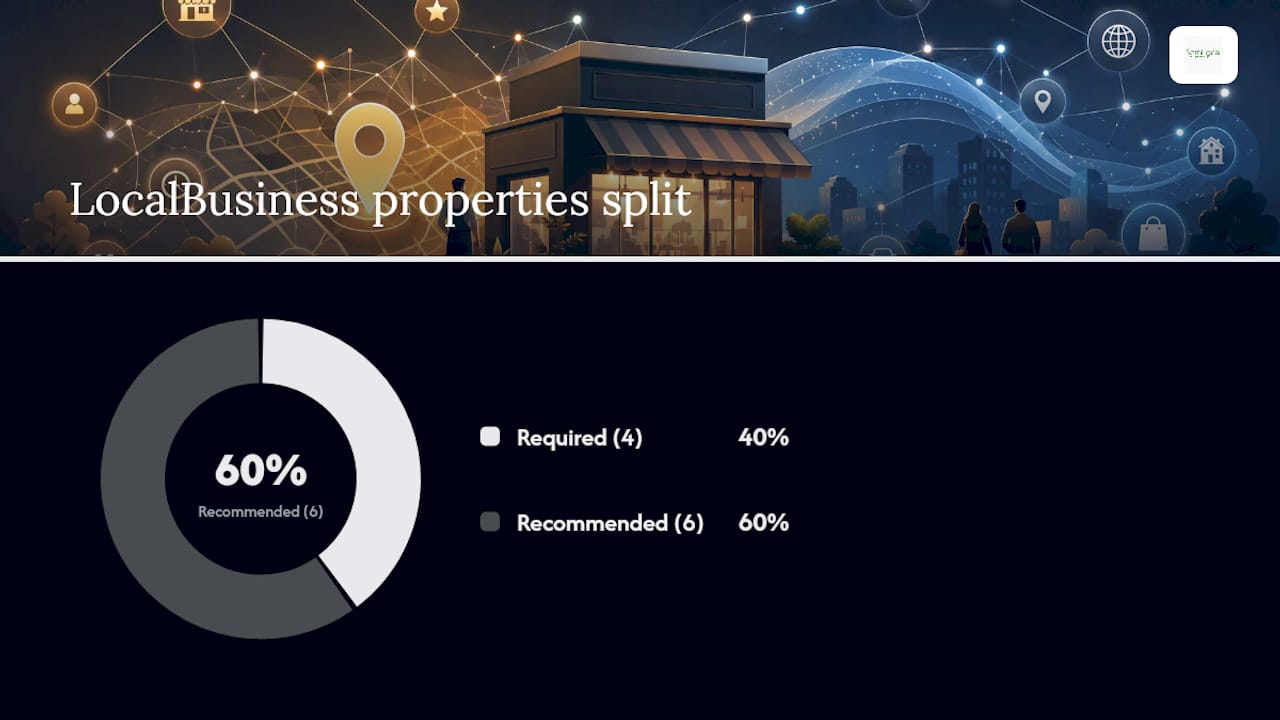
A few formatting details catch people out repeatedly. The address field must always be a PostalAddress object with its own streetAddress, addressLocality, postalCode and addressCountry sub-fields, never a single flattened string. openingHoursSpecification needs dayOfWeek as an array and times in 24-hour format such as "09:00" and "17:30", following the structure set out in Schema.org’s OpeningHoursSpecification type. For geo, aim for four to six decimal places on your coordinates; anything less precise can place you on the wrong side of a street.
Two things to avoid entirely. Never fabricate aggregateRating or review counts that you cannot verify. Google treats manipulated review markup as a policy violation, and it is one of the more common causes of manual actions on local sites. Second, never let your schema’s name, address or telephone drift out of sync with your Google Business Profile. Even a small formatting mismatch, such as an unlisted trading name or an outdated area code, dilutes how confidently Google links your website entity to your map listing.
How do you add LocalBusiness JSON‑LD to your website?
JSON‑LD is the format Google recommends over microdata or RDFa, mainly because it sits in a single script block and does not require you to tag individual HTML elements. Here is a minimal, valid example for a single-location business:

<script type="application/ld+json">
{
  "@context": "https://schema.org",
  "@type": "LocalBusiness",
  "@id": "https://www.example.co.uk/#business",
  "name": "Example Home Services Ltd",
  "address": {
    "@type": "PostalAddress",
    "streetAddress": "14 Mill Lane",
    "addressLocality": "Ely",
    "postalCode": "CB7 4AA",
    "addressCountry": "GB"
  },
  "telephone": "+441353123456",
  "url": "https://www.example.co.uk"
}
</script>
Add opening hours and you get something closer to what most businesses need in practice:
"openingHoursSpecification": [
  {
    "@type": "OpeningHoursSpecification",
    "dayOfWeek": ["Monday", "Tuesday", "Wednesday", "Thursday", "Friday"],
    "opens": "08:00",
    "closes": "17:30"
  },
  {
    "@type": "OpeningHoursSpecification",
    "dayOfWeek": "Saturday",
    "opens": "09:00",
    "closes": "13:00"
  }
]
For a business with genuinely separate departments under one roof, such as a garage with a bodyshop and an MOT bay, nest a department array rather than duplicating the whole business entity:
"department": [
  {
    "@type": "AutoBodyShop",
    "name": "Example Bodyshop",
    "telephone": "+441353123457"
  },
  {
    "@type": "AutoRepair",
    "name": "Example MOT Centre",
    "telephone": "+441353123458"
  }
]
Where the block goes matters as much as what is in it. Paste one full block on the homepage for a single-location business. For multi-location businesses, give every location its own JSON‑LD block on its own canonical page, each with a unique @id, rather than cramming every branch into one script. Add image and sameAs only when you have real, working URLs to reference. Before pushing anything live, run through a short checklist: back up your template, test the change in staging, validate with the Rich Results Test, then publish and watch Search Console over the following fortnight.
What Google guidelines commonly catch people out?
Google’s structured data guidelines go beyond the bare property list, and most of the penalties or missed rich results trace back to a handful of recurring mistakes.
- Fill in as many address sub-fields as you genuinely have; a partial address weakens Google’s confidence in the entity, even when technically valid.
- Choose the most specific subtype available rather than defaulting to generic
LocalBusinessfor convenience. - Keep every image URL live, high resolution and genuinely depicting the business, since broken or generic stock images reduce eligibility for image carousels.
- Only mark up
aggregateRatingorreviewwhen the reviews are real, verifiable, and visible somewhere a visitor can actually find them. - Follow the visible content rule: whatever facts you put in your JSON‑LD must also appear, in some form, on the visible page. Structured data that contradicts what a visitor sees is treated as a red flag, not a shortcut.
The most common technical errors are refreshingly mundane once you know to look for them: a phone number formatted differently between the header, footer and JSON‑LD; the same schema block copied verbatim across ten location pages with only the name changed; a subtype chosen years ago that no longer reflects what the business actually does. Fix the mismatch, not just the markup, and the schema starts doing its job properly.
How do you test and troubleshoot LocalBusiness schema?
Three tools cover almost every validation need, and each does a slightly different job.

| Tool | Best for | What an error looks like |
|---|---|---|
| Rich Results Test | Checking eligibility for a specific rich result type | “Missing field ‘address’” or a warning that a required property is absent |
| Schema Markup Validator | Checking vocabulary correctness against Schema.org’s full spec | Flags an invalid @type or a property that does not belong on that type |
| Search Console structured data report | Monitoring live, indexed pages at scale over time | Shows a spike in “Invalid items” after a template change goes out |
A missing PostalAddress sub-field is the single most frequent error site managers encounter, usually because a developer flattened the address into a plain string rather than nesting it correctly. Invalid time formats come a close second: "9am-5pm" will not validate, but "09:00" will. Geo precision errors show up less often but matter more when they do, since a coordinate rounded to two decimal places can genuinely misplace a business by several hundred metres.
The safest deployment sequence is staging first, always. Push the change to a staging environment, run the Rich Results Test against it, fix anything flagged, then publish to the live site. Give Search Console a week or two to recrawl and report before you assume the job is finished, and keep the previous version of the template on hand in case a rollback is needed.
How do you keep local business schema accurate over time?
Structured data is not a set-and-forget task. According to guides across the industry, schema strengthens how confidently search engines and AI assistants understand your entity, but the moment your hours, address or phone number changes and the schema does not follow, that confidence starts to erode.
Run a short check after any change to hours, contact details, services or locations:
- Update the JSON‑LD
openingHoursSpecificationthe same day the physical hours change, not weeks later. - Cross-check
telephone,addressandnameagainst your Google Business Profile every time either one is edited. - Reuse the same
@idacross related schema blocks, including breadcrumbs, service listings and review markup, so every reference points back to one entity rather than several fragmented ones. - If you use
ProfessionalServiceand need to describe a coverage area, modelareaServedas aGeoShapeor a list of named places rather than leaving it vague.
For teams managing this properly, a monthly audit against your live Google Business Profile catches drift before it compounds, and a lightweight continuous-integration check that validates JSON‑LD on every template deploy stops a broken block from ever reaching production. Keeping your business profile current is as much a schema task as a listings task; the two should never fall out of sync.
For a single-location business with one developer keeping an eye on things, doing this in-house is entirely manageable with the checklist above. Once you are managing schema across five, ten or fifty locations, each with its own hours, phone number and service list, delegating to a provider who treats this as a recurring discipline rather than a one-off task tends to save far more time than it costs.
What do practical local SEO engagements actually reveal about schema?
The mistakes that damage entity confidence are rarely exotic. Across genuinely varied local SEO work, the two that recur most are mismatched opening hours between the website and the Google Business Profile, and phone numbers formatted three different ways across three different pages of the same site.
A cleaning company might list “Mon to Fri, 8 to 6” in its JSON‑LD while its Google Business Profile says the office actually closes at 5:30pm on Fridays. Neither figure is wrong exactly, but the discrepancy is exactly the kind of small signal that erodes how confidently an AI assistant or a knowledge panel can state a fact about that business. Fixing that kind of mismatch, on its own, has produced measurably cleaner knowledge panel summaries and more consistent business details surfacing when AI tools are asked about the company, in cases observed across local SEO engagements.
Schema earns its keep in a specific place: helping AI summarisation tools and knowledge panels state facts about a business correctly and consistently. It does far less for where a business sits in the actual map pack, which remains driven mainly by your Google Business Profile, proximity to the searcher and review volume. Treating schema as a map-pack ranking lever is the single most common misunderstanding in this area, and it sets business owners up to be disappointed by a tool that was never designed to do that job. What it is designed to do, it does quietly and reliably: give every machine reading your site the same clean, unambiguous facts a human visitor would see.
Want your schema and Google Business Profile managed for you?
Semlocal handles the whole job of keeping your LocalBusiness schema and your Google Business Profile pointing at exactly the same facts, so nothing drifts out of sync after the next opening-hours change or office move.
A typical small-business package includes:
- A dedicated JSON‑LD
LocalBusinessblock for every physical location, built with the right subtype and a stable@id. - Monthly audits that catch any mismatch between your website, your schema and your Google Business Profile before it affects how you appear.
- Ongoing updates whenever your hours, services or contact details change, so your structured data never falls behind reality.
- Monitoring through Search Console to flag validation errors early rather than after they have cost you visibility.
If you would rather have this handled properly than chase it yourself every time something changes, get your Google Business Profile optimised and see exactly where your current listing and schema are falling out of step.
Where should you go next to implement and validate this?
A handful of resources cover almost everything a site manager needs beyond this guide.
- Google Search Central’s LocalBusiness structured data page sets out the definitive list of required and recommended properties straight from Google.
- Schema.org’s LocalBusiness type page is the canonical reference for every subtype and property available to you.
- The ProfessionalService type page is worth bookmarking specifically if you run a firm that sells expertise from a fixed location.
- JSONLD.com’s local business examples collection offers copy-paste patterns for single-location, hours-rich and multi-department setups.
- Run your finished markup through the Rich Results Test and the Schema Markup Validator before publishing, then keep Search Console open for the following few weeks to catch anything the validators missed.
Sources
- Local business (LocalBusiness) structured data
- Schema
- What Is Local Business Schema Markup? And How to Add It
- Local Business Schema JSON-LD – Examples and 100+ Sub-Types