For most businesses, the right route is middleware (Zapier or Make) if you need basic lead capture fast, and a direct API connection if you need to live lookups or two-way updates. Every setup follows the same five-step flow: identify the customer, retrieve their CRM data, use it in the conversation, write updates back, then hand off to a human. Check whether you need a DPIA before you build anything.
TL;DR:
- Middleware solutions like Zapier or Make are ideal for quick lead capture but lack the capacity for real-time updates during conversations.
- Direct API integration supports live lookups and two-way updates, making it essential for complex, real-time CRM interactions.
- Mapping identity fields such as email and phone number first prevents duplicate records and ensures reliable contact management.
- Privacy compliance, especially UK GDPR, requires a Data Protection Impact Assessment and safeguards like encryption, scoped API permissions, and regular data review.
- Successful deployments typically start with lead qualification, gradually adding context-aware responses and support features, emphasizing data quality and clean workflows.
Table of Contents
- How does connecting a chatbot to your CRM actually work?
- Which integration method should you choose: connectors, middleware, webhooks or API?
- What fields should you map first, and how do you prevent duplicates?
- How do you personalise replies in real time and hand off to a human?
- What UK data-protection rules apply to chatbot-CRM integrations?
- How do you test and monitor a chatbot-CRM integration before launch?
- What’s the implementation checklist from discovery to launch?
- What impact do CRM-integrated chatbots have on sales and service workflows?
- What do successful chatbot-CRM integrations look like in practice?
- When should you build this yourself, and when should you brief an agency?
- Get a chatbot-CRM integration built without the trial and error
- Sources
- FAQ
How does connecting a chatbot to your CRM actually work?
Once a chatbot is CRM-connected, every conversation runs through the same underlying sequence, whether the visitor is a stranger filling in a form or a returning customer chasing an invoice.
The bot first tries to identify who it’s talking to. This usually happens through an email address typed into the chat, a phone number captured via SMS, a logged-in session token, or a cookie matched against an existing contact record. No match, no lookup, so the bot treats the visitor as new and starts building a fresh record from scratch.
Where a match exists, the integration retrieves relevant CRM data before the bot replies. That might mean pulling the customer’s order history, their last support ticket, their lifecycle stage, or a note from their account manager. HubSpot’s chatbot builder can pull this kind of CRM data into replies without custom code, personalising a greeting or skipping questions the CRM has already answered.
The bot then uses that data inside the conversation, referencing a past order, confirming an existing appointment, or routing a VIP customer straight to priority support. Every exchange worth keeping gets logged: the full transcript as a timeline activity, plus discrete fields for intent, sentiment, or a qualification score, so reporting stays fast without wading through raw text.
Key moments in the runtime flow include:
- Identity resolution (email, phone, session ID, or logged-in account)
- CRM read (pulling history, preferences, or open tickets)
- Contextual use (referencing that data mid-conversation)
- Write back (new record, updated field, logged activity)
- Handoff trigger (a human agent picks up with full context)
The final step, human handoff, only works if the bundle passed to the agent includes the transcript, the detected intent, and any urgency flag. Miss that step and your “seamless” bot experience collapses the moment a human joins.
Which integration method should you choose: connectors, middleware, webhooks or API?
The method you pick depends on how fast you need data to move and how much custom logic the conversation requires.
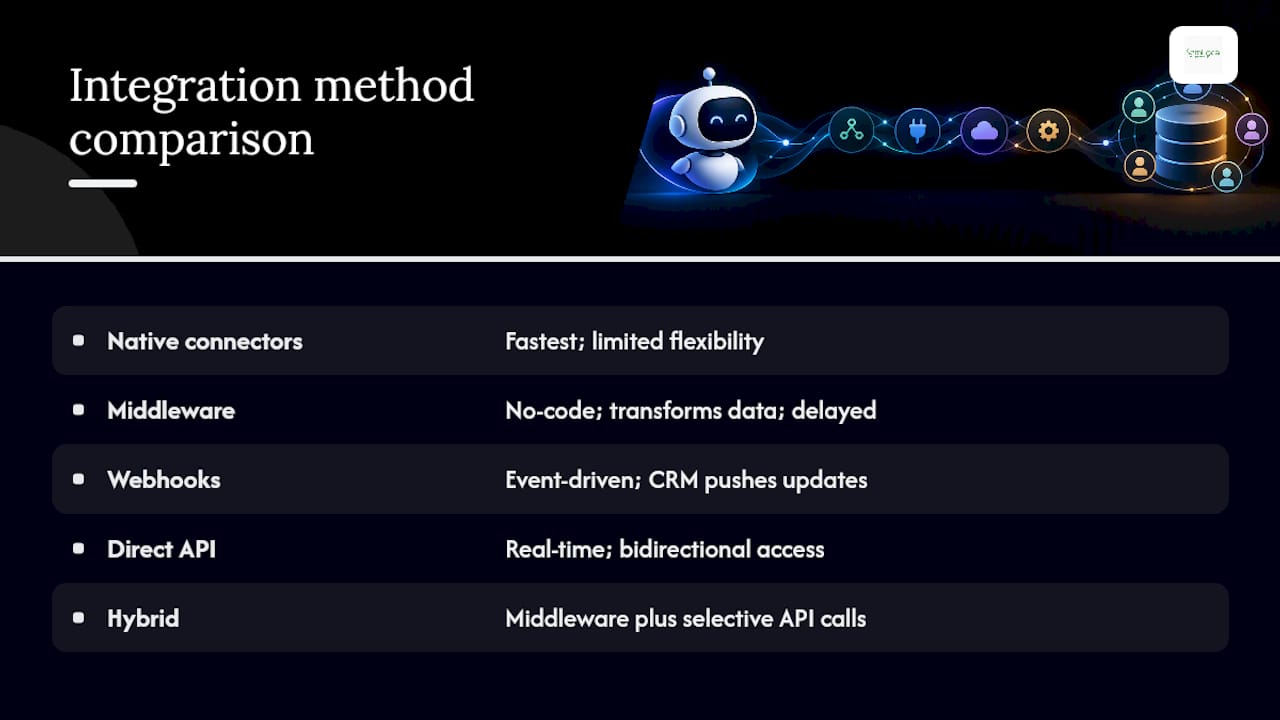
Native connectors are the fastest way to get something working. Platforms such as HubSpot offer built-in chatbot tools that sync with the CRM automatically, and the HubSpot connector for ChatGPT can create and update contacts, log calls and emails, and pull engagement history once an admin grants the right scopes. The trade-off is flexibility: you’re working within whatever fields and triggers the vendor has already built.
Middleware (Zapier, Make, Power Automate) sits between the chatbot and CRM, transforming and routing data without you writing a backend. It’s the practical choice for quick lead-capture workflows, mapping a chat form to a new CRM contact, firing a Slack alert, adding a tag, according to the practitioner’s playbook on chatbot CRM integration. It struggles with anything requiring a live read mid-conversation, since most middleware runs on a delay or a polling schedule rather than instantly.
Webhooks flip the model: instead of your bot asking the CRM for updates, the CRM pushes events to your bot the moment something changes. HubSpot’s webhooks API lets you subscribe to contact, deal, or ticket events, provided you’ve configured the correct OAuth scopes, such as crm.objects.contacts.read, for each subscription type. This suits event-driven patterns: a deal moves to “closed won,” and the bot automatically sends a follow-up sequence.
Direct API integration is the only route that supports real-time, bidirectional actions inside a live conversation, checking stock, confirming an appointment slot, or writing a new field the moment the customer answers a question. No-code middleware is fine for basic capture; you need direct API access once you need real-time CRM lookups or two-way workflows.
For most mid-sized operations, a hybrid works best: middleware for the routine capture and tagging, with a handful of direct API calls reserved for the moments that genuinely need a live read.
What fields should you map first, and how do you prevent duplicates?
Not every field deserves equal priority on day one. Mapping the wrong ones first is how teams end up with a CRM full of half-finished records nobody trusts.
- Tier 1, identity fields. Email and phone number are the two upsert keys that matter most, since they’re what the CRM uses to decide whether a chat is starting a new record or updating an existing one. Name comes next, but it should never be used alone as a matching key.
- Tier 2, context fields. Lifecycle stage, last contacted date, assigned owner, and open deal or ticket status. These speed up the next human interaction because whoever picks up the conversation doesn’t have to ask the customer to repeat themselves.
- Tier 3, intelligence fields. Lead source, qualification score, detected intent, and UTM parameters. Practitioner guidance recommends recording exactly this kind of tiered field set, identity fields first, then context, then intelligence, so the earliest, cheapest lookups get built first.
Deduplication rules need to be explicit and applied before a write, not after. Match on email first, phone second, and only fall back to a fuzzy name-and-company match as a last resort with a human review flag attached. Store full transcripts as timeline activities rather than custom fields; separate reporting fields (summary, sentiment, score) stay clean and fast to query, following the same pattern practitioners use for transcript storage.
Consent status deserves its own field, mapped and checked before any marketing follow-up fires, not bundled into a general notes column where it will inevitably get missed.
Pro Tip: Build your deduplication logic before you build your chatbot flows. Retrofitting a matching rule after six months of messy contact records is far more painful than getting it right on day one.
How do you personalise replies in real time and hand off to a human?
Live personalisation depends on knowing when to query the CRM directly and when to rely on a cache.
Synchronous API calls make sense for anything that must be accurate at the moment of asking, checking whether an appointment slot is still free, confirming an order status, or verifying a discount code. Anything else, general account tier, past purchase categories, standard preferences, can be cached for the session and refreshed periodically, which keeps the conversation feeling instant rather than laggy.
Handoff bundles should be built with the human agent’s first ten seconds in mind. Design the summary specifically to cut the time-to-first-action for agents, meaning it needs:
- A short intent summary (“wants to reschedule a booking”)
- Qualification score or lead temperature
- Full transcript link, not a wall of text pasted inline
- Timestamp and channel (web chat, SMS, voice)
- Any urgency flag (complaint, cancellation risk, VIP tag)
When a CRM lookup fails, mid-outage, timeout, malformed response, the bot needs a scripted fallback rather than a silent stall or a generic error. A line such as “I’m having trouble pulling up your account, let me connect you with someone who can help” keeps the interaction moving and avoids the customer repeating information into a void.
Retry logic should use exponential backoff rather than immediate retries, and concurrency limits need to be set so a traffic spike doesn’t hammer the CRM’s API with duplicate requests within the same second.
What UK data-protection rules apply to chatbot-CRM integrations?
A Data Protection Impact Assessment is likely required whenever the integration is likely to result in high risk to individuals, and the ICO’s guidance on AI and data protection is explicit that controller and processor roles must be identified and documented before deployment, not worked out after a complaint arrives.
If you’re outsourcing the AI layer to a third-party platform, you and that vendor may end up as joint controllers, which changes who’s accountable for what. This decision belongs in procurement, not engineering: document it as part of contract negotiation so it shapes which integration options are even acceptable, rather than discovering the constraint after the bot is live.
Practical safeguards worth building in from day one:
- Encrypt data in transit and at rest, including CRM write payloads
- Scope API permissions tightly, don’t grant a chatbot connector full account access when it only needs contact-level read/write
- Set retention policies for transcripts and personal data, don’t keep everything indefinitely by default
- Log who accessed what, and when, for audit purposes
One area many teams overlook entirely: when a customer discloses special category data unprompted, health details, religious belief, sexual orientation, inside a normal chat, UK GDPR requires that disclosure to be reviewed and likely deleted unless a lawful Article 9 condition applies, according to ICO guidance on sensitive personal data disclosures. Build a review process for this now, not after it happens. If you’re weighing up a managed AI receptionist or chatbot product, checking how the vendor handles legal and confidentiality obligations is a reasonable question to ask before signing anything.
How do you test and monitor a chatbot-CRM integration before launch?
Testing needs to go beyond the happy path. Run these before launch:
- End-to-end scenario tests. New contact creation, existing contact match, duplicate merge, and a deliberately malformed submission (special characters, emoji, non-Latin scripts) to catch character-encoding failures early.
- Failure-mode tests. CRM temporarily unreachable, malformed API response, expired auth token, missing required field.
- Load tests. Simulate a traffic spike to see how the integration behaves once you’re approaching your rate limit.
Once live, monitor 4xx and 5xx responses continuously, and treat 429 “too many requests” errors as a first-class alert rather than background noise. HubSpot’s platform usage guidelines cap public apps at 110 requests every 10 seconds per account, and exceeding that limit breaks automation silently unless you’re watching for it.
Rate-limit strategies worth building in: batch non-urgent writes, cap concurrency per account, and use durable queues so failed writes retry automatically rather than vanishing.
Pro Tip: Set your alerting threshold well below the actual rate limit, not at it. If your ceiling is 110 requests per 10 seconds, alert at 80. That gives your team time to react before customers notice anything.
What’s the implementation checklist from discovery to launch?
- Define scope. Map the data flows involved and decide, with documentation, whether a DPIA is required.
- Choose your integration method. Native connector, middleware, webhook, or direct API, based on the latency and customisation needs covered above.
- Confirm scopes and permissions. Request only the API or webhook scopes the integration actually needs.
- Map fields and set dedupe rules. Identity fields first, then context, then intelligence, with explicit matching keys.
- Configure security. Encryption, retention policy, and access logging before any live data flows through.
- Test thoroughly. Run the end-to-end and failure-mode scenarios above.
- Enable monitoring. Set alerting thresholds below your actual rate limit.
- Launch with a runbook. Document rollback steps and who’s on call if something breaks.
Pro Tip: Hand this checklist to whoever’s building the integration, whether that’s an in-house developer or an external agency, before the first line of code gets written. It’s far cheaper to agree on scope than to renegotiate it halfway through.
What impact do CRM-integrated chatbots have on sales and service workflows?
The most immediate shift is speed. A chatbot that can read CRM data mid-conversation skips the repetitive triage questions that used to eat the first few minutes of every sales call, “have you contacted us before,” “what’s your account number,” and gets straight to the actual request.
For sales teams, this means leads arrive pre-qualified with a score, an intent tag, and a transcript attached, rather than a bare name and email that still needs a follow-up call just to establish basic context. Reps spend less time on discovery and more time on the parts of a deal that actually need a human.
For customer service, the effect shows up in resolution time. A returning customer whose order history and last support ticket are already visible to the bot, and then to the human agent after handoff, gets a faster answer because nobody’s asking them to repeat themselves. That handoff bundle, transcript, intent, urgency flag, is what turns a frustrating “I already told the bot this” moment into a smooth transition.
The workflow change extends beyond the conversation itself. Every chat interaction becomes a CRM event: a new contact, an updated field, a logged activity. That means reporting on lead source, conversion rate by channel, and average response time gets more accurate automatically, because it’s if the same system logging the sale is also logging every touchpoint that led to it. Businesses running AI voice agents alongside web chat often see the biggest gains once both channels write to the same CRM record, rather than living in separate silos.
What do successful chatbot-CRM integrations look like in practice?
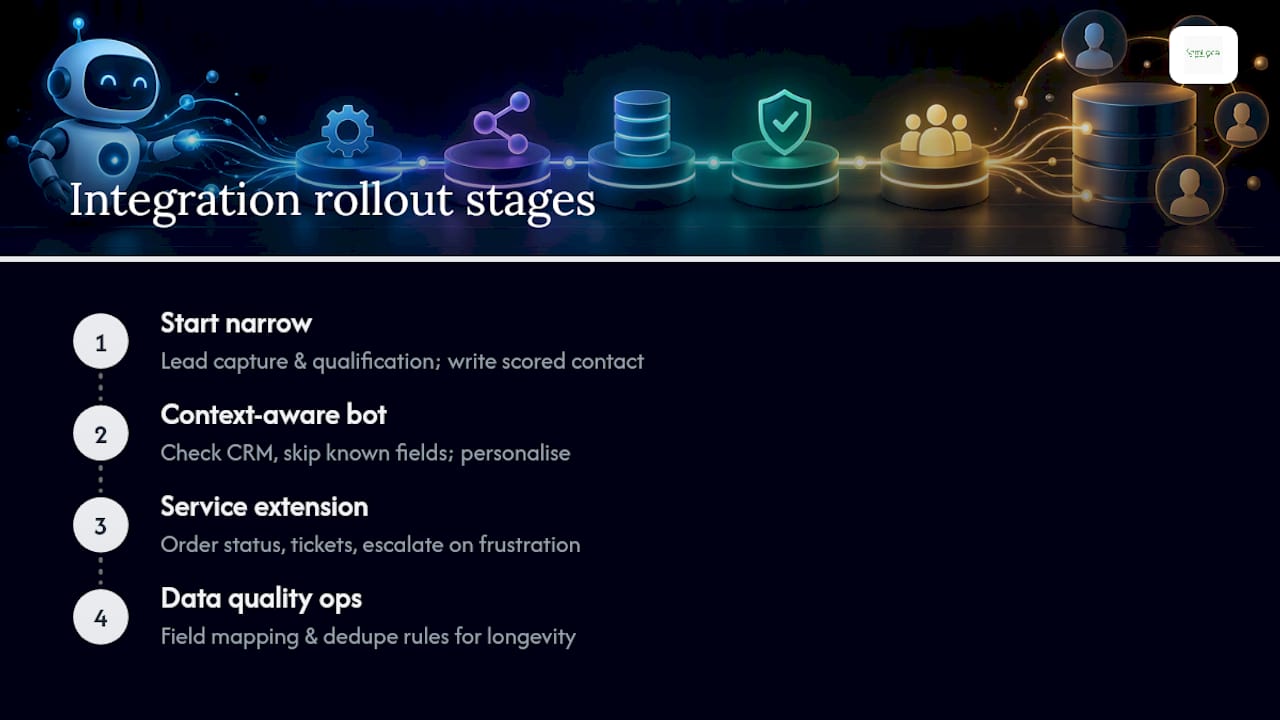
The clearest pattern across successful integrations is restraint: the businesses that get the most value tend to start narrow and expand, rather than trying to automate every workflow on day one.
A typical rollout begins with lead capture and qualification, the chatbot handles the initial “are you a good fit” questions, writes a scored contact into the CRM, and hands the conversation to a rep only once there’s something worth discussing. This is deliberately the lowest-risk starting point because it doesn’t require live CRM reads mid-conversation, just a reliable write at the end.
The next stage usually adds context-aware replies: the bot checks whether the visitor is an existing contact and adjusts its questions accordingly, skipping anything the CRM already knows. This is where native connectors like the HubSpot chatbot builder tend to earn their keep, since the CRM sync and personalisation logic are already built in.
More mature setups extend into service, using the bot to check order status, log support requests directly into the CRM’s ticketing system, and escalate automatically when sentiment analysis flags frustration. This stage is also where teams start using website AI agents connected directly to the CRM for genuinely round-the-clock coverage, rather than a bot that only answers simple FAQs during business hours.
What separates the integrations that stick from the ones that get quietly switched off is usually data quality upstream, not the sophistication of the bot itself. Clean field mapping and sensible dedupe rules do more for long-term success than any amount of clever conversational design.
When should you build this yourself, and when should you brief an agency?
Building in-house makes sense when your data flows are simple, one CRM, one channel, low volume, and nobody’s asking for phone or voice integration. The moment you’re juggling multiple channels, a formal DPIA, and real-time lookups against a CRM with messy legacy data, the calculus changes. That’s usually the point where compliance risk and engineering time both start climbing faster than a small team can absorb.
An experienced agency builds these integrations for service businesses that need voice, SMS and web chat all writing to the same CRM record, not three disconnected tools. Engagements typically start with a discovery call mapping your current data flows before any build work begins. If you’re briefing an agency yourself, come with your CRM name, your compliance constraints, and a rough sense of which conversations actually need a live lookup, that alone will speed up the quote.
— Geoff
Get a chatbot-CRM integration built without the trial and error
An experienced agency can be a practical alternative to piecing this together yourself with Zapier tutorials and trial-and-error API calls. Rather than spending weeks testing webhook scopes and dedupe logic, you can brief one provider once and have them build the connection between your chatbot, your CRM, and your phone lines as one working system.
Our AI receptionist and chatbot services cover exactly the integration work this article walks through, field mapping, DPIA decisions, real-time lookups, human handoff, built specifically for your CRM rather than a generic template. Where volume or compliance complexity makes an in-house build risky, this is where a managed engagement earns its keep.
A discovery call is the fastest way to find out what your setup actually needs. We’ll map your current data flows, flag anything that needs a DPIA, and give you a clear view of which integration method fits your CRM and channel mix. Get in touch with AIM Agency to book that call and see what a properly connected chatbot and CRM actually look like for your business.
Sources
- Guidance on AI and data protection | ICO
- Connect your HubSpot account to ChatGPT | HubSpot knowledge
- How to integrate a chatbot with your CRM | Social Intents
FAQ
Can you build a CRM chatbot connection using AI without a developer?
Yes, for basic setups. No-code middleware like Zapier or Make, or native connectors built into platforms such as HubSpot, let you connect a chatbot to your CRM without writing backend code. Anything needing live CRM lookups mid-conversation still needs direct API work, which usually means bringing in a developer.
How is AI used inside CRM systems beyond chatbots?
AI inside a CRM typically scores leads, predicts which deals are likely to close, summarises call transcripts, and flags contacts at risk of churning. Chatbots are one application of this, feeding conversational data into the same scoring and prediction models the rest of the CRM already runs on.
How do you integrate AI agents with a CRM step by step?
Identify the customer (email, phone, or session), retrieve their existing CRM data, use that data in the conversation, write updates back to the record, then hand off to a human agent with a summary bundle. The technical route, native connector, middleware, webhook, or direct API, depends on how much real-time interaction the conversation needs.
Which AI or chatbot platform works best for CRM integration?
It depends on which CRM you already run and how much real-time personalisation you need. Native connectors, such as the HubSpot connector for ChatGPT, suit teams already inside that ecosystem, while businesses needing voice, SMS and web chat unified under one CRM record are better served by a managed build, which is the approach AIM Agency takes with custom AI agent development.