If you’re chasing fewer no-shows, the fastest route is an automated two-way SMS reminder system with calendar sync, backed by a managed setup rather than a DIY tool you have to babysit. Text-based reminders get read within minutes, and pairing them with a two-message sequence gives clients time to reschedule instead of simply vanishing. Independent research from randomised trials and systematic reviews confirms SMS reminders consistently cut missed appointments across clinical and service settings, and GDPR compliance is non-negotiable from day one. To start:
- Set two reminder timings: 24 hours before, then 2 to 4 hours before.
- Enable two-way replies so clients can confirm, cancel, or reschedule by text.
- Check your provider’s UK data handling before you send a single message.
Key Takeaways
Automated two-way SMS reminders with calendar sync and managed compliance oversight cut no-shows more reliably than one-way texts or email alone.
| Point | Details |
|---|---|
| Use two-way SMS | Enable replies so clients can confirm, cancel, or reschedule without calling. |
| Run a two-message sequence | Send a 24-hour reminder followed by a 2 to 4-hour nudge for best results. |
| Prioritise calendar sync first | Connect Google Calendar or Outlook before adding extras like MMS or waitlists. |
| Check compliance early | Confirm UK data residency, GDPR handling, and STOP opt-out support before signing up. |
| Track four core KPIs | Monitor no-show rate, confirmation rate, reschedule rate, and recovered revenue monthly. |
Table of Contents
- Why SMS appointment reminders work and what you gain
- What features actually matter when choosing a system?
- How long does it take to set up SMS reminders?
- What message templates actually convert best?
- How much do SMS appointment reminders cost?
- Which type of SMS reminder solution should you choose?
- What should you track after launch?
- Do SMS reminders need to follow rules beyond GDPR?
- Frequently asked questions
- Sources
Why SMS appointment reminders work and what you gain
Text messages get opened almost immediately, which is exactly why they beat email or phone calls for anything time-sensitive. A missed call goes to voicemail nobody checks; an unread email sits for days. A text sits on the lock screen until it’s dealt with.
The evidence: Systematic reviews pooling multiple randomised trials found SMS reminders consistently reduce missed appointments compared with sending no reminder at all, across a range of healthcare and service settings.
The knock-on effects matter more than the headline stat. When clients get a clear nudge:
- No-shows drop, which protects revenue from empty slots.
- Cancellations happen earlier, giving staff time to fill the gap.
- Rota planning becomes more predictable, since fewer hours go to waste.
- You collect reply data that feeds rebooking and follow-up campaigns.
What features actually matter when choosing a system?
Not every SMS tool does the same job well. Before you commit budget, check it covers the essentials.
Must-haves:
- Calendar sync with Google Calendar or Outlook, so reminders pull appointment details automatically.
- Two-way SMS, letting clients reply to confirm, cancel, or ask to reschedule.
- Merge fields for name, date, time, location, and any prep notes specific to the appointment.
- Flexible timing rules so you can run more than one reminder per booking.
Deliverability and compliance essentials:
- A verified sender ID or dedicated virtual number, which improves delivery rates and trust.
- A clear UK data residency and GDPR checklist from the provider, not just a vague privacy policy link.
- Proper opt-in capture and automatic STOP handling for opt-outs.
- Reporting on delivery, reply, and opt-out rates so you can see what’s actually happening.
Useful extras: multi-language templates, WhatsApp or MMS fallback for undeliverable numbers, automated waitlist backfill when a slot frees up, CRM or booking-software integrations, and a template library so you’re not writing copy from scratch.
Pro Tip: If budget is tight, spend it on two-way replies and calendar sync first. A one-way reminder without the ability to reply is only half a solution, since clients who want to cancel will just call your reception desk instead, which defeats the point.
How long does it take to set up SMS reminders?
Setup speed depends entirely on which route you take. A calendar add-on like SMS Reminder for Google Calendar can be sending your first message within minutes of installation. A fully managed setup with booking-software integration typically takes longer, from a few hours to a couple of days, depending on verification and how many systems need connecting.
The sequence looks like this in practice:
- Choose a provider or managed partner.
- Verify your business number and confirm opt-in handling.
- Connect your calendar or booking system.
- Build templates with the correct merge fields.
- Set your timing rules (24 hours, then 2 to 4 hours, for example).
- Test with a small sample list, then launch.
Before you start, gather your appointment types, staff assignments, cancellation policy wording, and a short test phone list. Having these ready cuts the setup timeline noticeably.
What message templates actually convert best?
Short, specific, and easy to act on. Here are four you can adapt today:
- 24-hour reminder: “Hi [Name], reminder: your [Service] appointment is tomorrow at [Time] at [Location]. Reply YES to confirm or CALL to reschedule.”
- 2 to 4-hour reminder: “Hi [Name], just a nudge: [Service] today at [Time]. See you soon!”
- Confirmation reply: “Thanks [Name], you’re confirmed for [Time] on [Date]. Reply STOP to opt out.”
- Reschedule instruction: “No problem, [Name]. Reply with a preferred day and time, or call [Number] to rearrange.”
Keep plain text under 160 characters where possible, since anything longer splits into multiple SMS segments and can cost more per send. If you serve non-English speaking clients, keep a second template set ready in the relevant language rather than translating on the fly.
Pro Tip: Always give clients an alternative to text if they’ve indicated they prefer email, a quick note in your booking system to trigger the right channel automatically saves awkward follow-up calls.
How much do SMS appointment reminders cost?
Pricing generally falls into three shapes: pay-as-you-go per message, subscription bundles with a set message allowance, and managed fees covering setup and ongoing integration work.
Other cost drivers worth checking before you sign anything:
- Two-way messages sometimes cost more than one-way sends.
- Short codes and branded sender IDs often carry a one-off verification fee.
- International SMS rates vary by country, so check if you serve clients abroad.
A rough worked example: a salon running 400 appointments a month with a two-message sequence sends roughly 800 texts. At typical bundle rates, that’s a modest monthly spend, easily recovered if it prevents even a handful of no-shows on higher-value bookings. Most providers offer a free trial or a low-volume free tier, though two-way replies and calendar sync are usually locked behind a paid plan.
Which type of SMS reminder solution should you choose?
You’ll generally encounter four categories. Each suits a different stage of business.
- Calendar marketplace add-ons are the fastest to install and cheapest to trial, but customisation is limited and support is minimal.
- Standalone reminder platforms offer more templates and reporting, at the cost of managing another separate login and billing relationship.
- Developer APIs give full control over logic and integrations, but need technical resources most small teams don’t have spare.
- Managed agency services hand off setup, compliance checks, and ongoing optimisation to someone else.
For most small businesses juggling bookings, staff rotas, and marketing at the same time, a managed approach removes the admin burden entirely. Semlocal’s approach connects SMS reminders with the same local presence work that drives the bookings in the first place, so reminders, calendar sync, and lead generation sit under one system instead of three disconnected tools. Partner services like RingPort’s AI receptionist show how two-way confirmation and rescheduling can be handled automatically alongside reminder sends, which is the direction most managed offerings are heading.
What should you track after launch?
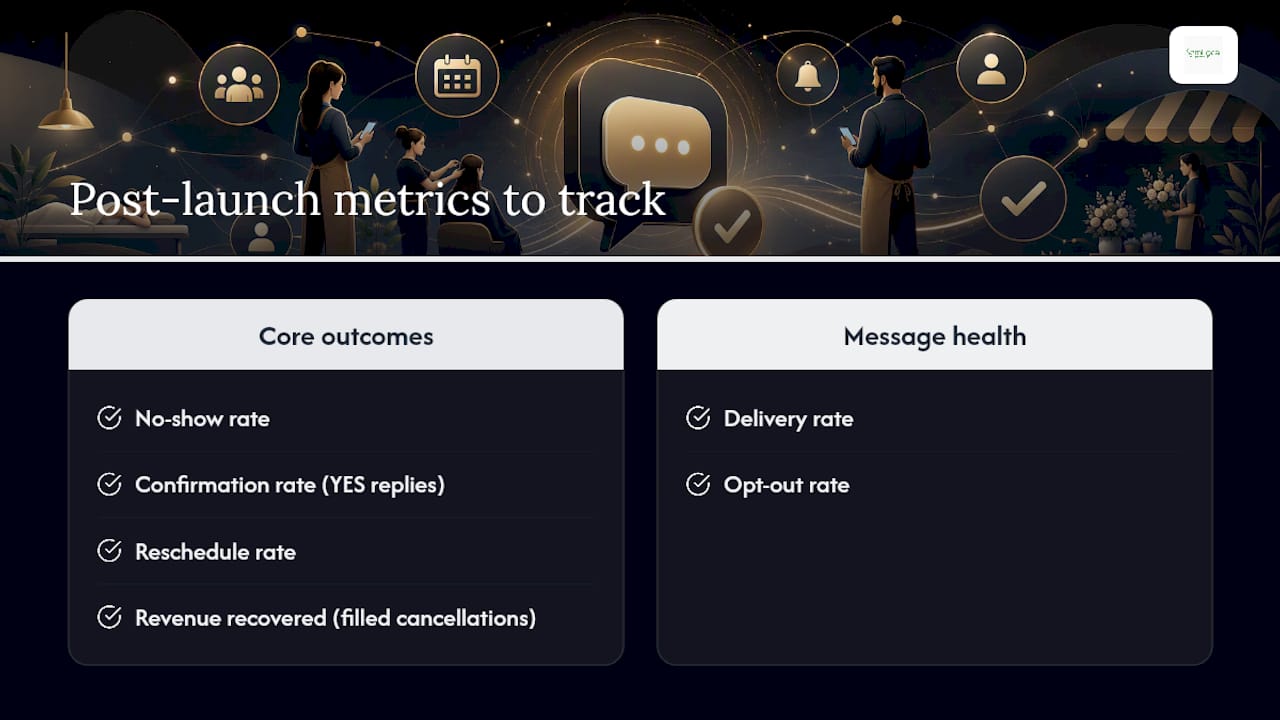
Four numbers tell you if the system is working: no-show rate, confirmation rate (replies to YES), reschedule rate, and revenue recovered from filled cancellation slots. Delivery rate and opt-out rate tell you if the messages themselves are landing properly.

As indicative targets, many small businesses aim to cut no-shows by a significant margin, depending on their starting baseline, with confirmation rates improving noticeably once two-way replies are enabled. These ranges vary a lot by industry and existing no-show habits, so treat them as a direction, not a promise. Run a simple A/B test on timing, morning versus afternoon reminders, for instance, and watch which produces more replies before locking in your default.
Do SMS reminders need to follow rules beyond GDPR?
GDPR governs how you store and process UK client data, but it isn’t the only rulebook that applies to text messaging. Under the Privacy and Electronic Communications Regulations (PEC Regulations), businesses need clear consent before sending marketing-style texts, and appointment reminders sit in a slightly different category from marketing since they’re operational rather than promotional. Even so, best practice is to capture explicit opt-in when a client first books, and to always provide a working STOP mechanism regardless of message type.
If you serve clients outside the UK, particularly in the US, be aware that the Telephone Consumer Protection Act (TCPA) imposes its own consent and identification rules on text messages sent to American numbers. That’s rarely relevant for a UK hairdresser or dental practice, but it matters if you run a multi-location franchise with cross-border clients or use a platform that routes messages through US infrastructure.
The safest practical approach: treat every reminder as if it needs consent, document how and when that consent was captured, keep an accessible opt-out process, and choose a provider that can show you exactly where client data is stored and processed. A provider vague about UK data residency is a warning sign worth taking seriously before you hand over your client list.
Why we recommend the managed route
Semlocal has seen how automated confirmations and receptionist support turn missed calls into predictable bookings, as shown in a recent case study on booking conversion.
Frequently asked questions
Do SMS appointment reminders actually reduce no-shows?
Yes. Systematic reviews of randomised trials consistently show SMS reminders lower missed-appointment rates compared with sending no reminder, though the exact reduction depends on your industry and baseline no-show habits.
How many reminder texts should I send per appointment?
Two tends to work well for most small businesses: one roughly 24 hours before and a second 2 to 4 hours before, giving clients enough notice to reschedule without feeling nagged.
Can clients reply to SMS reminders to cancel or reschedule?
They can, provided your system supports two-way messaging. This is one of the most important features to check for, since a one-way reminder still leaves clients calling reception to make changes.
Is a subscription or pay-as-you-go pricing model better for a small business?
It depends on your volume. Low-volume businesses often do better with pay-as-you-go, while practices sending hundreds of reminders monthly usually save more with a subscription bundle.
What UK regulations apply beyond GDPR?
The PEC Regulations govern consent for electronic messages, and appointment reminders should still capture opt-in and offer a clear STOP option, even though they’re less strictly regulated than marketing texts.
Ready to stop chasing no-shows manually? Explore Semlocal’s local visibility and automation services to see how a managed setup connects your reminders, bookings, and local search presence in one place.
Sources
- Randomised trials and systematic reviews of text message reminders (NCBI PMC6243417)
Recommended
- AI for appointment scheduling: a small business guide – AI Management Agency
- AI appointment setting: a guide for UK small businesses – AI Management Agency
- How to book sales appointments with AI: UK small business – AI Management Agency
- Uses of AI in SMEs: boost efficiency with smart tools 2026 – AI Management Agency