Deploy a managed AI receptionist that captures a caller’s name, phone or email and postcode before anything else happens, then writes that booking straight into your calendar with CRM write-back. Turn on a short GDPR disclosure and a human fallback from day one. Do this, and you protect revenue and compliance in the same move, usually within two to four weeks of tuning.
TL;DR:
- Ensuring real-time CRM and calendar integration, along with after-hours routing and GDPR compliance, are critical to a successful AI receptionist deployment.
- Properly mapping call types and conducting a pilot with at least 100 to 300 calls helps reveal issues before full rollout, reducing costly fixes later.
- Maintaining consistent business information across online directories, verifying listings promptly, and avoiding frequent edits prevent suspension risks.
- A suspended Google Business Profile typically results from mismatched data, unverified listings, or suspicious review activity, impacting local visibility and trust.
- Reinstatement can take from days to weeks based on case complexity, with thorough documentation and full correction of profile details accelerating approval.
Table of Contents
- What should you check first if you’re worried about a Google Business Profile suspension?
- How to deploy a managed AI receptionist: project plan, timeline and cost shape
- Technical integrations checklist: CRM, calendar, telephony and webhooks
- Compliance and data handling essentials (GDPR and PECR checklist)
- How to measure success: KPIs, baseline and reporting cadence
- Common pitfalls and troubleshooting with immediate fixes
- Common reasons for Google Business Profile suspension
- Step-by-step process to appeal a suspension
- Preventative measures to avoid suspension
- Impact of suspension on business visibility and customer trust
- Timeline for suspension review and appeal outcomes
- Semlocal perspective on managed AI reception
- Ready to stop losing calls while you’re focused on your listing?
- Sources
What should you check first if you’re worried about a Google Business Profile suspension?
Before anything else, look at how your business actually handles the calls your Google Business Profile generates. A profile can look perfect and still bleed leads if nobody, or nothing, is capturing the caller’s details properly. That’s the operational gap most service businesses miss while they’re worrying about listing compliance.
Here’s what to switch on today, in order:
- Capture name, phone/email and postcode before quoting anything. Default lead-capture flows that ask for contact details at the very start of the call mean you keep the lead even if the caller hangs up before booking.
- Turn on after-hours and overflow routing. A missed call at 7pm on a Tuesday is a lead your competitor answers instead.
- Add a short GDPR disclosure at the start of every call and log consent in your CRM. This takes seconds to say and protects you later.
- Confirm calendar hold and write-back for every booked slot, and keep a human escalation path for anything the system can’t handle.
None of this requires a full rebuild. It requires switching the right settings on and testing that they actually fire when a real call comes in.
How to deploy a managed AI receptionist: project plan, timeline and cost shape
A proper deployment follows a predictable shape, and knowing that shape stops you overpaying or under-scoping the project.
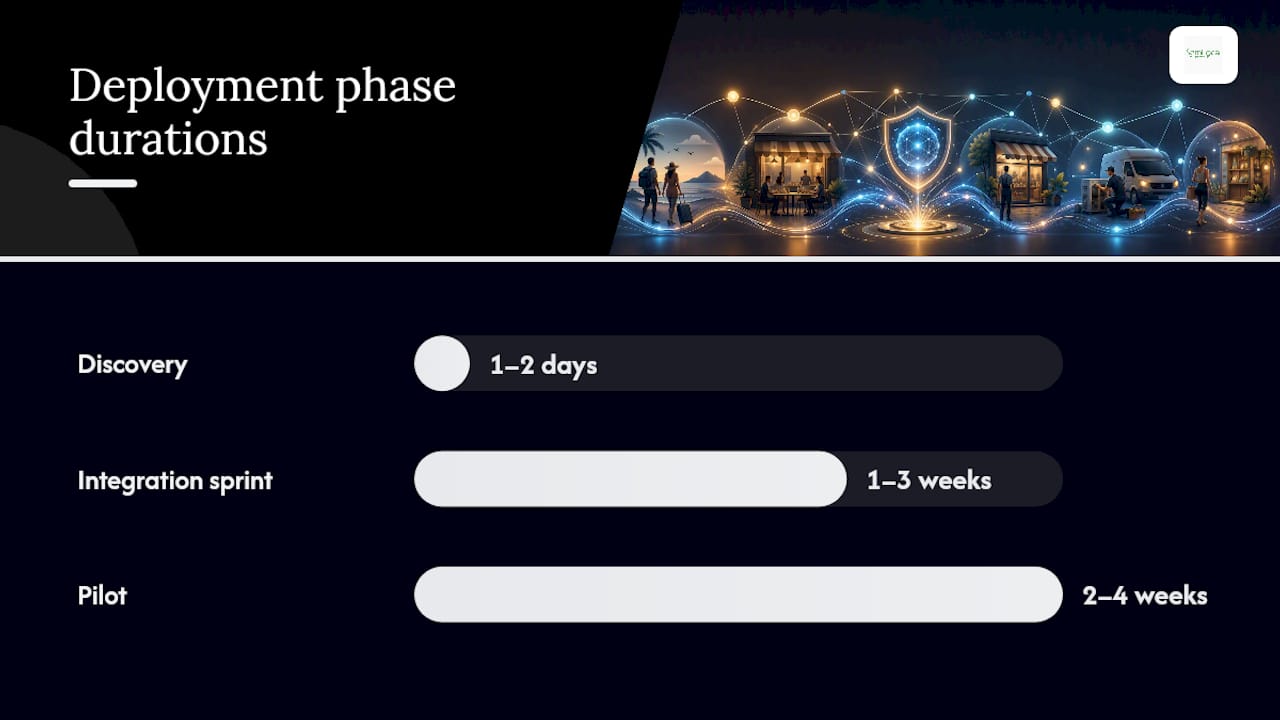
- Discovery (1 to 2 days). Map your call types, write the qualification questions the agent needs to ask, and define exactly when a call should escalate to a human. Skipping this step is the single most common cause of a messy rollout.
- Integration sprint (1 to 3 weeks). This covers telephony routing, CRM and calendar write-back, and, for outbound or certain inbound flows, TPS suppression checks. Underspecified integration mapping causes overruns more often than any other part of the build, so agree exactly which CRM fields the agent reads and writes before development starts.
- Pilot (2 to 4 weeks, roughly 100 to 300 calls). Run the agent against real or near-real traffic and watch what actually happens on live calls. A pilot sized around 100 to 300 calls against a known list tends to surface the edge cases that scripted testing misses.
- Rollout and monitoring. Move the agent from overflow-only to always-on once performance stabilises, then schedule recurring prompt tuning rather than treating the build as finished.
Pro Tip: Run at least ten test scenarios across your expected call types before you publish the number publicly, covering good-fit enquiries, vague questions, pricing objections, voicemail and hand-off requests. Fixing failures before launch is far cheaper than fixing them after a bad review.
Costs sit in three places: the discovery and integration work (largely fixed, front-loaded), a pilot period where you’re paying for tuning rather than volume, and an ongoing management fee once the agent is live. Businesses that treat the pilot as optional, and skip straight to full rollout, tend to spend more later fixing avoidable mistakes than they saved by rushing.
Technical integrations checklist: CRM, calendar, telephony and webhooks
Conversion lives or dies in the integration layer, not the script. Real-time CRM and calendar write-back during the call itself is what separates a receptionist that books appointments from one that just takes messages.
- CRM write-back: contact creation, a full call transcript, an outcome code (booked, quoted, unqualified, escalated) and relevant tags so your team has context for follow-up.
- Calendar booking: a real-time availability check, a short slot hold while details are confirmed, and a confirmation message once the booking completes.
- Telephony routing: clear rules for overflow, after-hours cover and, eventually, always-on handling as confidence builds.
- Webhooks and observability: an end-of-call payload sent to your systems, logging on every write, and alerts when a CRM or calendar write fails.
That last point matters more than it sounds. Vendor case studies show AI voice agents pre-qualifying leads and booking appointments reliably, but only when the agent is genuinely grounded in CRM data rather than working from a static script. Holding a calendar slot with a short reservation token until confirmation, rather than writing the booking immediately, avoids the double-booking problem that undermines trust in the system fastest.
Compliance and data handling essentials (GDPR and PECR checklist)
Every call should open with a short, plain disclosure that the caller is speaking to an AI system, with consent logged in your CRM at that point. For outbound calling, PECR rules and TPS screening apply and suppression checks need to be logged, not assumed.
Store transcripts and recordings in GDPR-compliant storage with a defined retention policy rather than an indefinite one. If you operate in a regulated sector, healthcare, financial services or anything handling sensitive personal data, get specific legal or compliance advice before launch rather than after your first complaint.
How to measure success: KPIs, baseline and reporting cadence
Track four numbers from day one: answer rate, lead qualification rate, meeting booking rate and no-show rate. Pull your baseline from the last 30 days of call logs before you switch anything on, so the pilot has something honest to compare against.
Businesses that tune prompts from live call data in the first 30 days see measurably better booking rates than those running static, unedited scripts.
Set up daily alerts for integration failures (a missed CRM write is a lost lead, not a minor bug) and weekly trend reports for the conversion metrics themselves. A/B test prompt changes one at a time and record the impact against baseline before rolling a change out permanently.
Common pitfalls and troubleshooting with immediate fixes
Most failed deployments share the same handful of causes, and all of them are fixable before they cost you a customer.
- Overcomplicated scripts. Start with five qualification questions, not fifteen, and add complexity only once the basics are working.
- Optional CRM or calendar write-back. Make it mandatory. Every skipped write is a lost lead nobody follows up on.
- Untested latency and interruption handling. Test under real call load, not a quiet office demo, because callers talk over agents and expect a natural pause.
- Slow or unclear human escalation. A caller who can’t reach a person when they need one will simply hang up and call the next name on their list.
Pro Tip: Review a sample of live call transcripts weekly, not just the failure alerts. Owner-facing plain-English tuning consistently outperforms systems left untouched after launch, because small wording fixes compound into a meaningfully higher booking rate over a few weeks.
Common reasons for Google Business Profile suspension
A Google Business Profile suspension almost always traces back to a mismatch between what the listing claims and what Google can verify. The most frequent triggers include inconsistent business names, addresses or phone numbers across the web (known as NAP inconsistency), a virtual office or residential address listed as a storefront when it isn’t one, and category or service claims that don’t match what the business actually does.
Sudden spikes in reviews, especially clusters of five-star ratings arriving within a short window, can also flag an account for manual review. So can shared addresses between multiple listings, unauthorised profile edits, or a business name stuffed with keywords rather than the actual trading name. Verification problems compound the risk: a profile that was never fully verified, or one where the verification method (postcard, phone, video) lapsed or was never completed, sits in a weaker position when Google runs automated integrity sweeps.
None of this is about how good the business is at its job. It’s about whether the listing’s data holds up to automated scrutiny, and inconsistency is the single biggest red flag across almost every suspension case reported by business owners.
Step-by-step process to appeal a suspension
Reinstating a suspended profile follows a fairly fixed sequence, and skipping steps rarely speeds things up.
- Confirm the suspension type. A “soft” suspension usually still shows the listing in search with reduced functionality; a “hard” suspension removes it entirely. The reinstatement path differs slightly for each.
- Read the notification carefully. Google’s message, where one is given, often hints at the underlying reason, even if it’s phrased generically.
- Audit and correct every profile detail. Name, address, phone number, category and website should match your other listings and your website exactly before you appeal.
- Submit the reinstatement request through Google’s official form, attaching supporting evidence such as utility bills, business licences or photos of a genuine storefront where relevant.
- Avoid creating a duplicate listing while waiting. This is one of the fastest ways to trigger a second suspension on top of the first.
- Follow up through Google’s Business Profile help community or support channels if there’s no response after a reasonable wait, rather than resubmitting repeatedly.
Patience matters here. Resubmitting the same appeal multiple times in quick succession tends to slow the review down rather than speed it up, because it resets the queue position rather than escalating priority.
Preventative measures to avoid suspension
The businesses that never face a suspension tend to share the same habits, and none of them are complicated.
Keep your business name, address and phone number identical across your website, your Google Business Profile and every directory you appear in. Verify your listing fully and promptly, and never let a verification method lapse without renewing it. Avoid editing sensitive fields (name, address, category) frequently, since rapid changes read as suspicious to automated review systems even when they’re entirely legitimate.
Never buy reviews or ask for them in unnatural clusters. Choose the primary and secondary categories that most precisely describe what the business does, rather than the categories with the highest search volume. If you operate from a genuine location, make sure that’s obvious in photos and details; if you’re service-area only, mark the profile as such rather than listing an address that implies a physical storefront. Monitor the profile regularly for unauthorised edits, since a suspension can follow from someone else’s mistake as easily as your own.
Impact of suspension on business visibility and customer trust
A suspended profile disappears from the map pack and from most local search results almost immediately, which cuts off one of the highest-intent channels a service business has. Customers searching “near me” simply won’t see the listing, and calls, direction requests and website clicks from that channel drop to zero for the duration.
The trust cost runs deeper than the visibility loss. Existing customers who go looking for the business and find it missing, or find a “temporarily closed” or similarly worded status, can reasonably assume something has gone wrong with the business itself, not the listing. Competitors fill the gap in search results during the outage, and some of that lost ground doesn’t return automatically once the profile is reinstated. Reviews, photos and the accumulated ranking signals built up over months or years don’t always recover their previous position instantly, even after a successful appeal.

This is precisely why the operational side of lead handling, what happens once a customer does call, matters as much as the listing itself. A business that loses visibility for a fortnight but has a rock-solid system for capturing and following up on every call that does get through recovers faster than one relying on the profile alone to generate business.
Timeline for suspension review and appeal outcomes
Reinstatement timelines vary considerably and Google doesn’t publish a fixed service level for review. Straightforward cases, typically a minor NAP mismatch or a lapsed verification, can resolve within a few days once corrected and resubmitted. More complex cases, particularly those involving suspected policy violations like address sharing or review manipulation, can take several weeks and sometimes longer if the first appeal is rejected and a second submission is needed.
Expect at least one round of back-and-forth if the initial evidence submitted wasn’t comprehensive. Businesses that gather full documentation, licences, utility bills, clear storefront photos, before the first submission tend to see faster outcomes than those who submit a bare-minimum appeal and wait to see what Google asks for next. There’s no guaranteed timeframe, and no reliable way to expedite the process beyond submitting a complete, accurate case the first time.
Semlocal perspective on managed AI reception
A managed deployment focuses on calendar write-back, conversion tracking and prompt tuning from real call data to reduce the time it takes to see genuine results while keeping compliance built in rather than bolted on afterwards. This approach typically leads to fewer missed leads and more reliable bookings within the first few weeks of live tuning.
— Geoff
Ready to stop losing calls while you’re focused on your listing?
Using a managed AI receptionist solution instead of a DIY chatbot build or a generic call centre contract, with CRM and calendar integration handled from day one, and pricing structured as either a project fee or an ongoing retainer, can suit different business operating models.
If your Google Business Profile is driving calls but your team can’t answer fast enough, or a chunk of those enquiries go straight to voicemail, that’s revenue leaking out before it ever reaches your calendar. A managed AI reception setup closes that gap without asking you to manage prompts, integrations or compliance yourself. Pair it with a properly optimised Google Business Profile and consistent business information across every directory, using guidance like this reputation management overview, and you protect both the visibility and the conversion side of the same funnel. Book a discovery call to map your call types and get a pilot running within weeks, not months.
Sources
- AI receptionist prompting
- AI Receptionist Industry Report 2026: Real Data
- AI Voice Agent Integrations UK: CRM, Calendar & Telephony Setup Guide 2026
- Agentforce voice AI agents