Yes, UK businesses can use WhatsApp for customer communications, but lawfulness depends entirely on message type. Transactional messages, such as booking confirmations, can usually rely on contract performance or legitimate interest. Marketing messages need explicit, documented opt-in consent under PECR before you send a single one. You remain the data controller throughout, which means you must keep processing records and be ready to answer a subject access request.
TL;DR:
- Transactional messages like appointment reminders and order updates are lawful without separate consent if based on contract performance or legitimate interest.
- Marketing messages require explicit, documented opt-in consent before sending, as relying on previous purchases or soft opt-ins is not compliant under UK GDPR and PECR.
- Using WhatsApp Business API with CRM integration creates a formal data processor relationship that must be reflected in privacy policies and transfer safeguards.
- Small businesses should conduct an audit, build an opt-in system, update privacy policies, and maintain detailed records to ensure WhatsApp compliance.
- Handling subject access requests and breaches involves timely export and review of chat histories, strict device management, and prompt ICO notification if necessary.
Table of Contents
- WhatsApp GDPR UK: the legal framework you’re actually working with
- Transactional vs marketing: when WhatsApp is fine and when it isn’t
- WhatsApp Business options and the UK Data Transfer Addendum
- Your WhatsApp compliance checklist for this week
- Handling subject access requests and breaches involving WhatsApp
- Workplace risks managers overlook
- Semlocal’s perspective: making compliance practical, not theoretical
- How Semlocal keeps your WhatsApp setup compliant without the admin headache
- Where to read the source guidance yourself
- Sources
WhatsApp GDPR UK: the legal framework you’re actually working with
Two separate laws govern WhatsApp use in the UK, and most business owners only know about one of them. UK GDPR sets the rules for how you handle personal data generally. The Privacy and Electronic Communications Regulations (PECR) set stricter rules specifically for electronic marketing, including messages sent through apps like WhatsApp.
UK GDPR rests on seven principles: lawfulness, fairness and transparency, purpose limitation, data minimisation, accuracy, storage limitation, integrity and confidentiality, and accountability. As a business sending WhatsApp messages to customers, you’re the controller. WhatsApp (via Meta) processes that data on your behalf under its own terms, but the legal responsibility for lawful use sits with you, not with the app.
PECR adds a separate layer that catches many small businesses off guard. It requires prior, explicit opt-in consent for electronic direct marketing, and that rule applies fully to messaging apps such as WhatsApp. The Information Commissioner’s Office (ICO), which enforces both UK GDPR and PECR, has been explicit that messaging channels are more intrusive than email marketing and demands clearer, better-documented consent as a result.
The rules changed meaningfully with the Data (Use and Access) Act 2025 (DUAA). Before DUAA, some PECR enforcement required proof of “damage or distress” to the recipient before penalties applied. That threshold has gone. Penalty exposure under PECR now aligns with UK GDPR’s high tier maximum fines, though the exact figures cited come from secondary sources rather than official ICO publications. What matters practically is that enforcement is now easier to bring and the ceiling is significantly higher than the older PECR-only fines.
None of this makes WhatsApp unusable. It means the compliance bar for marketing messages sits higher than most business owners assume, while transactional messages sit on comparatively solid ground if you’ve thought through your lawful basis in advance.
Transactional vs marketing: when WhatsApp is fine and when it isn’t
The single most useful skill for WhatsApp compliance is correctly classifying a message before you send it. Get this wrong and you’re either being needlessly cautious with harmless transactional messages, or exposing yourself to a PECR complaint over what you thought was a “helpful reminder.”
Transactional messages generally fall under contract performance or legitimate interest as a lawful basis, meaning you don’t need separate marketing consent to send them:
- Appointment confirmations and reminders
- Order updates (“your delivery is arriving tomorrow between 10am and 12pm”)
- Invoice or payment confirmations
- Direct responses to a customer enquiry
- Service updates tied to a booking already made
Marketing messages require prior, explicit opt-in before you send anything:
- Promotional offers, discounts or sales announcements
- New product or service launches sent to your existing customer list
- Newsletter-style updates with no direct transactional link
- Re-engagement campaigns to lapsed customers
The trap most small businesses fall into is assuming email’s “soft opt-in” rules carry over to WhatsApp. They don’t, in practice. Email allows a soft opt-in when someone bought from you recently and you’re marketing similar products, with an easy opt-out. WhatsApp broadcasts rarely meet the same bar because the ICO treats messaging apps as more intrusive, and relying on a past purchase to justify a promotional WhatsApp blast invites a complaint you can’t easily defend.
A simple test: if the message exists because of something the customer already asked for or booked, it’s transactional. If it exists because you want to sell them something new, it’s marketing, full stop.
Pro Tip: Before sending any WhatsApp campaign, ask whether you could defend the message to the ICO using only your booking system or CRM as evidence. If the answer is no, you need documented consent first.
WhatsApp Business options and the UK Data Transfer Addendum
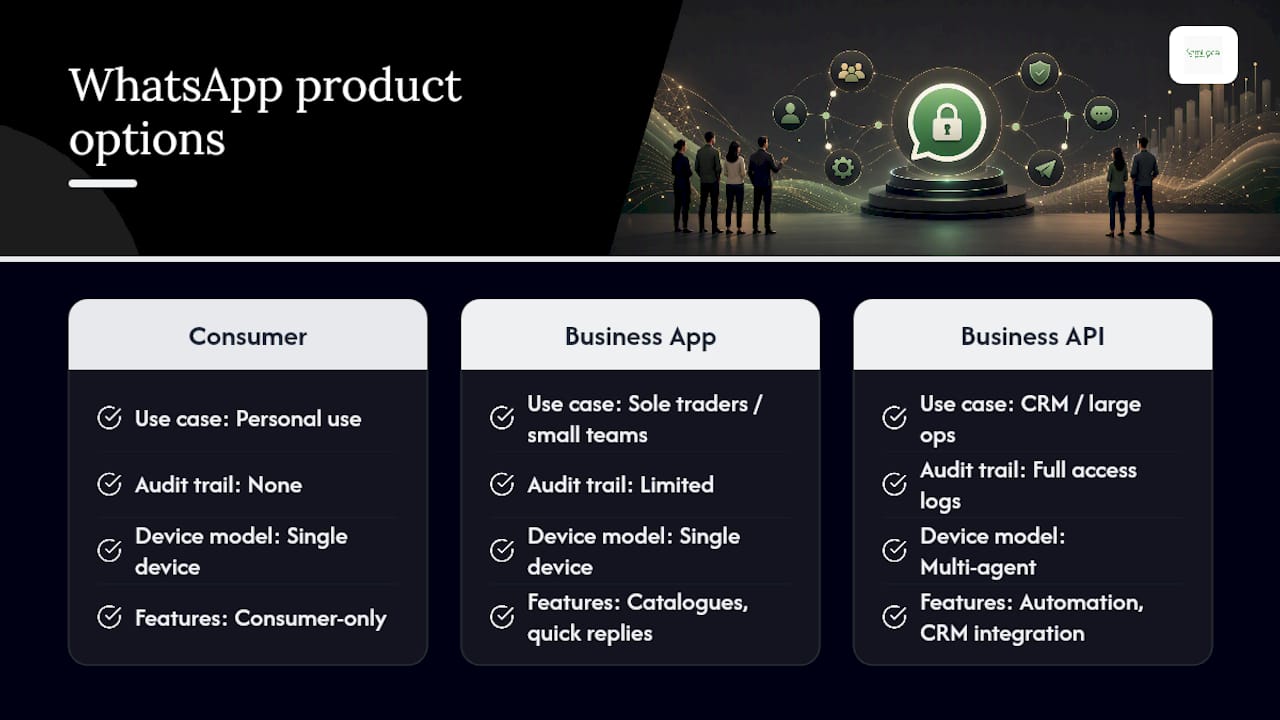
WhatsApp isn’t one product; it’s three, and the differences matter for compliance. The consumer app is designed for personal use and offers no business-grade audit trail or contractual safeguards. The WhatsApp Business App, free and aimed at sole traders and small teams, adds catalogues and quick replies but still runs largely on a single device. The WhatsApp Business API, used by larger operations and CRM integrations, supports multiple agents, automated workflows and proper access logging.
For most small UK businesses, the Business App is the sensible starting point, and it’s worth treating WhatsApp as a data processor from day one rather than an afterthought once things scale.
WhatsApp publishes a UK Data Transfer Addendum that governs how personal information moves from the UK to WhatsApp LLC, including audit rights and transfer safeguards. This addendum is a genuinely useful trust signal, and referencing it directly in your own privacy policy is far stronger than a vague line about “third-party processors.”
Practically, this affects three things. First, your privacy policy should name WhatsApp and Meta explicitly and describe that data may transfer outside the UK. Second, if you export chat backups to a cloud service, that export is itself a data transfer you need to account for in your records. Third, once you’re on the Business API and integrating with a CRM, you’re formalising a processor relationship that should be reflected in a written agreement, not left implicit.
Your WhatsApp compliance checklist for this week
None of this requires a legal team. It requires an afternoon and a spreadsheet. Here’s the order that gets you compliant fastest.
- Audit your current WhatsApp use. List every recurring message type you send and mark each as transactional or marketing.
- Build an explicit opt-in flow for marketing. Use an unticked checkbox on your booking form or website, or a keyword opt-in (“text START to…”), and capture the date, time and exact wording shown to the customer.
- Update your privacy policy. Name WhatsApp and Meta as processors, describe the UK Data Transfer Addendum arrangement, and state how long you retain message data.
- Create your Article 30 record. A simple spreadsheet with columns for data category, purpose, lawful basis, retention period and recipients satisfies the ICO’s accountability expectations for most small operations.
- Set retention and deletion rules. Decide how long you keep message history and unsubscribe/suppression lists, then actually action deletions rather than letting them sit indefinitely.
- Run a DPIA if you’re scaling up. If you’re moving to the Business API, integrating with a CRM, or handling sensitive categories of data, a Data Protection Impact Assessment becomes necessary, not optional.
A few extra details make the difference between a checklist and a genuinely working system:
- Log which staff members can access which conversations, particularly once WhatsApp is tied into a CRM through the Business API.
- Keep your suppression list separate from your active contact list so an unsubscribed customer never gets accidentally re-added.
- Review consent records every quarter to catch stale or ambiguous entries before they become a problem.
Pro Tip: If you’re designing the opt-in form itself, look at how established SMS opt-in flows structure their consent language. theNeedle’s guide to SMS opt-in covers UX patterns that translate directly to WhatsApp sign-up forms.
Handling subject access requests and breaches involving WhatsApp
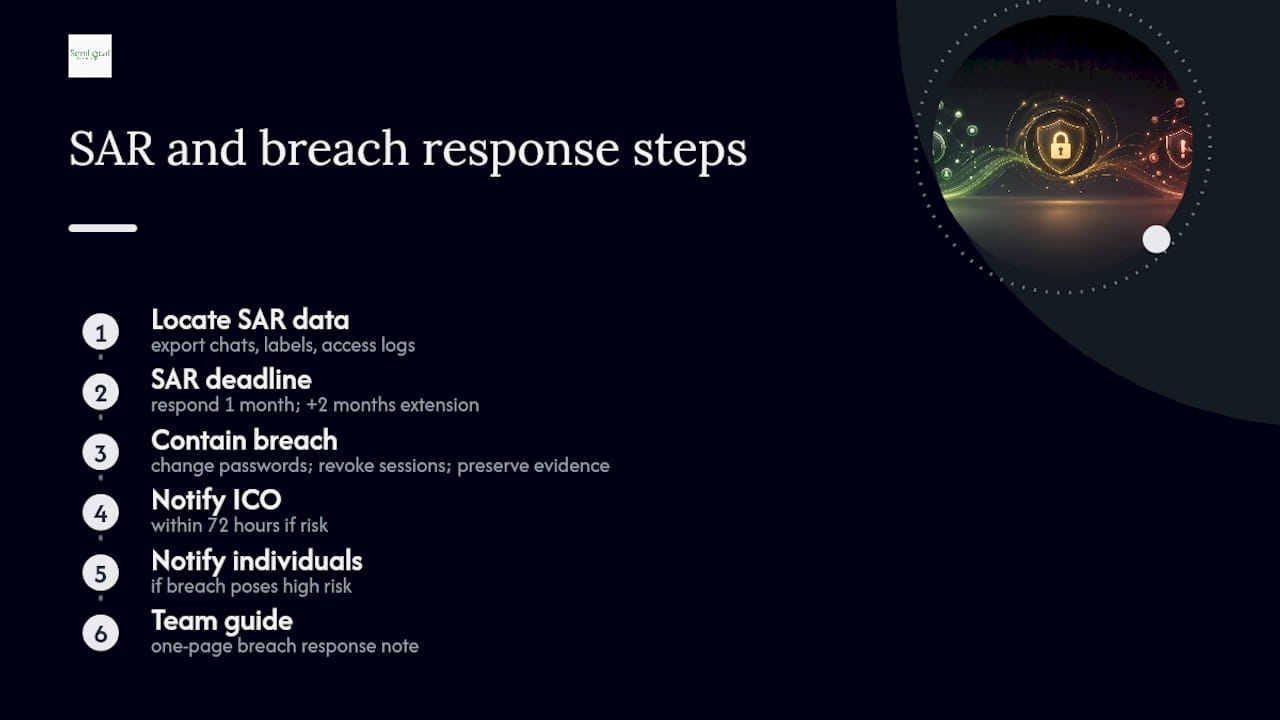
When a customer submits a subject access request, WhatsApp conversations count as personal data just like any CRM record. You need to search and export the full conversation history with that individual, any labels or tags applied to them, and, where the Business API is in use, the access logs showing which staff members viewed the thread.
You have one calendar month to respond to a SAR under UK GDPR, extendable by two further months for genuinely complex requests, though you must tell the requester if you’re extending. Miss that window without good reason and you’re already in breach territory before the substance of the request is even resolved.
If a breach occurs, WhatsApp account compromise, a lost device with unlocked chats, an employee sending customer data to the wrong number, containment comes first. Change passwords, revoke device sessions, and preserve evidence of what happened and when. You must notify the ICO within 72 hours if the breach poses a risk to individuals, and notify the affected individuals directly if that risk is high. Small teams without a dedicated compliance function benefit from a one-page breach response note kept somewhere everyone can find it, not buried in a policy document nobody reads twice.
Workplace risks managers overlook
The biggest risks rarely come from the platform itself. They come from how staff actually use it day to day.
- Personal and business accounts blur together when staff use their own phones for work WhatsApp, making it nearly impossible to separate personal and business data cleanly. A dedicated business device or supervised business profile solves most of this.
- Group chats create discoverability problems. A customer added to a staff group chat has effectively had their number shared with everyone in it, often without clear consent for that specific use.
- Backups extend your data footprint. Cloud-synced chat backups can sit unencrypted on third-party servers indefinitely unless you actively set retention limits.
- Some data shouldn’t be on WhatsApp at all. Financial details, health information or anything covered by additional regulatory regimes generally belongs on a proper secure system, not in a chat thread.
Semlocal’s perspective: making compliance practical, not theoretical
Most compliance advice for small businesses assumes you have a legal department. You don’t, and neither do most of the local service businesses Semlocal works with day to day, so the checklist above only earns its place if it can survive contact with a Tuesday afternoon.
What actually works in practice is smaller than what the guidance implies. A consent log doesn’t need software. A spreadsheet with date, method and the exact wording shown to the customer holds up perfectly well against an ICO enquiry, provided someone actually maintains it. Suppression lists work the same way. The failure point is never the format, it’s the habit of updating it every time someone unsubscribes.
SAR handling follows the same logic. A workflow that takes fifteen minutes, export the thread, check for staff access logs, redact anything referring to a third party, beats an elaborate policy document that nobody has opened since it was written. The businesses that manage this well tend to keep consent capture and message drafting in-house, since that’s where judgement calls actually happen, while outsourcing the ongoing audit and system maintenance to someone whose job is to remember the deadlines they’d otherwise miss.
— Geoff
How Semlocal keeps your WhatsApp setup compliant without the admin headache
Semlocal is the alternative to hiring a compliance consultant for WhatsApp setup, running audits, building your consent capture and suppression list architecture, and integrating it into the local marketing systems we already manage for you, so nothing sits as a separate, forgotten project.
A managed approach removes the two things that trip up small teams: remembering to update the Article 30 record and catching SAR deadlines before they slip. We build the consent workflow into your existing booking and enquiry systems, set retention rules that run automatically, and flag anything that looks like a DPIA trigger before it becomes a problem. That sits alongside the wider local visibility work we already do, from Google Business Profile management to local SEO, so your customer communications and your local search presence are handled by the same team rather than three different suppliers.
If you’re not sure whether your current WhatsApp setup would survive an ICO enquiry, book a short compliance review and we’ll tell you exactly where the gaps are.
Where to read the source guidance yourself
For the primary rules on electronic marketing consent, read the ICO’s guide to PECR directly. UK GDPR’s record-keeping requirements are set out in Article 30, and the ICO’s accountability and governance guide covers DPIAs and risk-based compliance in more depth. WhatsApp’s own UK Data Transfer Addendum and privacy policy are worth reading before you draft your own privacy notice wording.
Sources
- Guide to PECR: electronic and telephone marketing | ICO
- WhatsApp Business UK Data Transfer Addendum
- Article 30 GDPR — Records of processing activities