Move bookings online, add automated confirmations and enforce a deposit policy. Do those three things and you will cut admin time and reduce no-shows faster than any other change you can make this week. Automated confirmation and reminder sequences reduce no-shows by 30–50%, and deposits reduce them by a further 40–60%, which means the two fastest wins available to any UK service business are:
- Enable automated SMS and email reminders at 48 hours and 2 hours before every appointment.
- Require a 10–20% deposit at booking for any service worth more than £50, processed via Stripe or PayPal under PCI-DSS rules.
Both actions are compliant with the Data Protection Act 2018 and UK GDPR when you collect consent correctly. Semlocal recommends measuring your current no-show rate for four weeks before you change anything else. That baseline number is the single most useful figure you will own.
Key takeaways
Automated reminders, a deposit policy, and a minimal booking form are the three changes that deliver the fastest, most measurable improvement to any UK service business’s appointment workflow.
| Point | Details |
|---|---|
| Start with reminders and deposits | Automated reminders cut no-shows by 30–50%; deposits cut them by a further 40–60%. |
| Keep the booking form short | Every extra field reduces completion rates noticeably; ask only for name, email, phone, and service. |
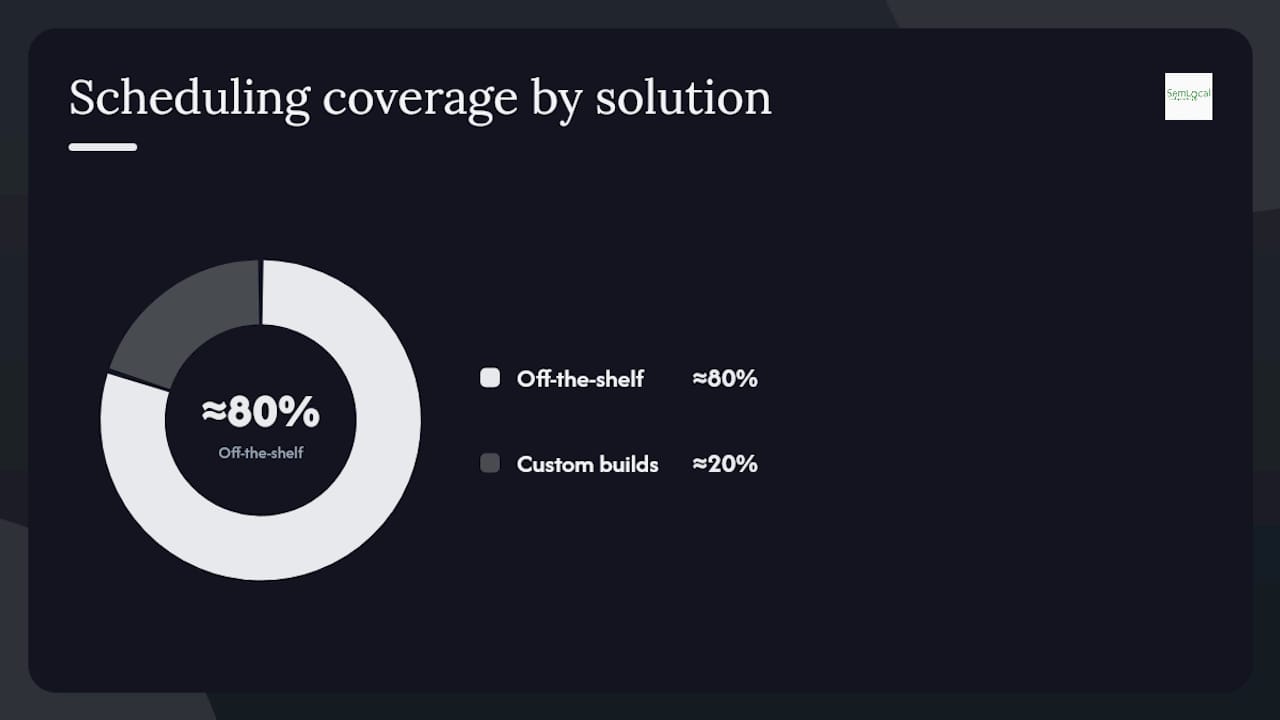
| Off-the-shelf first | Platforms like Calendly, Square Appointments, and SimplyBook.me cover roughly 80% of needs. |
| Measure before you build | Track no-show rate and admin hours for four weeks before committing to a custom AI agent. |
| Semlocal for complex builds | When routing, multi-channel capture, or deep CRM integration exceeds platform limits, Semlocal designs and runs a custom AI booking agent. |
Table of Contents
- What does the ideal booking flow look like for a customer?
- Which features must a UK booking system include?
- How do you capture and qualify leads before they book?
- How do you reduce no-shows and recover cancelled slots?
- Should you use peak and off-peak pricing for appointment slots?
- When should you use an off-the-shelf platform versus a custom AI agent?
- What does a 30-day setup and test plan look like?
- What are the GDPR essentials for UK booking systems?
- What mistakes do operators make most often, and how do you fix them?
- Semlocal’s take on booking automation for UK service firms
- Semlocal builds and runs custom AI booking agents for UK service businesses
- Sources
What does the ideal booking flow look like for a customer?
The whole journey, from landing on your booking page to receiving a calendar invite, should take under 60 seconds. Here is the sequence every system must deliver:
- Customer visits your booking page (linked from Google Business Profile, website, or social).
- Selects service type and preferred staff member or location.
- Picks an available slot from real-time availability.
- Pays a deposit or full amount via Stripe or PayPal.
- Receives an instant confirmation email with an
.icscalendar invite attached. - Receives an automated SMS confirmation within 30 seconds.
Each step requires a specific automation behind it: real-time calendar writeback to prevent double-bookings, payment capture before the slot is confirmed, and a triggered confirmation sequence that fires the moment the booking is saved.
Pro Tip: Remove every optional field from the booking form. Ask only for name, email, phone number, and service type at the point of booking. Every extra field reduces completion rates noticeably, so collect job details, access instructions, or preferences in a follow-up message after confirmation.
Which features must a UK booking system include?
Bi-directional calendar synchronisation with Google Calendar or Outlook is the baseline. Without two-way sync, double-bookings are inevitable. Beyond that, the following features protect revenue and reduce admin:
- Bi-directional calendar sync with Google Calendar or Outlook, updating in real time.
- Buffer and travel time between appointments, configurable per service or staff member.
- Deposit and payment capture via Stripe or PayPal at the point of booking.
- Multi-staff and multi-location support so availability reflects the right person at the right site.
- SMS and email reminders with reschedule links embedded in every message.
- Waitlist management to fill cancelled slots automatically.
- CRM integration (HubSpot, Zoho, or similar) and accounting sync with Xero for bookkeeping.
Platforms worth evaluating include Calendly, Squarespace Scheduling (formerly Acuity), Square Appointments, Setmore, and SimplyBook.me. Each supports Stripe and PayPal natively and offers a data processing agreement for UK GDPR compliance.
Pro Tip: Before signing up to any platform, request its Data Processing Agreement in writing. Under UK GDPR, you are the data controller and the platform is your processor. A signed DPA is not optional.
How do you capture and qualify leads before they book?
The core pipeline is capture, qualify, book, and sync. Responding to an enquiry within five minutes materially increases conversion, so the qualification step must be fast and automated where possible.
Collect these fields at the enquiry stage (not the booking stage):
- Name and contact details
- Service required
- Location or postcode
- Preferred date range
- Budget indication (optional but valuable)
- How they heard about you
Apply a simple 0–100 scoring model to prioritise responses:
| Field | Score weight | Action by band |
|---|---|---|
| Service matches your offer | 40 points | 80–100: call within 10 minutes |
| Location within your area | 30 points | 50–59: respond within 30 minutes |
| Budget meets minimum threshold | 30 points | 20–39: nurture sequence within 24 hours |
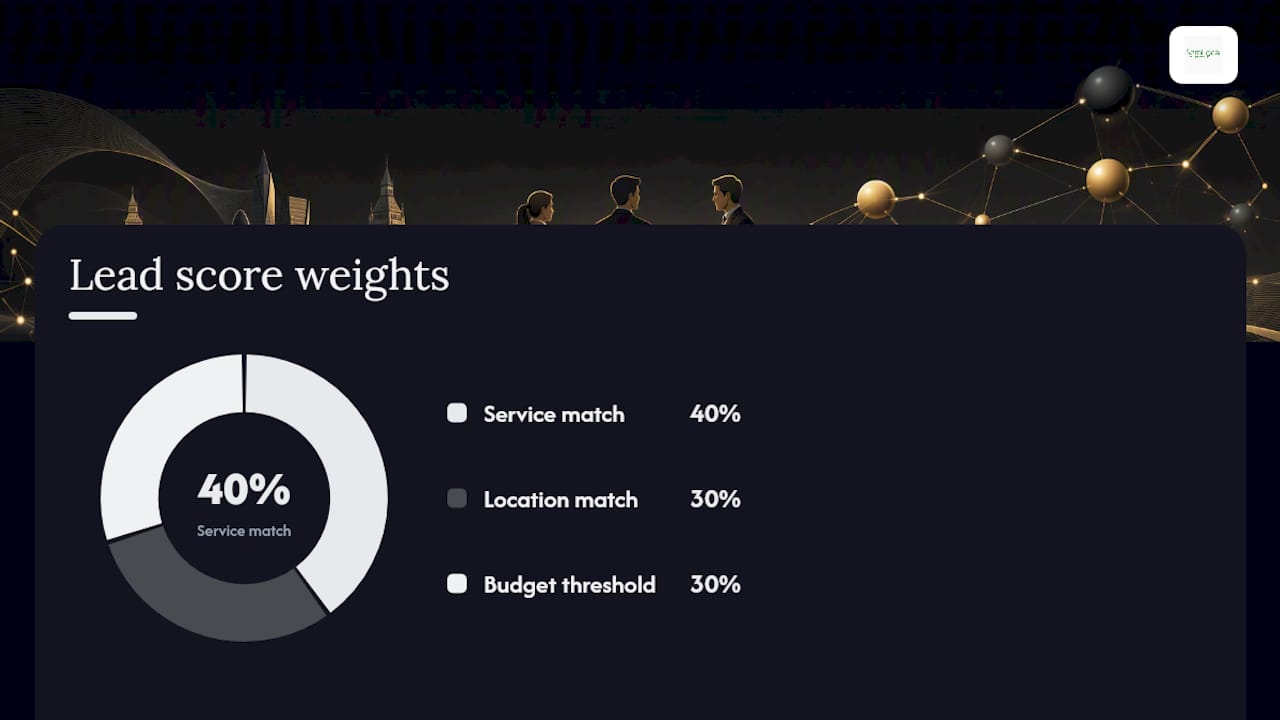
Leads scoring below 20 are low-fit. Route them into a nurture sequence rather than rejecting them outright. A low-fit lead today can become a booked job in three months. The capture-to-book pipeline works best when scoring happens automatically via your web chat or intake form logic.
How do you reduce no-shows and recover cancelled slots?
Automated reminders and deposits are the two most effective levers. SMS reminders perform as well as phone calls for attendance and cost far less, and wording matters: a message that states the cost of a missed appointment tends to reduce non-attendance more than a generic reminder.
Use this reminder cadence as your starting point:
| Reminder | Channel | Timing | Estimated no-show reduction |
|---|---|---|---|
| Booking confirmation | Email + SMS | Immediately | Baseline |
| First reminder | SMS | 48 hours before | 20–30% reduction |
| Final reminder | SMS + Email | 2 hours before | Additional 10–20% |
| Reschedule prompt | SMS | 24 hours before | Reduces late cancellations |
For deposits, apply these tiers based on service value:
- Under £50: no deposit required; confirmation email is sufficient.
- £50–£200: 10–20% deposit at booking.
- Over £200: 25–50% deposit, with a clear cancellation policy stating refund conditions.
Build automated reminder sequences into your platform from day one.
Should you use peak and off-peak pricing for appointment slots?
Yes, and it does not need to be complicated. The goal is to move bookings from your busiest periods into slots you would otherwise leave empty.
Deposit guidelines by service value:
- Low-value services (under £50): no deposit; use confirmation email as commitment device.
- Mid-value services (£50–£200): 10–20% deposit; refundable up to 48 hours before.
- High-value services (over £200): 25–50% deposit; non-refundable inside 24 hours.
Pro Tip: Run a three-month test on one price tier before making permanent changes. Track booking volume, revenue per slot, and cancellation rate separately for peak and off-peak periods. Three months gives you enough data to distinguish a real pattern from seasonal noise.
When should you use an off-the-shelf platform versus a custom AI agent?
Off-the-shelf platforms cover approximately 80% of scheduling needs and are faster and cheaper to deploy. Start there. Commission a custom AI agent only when you hit clear limits.
Signs you need a custom build:
- You have multiple locations with different staff, equipment, or room availability that the platform cannot route correctly.
- You need to qualify leads by postcode, job type, or budget before a slot is offered.
- You receive enquiries across phone, web chat, and SMS and need a single unified pipeline.
- You want deep CRM integration that off-the-shelf webhooks cannot deliver reliably.
Decision flow:
- Measure monthly booking volume and complexity.
- Estimate admin hours saved by automation.
- Pilot an off-the-shelf platform for 30 days.
- If the platform cannot handle your routing or integration needs, calculate ROI on a custom build.
A five-person London trades business handling 40+ enquiries a week eliminated its dedicated admin role after implementing AI automation. That is the benchmark to test against. Read the AI appointment booking guide for a fuller breakdown of when custom agents deliver measurable ROI.
Pro Tip: Start with web chat and SMS reminders. These capture the most leads for the least build effort and compliance overhead. Add AI voice handling later only if you can measure missed calls as lost revenue.
What does a 30-day setup and test plan look like?
Measure baseline bookings and no-shows for four weeks before implementing major changes. If you are starting fresh, use week one to gather that data while enabling online booking simultaneously.
- Week 1: Record current bookings, no-show rate, and admin hours. Enable online booking with a minimal form.
- Week 2: Activate automated confirmation emails and SMS reminders at 48 hours and 2 hours.
- Week 3: Add deposit capture for services over £50 and enable the waitlist feature.
- Week 4: Review KPIs, run an A/B test on reminder wording, and decide whether to add a second reminder touchpoint.
Track these KPIs:
| KPI | Baseline target | 30-day target |
|---|---|---|
| Online booking conversion rate | Measure only | Above 40% |
| No-show rate | Measure only | Below 10% |
| Admin time saved per week | Measure only | 4+ hours |
| Deposit capture rate | 0% | Above 60% |
| Waitlist fill rate | Not applicable | Above 30% |
For the A/B test, split your reminder SMS into two versions: one generic (“Your appointment is tomorrow at 10 AM”) and one cost-aware (“Your appointment is tomorrow at 10 AM. Missed appointments incur a £X fee.”). Run each version for two weeks and compare attendance rates.
What are the GDPR essentials for UK booking systems?
Under the Data Protection Act 2018 and UK GDPR, collecting contact data for appointment booking requires a lawful basis. For most service businesses, that basis is contract performance. For marketing messages, you need explicit consent.
Non-negotiable requirements:
- Lawful basis documented for every data type you collect (name, phone, email, payment details).
- Separate, unticked marketing consent checkbox on every booking and enquiry form.
- Signed Data Processing Agreement with your booking platform vendor.
- Card tokenisation via Stripe or PayPal so you never store raw card data on your own systems.
- Right-to-erasure process documented and tested: a customer must be able to request deletion and receive confirmation within one month.
Store consent records in your CRM or booking platform’s audit log. Do not rely on email threads as evidence of consent.
Pro Tip: Add a single line to your booking confirmation email: “We hold your contact details to manage your appointment. View our privacy policy [link]. To unsubscribe from reminders, reply STOP.” This covers your reminder basis and gives customers a clear opt-out, both of which the ICO expects to see.
What mistakes do operators make most often, and how do you fix them?
- Too many fields at booking. Fix: keep the form to name, email, phone, and service type. Move everything else to a post-confirmation message.
- No deposit policy. Fix: enable deposit capture in your platform settings today. Start at 10% for services over £50.
- Stale calendar availability. Fix: enable bi-directional sync and set a recurring block for lunch, travel, and preparation time. Review availability blocks weekly.
- Weak reminder cadences. Fix: add a reschedule link to every reminder. Customers who cannot attend will reschedule rather than simply not show up if the link is one tap away.
- No waitlist. Fix: turn on the waitlist feature in your platform. A cancelled slot filled by a waitlisted customer is recovered revenue with zero extra effort.
- Inaccessible booking widget. Fix: check that all form fields have visible labels, the widget is keyboard-navigable, and colour contrast meets WCAG 2.1 AA standards. Booking tools like Calendly and SimplyBook.me offer accessible widget options.
Build a client appointment accountability system around these fixes and you will see measurable improvement within the first two weeks.
Semlocal’s take on booking automation for UK service firms
Semlocal’s position is straightforward: automation should do the routine work, and humans should handle the exceptions. The businesses that get the most from booking automation are not the ones with the most sophisticated technology. They are the ones that measure first, automate second, and review the numbers every month.
For most clients, Semlocal recommends starting with an off-the-shelf platform, configuring it correctly, and running the 30-day test plan above. If the platform hits a ceiling, whether that is multi-location routing, complex lead qualification, or phone-channel capture, that is when a custom AI agent becomes the right investment. Semlocal manages Google Business Profile optimisation and local lead generation alongside booking automation, because the two are inseparable: a well-optimised profile drives enquiries, and a well-configured booking flow converts them.
When a client’s enquiry volume justifies a managed build, Semlocal designs, builds, and runs the agent. When it does not, Semlocal coaches the client to self-implement on Calendly, Square Appointments, or SimplyBook.me and monitors performance from the outside.
Semlocal builds and runs custom AI booking agents for UK service businesses
The off-the-shelf platforms covered in this guide will handle most businesses well. When your volume, routing complexity, or integration requirements outgrow them, Semlocal builds a custom AI booking agent that handles calls, web chat, and SMS enquiries in a single pipeline, qualifies leads automatically, and writes confirmed appointments directly into your calendar and CRM.
Typical integration coverage includes Google Calendar, Outlook, HubSpot, Zoho, Xero, Stripe, and PayPal. The build is scoped to your specific workflows, not a generic template. Most clients see admin time drop within the first 30 days and no-show rates fall within 60 days. To find out whether a custom build makes sense for your business, request a discovery call and Semlocal will assess your current setup at no cost.
Sources
Use these resources based on your immediate need:
- AI appointment booking and no-show reduction | Fernside Studio
- Choosing appointment scheduling software for your UK service business – Hiring People
- AI appointment booking | Operosus
- How to Build an AI Sales System That Captures Leads and Books Meetings Around the Clock | Softomate Solutions
- Lead intake workflow | Semlocal