A production-ready lead intake workflow does one thing above all else: it converts every inbound enquiry into a tracked, owned, actionable record within minutes. Capture every channel, normalise the data into a canonical lead record, validate consent under ICO requirements, qualify by fit and urgency, route to a named owner, and create an audit trail. That is the prescription. The outcome is faster first contact, fewer wasted consultations, and measurably higher conversion.
The business case is clear. Research from Harvard Business Review shows that conversion likelihood drops sharply after the first few minutes of a lead arriving. Automation that reduces response time from hours to under 90 seconds can improve quote conversion by 15–25% and capture after-hours leads fully. The target SLA for tier-1 leads is a response within a very short time frame to first contact.

UK service businesses face an additional requirement: the ICO mandates that consent status is captured at the point of entry and recorded for auditability. Every lead record must carry a consent timestamp and consent source before it enters any qualification or routing step.
Key outcomes to expect from a well-built workflow:
- Time-to-first-contact drops from hours to under 90 seconds for automated acknowledgement
- After-hours leads are captured and queued rather than lost
- Duplicate records are eliminated before CRM insertion
- Every lead has a named owner and a documented next action
- Consent and audit fields satisfy ICO requirements from day one
Pro Tip: If you would rather have this built and managed for you, Semlocal designs and deploys end-to-end AI lead intake systems for UK service businesses, including voice agents, web chat, CRM integration, and compliance-ready consent capture.
Table of Contents
- What are the seven stages every lead intake workflow needs?
- How do you build a single lead record that works across all channels?
- Which tools should you use for lead intake automation in the UK?
- When should automation stop and a human take over?
- How do you measure whether your lead intake workflow is actually working?
- UK-ready implementation checklist: how to go live without missing anything
- Key takeaways
- Why most intake failures are organisational, not technical
- Semlocal builds your lead intake system so you do not have to
- Useful sources and further reading
What are the seven stages every lead intake workflow needs?
A seven-stage operational framework gives every lead a defined path from first contact to conversion or disqualification. Without handoff conditions between stages, leads fall through the gaps.
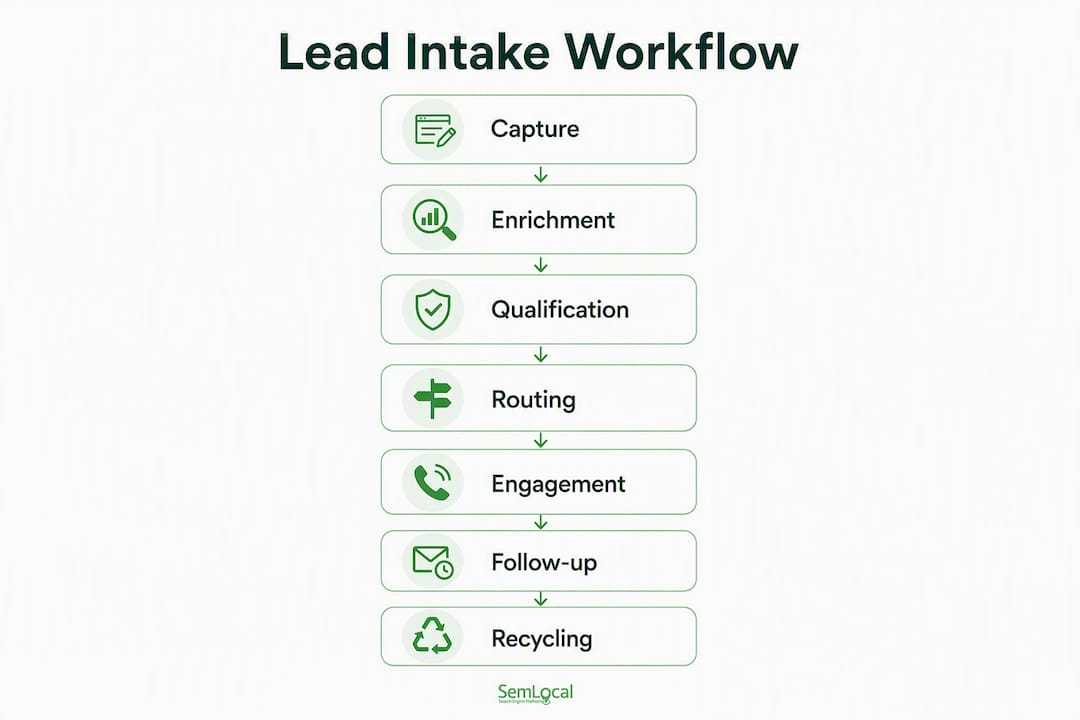
| Stage | Core actions | Output to next stage |
|---|---|---|
| Capture | Receive payload from form, call, chat, ad, social DM | Raw lead record with source, channel, timestamp |
| Enrichment | Append firmographics, intent signals, phone validation | Enriched record with company, job title, geo |
| Qualification | Score by fit, urgency, budget; apply rules | Qualified / borderline / disqualified flag |
| Routing | Assign owner by territory, service type, capacity | Lead with named owner, SLA timer started |
| Engagement | Send acknowledgement (<90s), run 2–3 question script | Confirmed interest or disqualification |
| Follow-up | Personalised outreach, booking confirmation, reminders | Booked appointment or recycled record |
| Recycling / Disqualification | Tag reason, set re-engagement date or archive | Clean CRM record with outcome logged |
Capture is where most workflows fail. A form on your website is not a lead intake system. You need triggers from every active channel: Typeform or native CRM forms for web, Twilio for inbound calls and SMS, a web chat agent for on-site conversations, and webhook receivers for ad platform lead forms (Google Ads, Meta). Each channel fires a different payload shape, which is why the next stage matters so much.
Enrichment transforms a sparse payload into a usable record. Progressive profiling and multi-step capture improve both conversion and data quality. Rather than asking for 12 fields upfront, capture name, phone, and service type at first touch, then append company data and intent signals automatically via enrichment APIs.
Qualification is where you protect your team’s time. Apply a scoring model against the canonical record: service type match, urgency band, location within your service area, and budget band. Leads that score below threshold go to recycling, not to a salesperson’s inbox.
Routing assigns a named owner and starts the SLA clock. Routing rules should be explicit: by postcode, by service type, by team capacity. Ambiguous routing is an exception, not a default.
Engagement is the first human or AI touchpoint. An automated acknowledgement within 90 seconds, followed by a short qualification script (two to three questions), confirms interest and gathers the data enrichment could not supply.
Follow-up closes the loop. Automated follow-up tools can draft personalised emails after a booked demo or consultation, keeping conversion rates up without adding manual work.
Recycling is not a bin. Tag every disqualified lead with a reason code and a re-engagement date. A lead that is out of budget today may be ready in 90 days.
How do you build a single lead record that works across all channels?
Canonical lead normalisation is the foundation of effective lead management. Without it, automation scales chaos rather than fixing it.

Every channel produces a different payload. A web form sends JSON fields. A Twilio call sends a transcript and caller ID. A social DM sends a message thread. The normaliser’s job is to map all of these into one consistent object before any qualification or routing logic runs.
Required fields for the canonical lead record:
| Field | Type | Notes |
|---|---|---|
lead_id |
UUID | Generated on capture |
name |
String | Full name, normalised |
phone |
E.164 format | Validated at capture |
email |
String | Validated format |
source |
Enum | google_ads, organic, referral, social, direct |
channel |
Enum | form, call, chat, sms, ad_lead_form |
service_type |
Enum | Mapped to your service taxonomy |
location_geo |
String | Postcode or region |
urgency |
Enum | immediate, within_week, planning |
budget_band |
Enum | <£1k, £1k–5k, £5k+ |
consent_status |
Boolean | Must be true before processing |
consent_timestamp |
ISO date format | Captured at point of entry |
consent_source |
String | Form URL, call recording ref, chat session ID |
owner |
String | Assigned after routing |
next_action |
Enum | call_back, send_quote, book_consult, disqualify |
created_at |
ISO date format | Immutable |
raw_payload |
JSON | Original source payload, archived |
change_log |
Array | Append-only audit trail |
Derived fields added during enrichment include company name, job title, employee count, and intent signals pulled from tools such as Clearbit or Apollo. These never overwrite the raw payload; they append to the record.
The consent_status field must be true before the record moves past capture. Any record without verified consent is held in a quarantine queue for human review, not routed to a salesperson. This is the ICO requirement in practice, not just in policy.
Deduplication runs on a hash of phone + email + service_type. If a matching hash exists in the CRM, the new payload is merged into the existing record and the change_log is updated. The sales qualification process for B2B teams covers how to apply strict qualification criteria once the record is clean.
Which tools should you use for lead intake automation in the UK?
The orchestration layer is where the workflow lives. Your CRM (HubSpot, Pipedrive, or Zoho CRM) stores records; it does not run logic. Make (formerly Integromat) or Zapier sits between your capture channels and your CRM, running the normalisation, scoring, routing, and SLA logic.
Tool roles in a UK-ready stack:
- Forms / capture: Typeform, HubSpot forms, native CRM forms, or a custom web chat agent
- Call and SMS handling: Twilio (UK numbers, call recording, SMS confirmations, voice transcription)
- Orchestration: Make or Zapier (webhook receivers, field mapping, conditional routing, SLA timers)
- CRM: HubSpot, Pipedrive, or Zoho CRM (record storage, pipeline management, owner assignment)
- Booking: Calendly or HubSpot Meetings (integrated with CRM to prevent double-booking)
- Follow-up: Automated email drafting tools for personalised post-consultation outreach
- AI voice agents: Custom-built agents for 24/7 call handling and qualification (Semlocal’s core offering)
The standard orchestration pattern runs like this: a lead arrives via any channel and fires a webhook to Make or Zapier. The orchestrator normalises the payload into the canonical schema, runs a dedupe hash check against the CRM, scores the record, applies routing rules, creates or updates the CRM record, starts the SLA timer, and triggers the acknowledgement (SMS via Twilio, email via HubSpot, or both). The whole sequence runs in under 90 seconds.
For 24/7 lead capture via an AI website agent, the agent handles the initial qualification conversation, maps responses to canonical fields, and pushes the completed record to the orchestrator via webhook. No human is needed until the routing stage.
UK data residency matters. Make and Zapier both offer EU/UK data processing agreements. Twilio’s UK infrastructure keeps call data within the UK. HubSpot and Pipedrive offer GDPR-compliant data processing addenda. Verify these contracts are in place before go-live; the ICO expects documented processor agreements.
Pro Tip: Use a small LLM prompt in your orchestration layer to classify intent from free-text fields (web chat messages, call transcripts). A simple prompt that maps text to your service_type and urgency enums catches nuance that keyword matching misses, without generating false positives if you constrain the output to your defined enum values.
When should automation stop and a human take over?
Exception handling is where most intake workflows fail at scale. The happy path is easy to automate. The edge cases are where revenue leaks.
Define these exception classes before you build:
- Ambiguous data: name only, no phone or email, or a phone number that fails E.164 format validation
- Dedupe conflict: two records with matching phone but different emails, or vice versa
- Missing consent:
consent_statusis false or absent - Out-of-service-area: postcode outside your defined coverage
- Potential fraud: disposable email domain, VoIP number flagged by validation API, or repeated submissions from the same IP
- High-value outlier: budget band above your standard threshold, requiring senior review
When any exception flag fires, the record moves to a human reviewer queue rather than continuing through automation. The queue shows the reviewer: the raw payload, the exception reason, the canonical fields populated so far, and the suggested action. The reviewer has override authority to approve, correct, or disqualify the record. Every decision is appended to the change_log.
SLA fallback rules prevent reviewer queues from becoming black holes. If a flagged record has not been reviewed within a defined period, it escalates to an on-call contact via SMS (Twilio) or email. Booking is suppressed until the record is verified. This prevents a potential client from receiving a confirmation for a consultation that has not been properly qualified.
Pro Tip: Build and test your exception-handling flows in isolation before connecting them to live channels. Create a small set of synthetic test records that trigger each exception class, and verify the queue, notification, and audit trail work correctly. Fixing exception logic after go-live is significantly harder than testing it first.
How do you measure whether your lead intake workflow is actually working?
Speed is the primary metric. The five-minute rule is the target SLA for tier-1 leads: contact within five minutes of arrival materially improves qualification and conversion rates. Automation typically achieves acknowledgement in under 90 seconds, which gives your team time to make a personal follow-up call within the five-minute window.
Automation that reduces response time from hours to under 90 seconds can improve quote conversion by 15–25% and capture after-hours leads at 100%. Source: Harvard Business Review
| KPI | Target | Measurement frequency |
|---|---|---|
| Time-to-first-contact (tier-1) | <5 minutes | Real-time / daily |
| Automated acknowledgement time | <90 seconds | Real-time |
| Qualification-to-book rate | Track baseline, improve monthly | Weekly |
| Conversion rate by source | Track by channel | Weekly |
| Duplicate record rate | <2% | Weekly |
| SLA breach rate | <5% of tier-1 leads | Daily |
| Disqualification reason distribution | Review top 3 reasons | Monthly |
| Exception queue clearance time | Within defined reviewer SLA | Daily |
Track disqualification reasons monthly. If “out of service area” is your top reason, your capture forms do not filter geography early enough. If “budget mismatch” dominates, your qualification script needs an earlier budget question. The data tells you where to fix the workflow, not just whether it is working.
UK-ready implementation checklist: how to go live without missing anything
Follow this sequence. Skipping steps creates technical debt that is expensive to fix after launch.
- Audit all lead sources. List every channel that currently generates enquiries: website forms, phone, web chat, Google Ads lead forms, Meta lead ads, social DMs, referrals. Assign a channel owner for each.
- Map canonical fields. Define your
service_typetaxonomy,urgencyenums,budget_bandranges, andlocation_geocoverage. Document these in a shared field dictionary. - Build the normaliser. Create a Make or Zapier scenario that receives a webhook from each channel and maps it to the canonical schema. Test with a sample payload from each source.
- Implement dedupe logic. Hash
phone+email+service_type. Configure your CRM to check for existing records before creating a new one. - Create qualification rules. Define the scoring model: which
service_typevalues qualify, whichurgencybands trigger immediate routing, whichbudget_bandvalues disqualify. - Configure routing and SLA timers. Set routing rules by territory and service type. Start the SLA timer on record creation. Configure escalation if the SLA is breached.
- Set up booking and confirmation flows. Connect Calendly or HubSpot Meetings to the CRM. Configure Twilio SMS confirmations and email reminders.
- Build reviewer queues. Create the exception queue in your CRM or a tool such as Notion or Airtable. Configure notifications for each exception class and set the reviewer SLA.
- Integrate CRM fully. Verify that all canonical fields map to CRM properties. Confirm that the
change_logappends correctly on every update. - Run test scenarios before go-live:
- Happy path: Submit a qualifying form entry; verify acknowledgement <90s, correct owner assigned, SLA timer started, CRM record created.
- After-hours call: Trigger a Twilio inbound call outside business hours; verify the AI agent captures the record and queues it correctly.
- Duplicate submission: Submit the same phone and email twice; verify merge, not duplication.
- Borderline qualification: Submit a record that scores at the threshold; verify it routes to the reviewer queue, not auto-qualifies.
- Fraud pattern: Submit with a disposable email domain; verify the exception flag fires and booking is suppressed.
- Run a pilot with one channel for two weeks. Monitor KPIs daily. Fix exception handling before expanding to all channels.
- Monitor and iterate. Review KPI dashboard weekly for the first month, then monthly.
UK data compliance checklist:
- Consent capture point documented for every channel (form checkbox, call recording notice, chat disclaimer)
- Retention policy defined and configured in CRM (ICO recommends reviewing data you no longer need)
- Access control: only named staff can view raw payloads and consent records
- Audit logs:
change_logandconsent_timestampfields are immutable and retained per your policy - Data processor agreements signed with Make/Zapier, Twilio, HubSpot/Pipedrive/Zoho CRM
Legal intake case studies confirm that firms lose leads primarily because intake covers only some channels or only business hours. After-hours handling and integrated qualification scripts are not optional for a 24/7 service business.
This article is general information, not legal or compliance advice. Confirm your specific data handling obligations with the ICO or a qualified data protection professional.
Key takeaways
A well-built lead intake workflow captures every channel, normalises into a canonical record, validates consent, qualifies by fit and urgency, and routes to a named owner within five minutes.
| Point | Details |
|---|---|
| Five-minute SLA is the target | Automation achieves <90s acknowledgement; human follow-up completes the five-minute window. |
| Canonical field map comes first | Build the schema before automation; without it, deduplication and routing cannot work reliably. |
| Consent must be captured at entry | ICO requires consent status, timestamp, and source recorded before any processing begins. |
| Exception handling prevents revenue leakage | Define exception classes and reviewer authority before go-live; do not automate ambiguous records. |
| Semlocal builds this end-to-end | Semlocal designs and deploys AI voice agents, orchestration, CRM integration, and compliance-ready intake for UK service businesses. |
Why most intake failures are organisational, not technical
Most lead intake problems I see in UK service businesses are not technology failures. The form works. The CRM is set up. The problem is that no one owns the next step.
A lead arrives, sits in an inbox, and waits for someone to notice it. By the time a salesperson picks it up, the prospect has already spoken to a competitor. The system did not fail. The process did.
The insight that changes everything is this: the workflow must own the next step, not a person’s habit. When routing assigns a named owner and starts an SLA timer, the system creates accountability. When the SLA expires and an escalation fires, the system enforces it. Human judgement is reserved for the decisions that genuinely require it: ambiguous records, high-value outliers, consent disputes.
I have also seen businesses over-automate qualification and book consultations with leads that were never a realistic fit. Protecting your team’s time by enforcing strict qualification before booking is not about being selective for its own sake. It is about making sure the consultations that do happen are worth having. A predictable pipeline case study from a managed IT services firm illustrates exactly this: fewer, better-qualified consultations produced a more reliable revenue pipeline than a high volume of poorly screened ones.
The canonical field map and exception-handling paths are the system. Automation is the layer that enforces them. Build the map first, automate second.
Semlocal builds your lead intake system so you do not have to
More calls and enquiries mean nothing if your intake process loses half of them before a conversation happens. Semlocal’s managed AI lead intake service gives UK service businesses a complete, audit-ready system: custom AI voice agents that handle calls and qualify leads 24/7, web chat agents that capture and route enquiries in real time, Make/Zapier orchestration connecting every channel to your CRM, and SLA monitoring with exception queues built in.
Every deployment includes a canonical field schema, consent capture configured to ICO requirements, deduplication logic, reviewer queues, handoff logging, and a go-live test plan. You get a working system, not a template to figure out yourself. For businesses that need local lead generation to convert into booked appointments rather than missed calls, this is the practical next step.
Book a discovery call with Semlocal today. We will audit your current intake channels, identify where leads are being lost, and show you exactly what a production-ready system looks like for your business.
Useful sources and further reading
- ICO: Information Commissioner’s Office — Primary UK authority on consent capture, data retention, and audit requirements for lead data.
- The short life of online sales leads (Harvard Business Review) — The foundational research behind the five-minute rule and its impact on conversion.
- Lead intake automation end-to-end (PrimeAxiom.ai) — Technical guide to canonical lead modelling, SLA queues, and orchestration patterns.
- Lead management process: the 7-step operational workflow — Framework reference for the seven-stage model and handoff conditions.
- What is lead capture? (CUFinder) — Practical guidance on progressive profiling, multi-step forms, and conversion tracking.
- How to automate lead intake for small businesses (Barrana.ai) — Implementation example covering acknowledgement flows, qualification scripts, and typical build timelines.
- Legal intake process guide (Smith.ai) — Case examples for after-hours handling and qualification scripts; directly applicable to UK service businesses.
- From lead to booked: autonomous AI agents for B2B (AIM Agency) — Explains autonomous agent workflows and outcomes for 24/7 lead handling.
Recommended
- Predictable Pipeline for a Managed IT Services Firm – AI Management Agency
- From Lead to Booked: How Autonomous AI Agents for B2B Handle the “Grunt Work” While You Sleep – AI Management Agency
- How to Integrate an AI Website Agent With Your CRM for 24/7 Lead Generation – AI Management Agency
- Customer enquiry workflow: a 2026 guide for UK smes – AI Management Agency