After-hours IT support means having qualified engineers available outside standard business hours to handle network alerts, outages and staff requests. The most reliable structure pairs a genuine 24/7 emergency response tier with a lower-cost scheduled window for routine issues. Before signing anything, ask prospective providers for their exact SLA response times and how their monitoring tools integrate with your systems.
TL;DR:
- Providers should offer documented escalation flows and real response times that are tested and followed during all hours, especially at 3am.
- Outsourced support is usually more cost-effective than in-house night staff for small to mid-sized businesses, with the option for dedicated teams to deepen knowledge.
- Clear SLAs, response definitions, and verified incident histories are essential for choosing a reliable provider, with references from clients with similar setups.
- Automation with AI can handle first-line troubleshooting and call routing, but complex diagnostics still require human engineers, making a hybrid approach most effective.
- Routine support such as password resets and minor issues can be handled by AI or tiered support, allowing premium response times only for critical incidents like outages or security breaches.
Table of Contents
- What does IT support after hours actually include?
- Why does after-hours coverage pay for itself?
- How do you choose the right after-hours IT support provider?
- What does after-hours IT support cost?
- How should you tier emergency versus routine requests?
- How do you roll out after-hours support without disrupting your team?
- What mistakes should you avoid with after-hours coverage?
- In-house night staff or an outsourced provider: which wins?
- How do you check if a provider is actually reliable?
- What contract terms should you negotiate?
- How long does onboarding take?
- Will after-hours support fit your existing tools?
- How do you scale after-hours support as you grow?
- When do AI agents make sense in an after-hours setup?
- Want after-hours cover without hiring a night shift?
- Sources
What does IT support after hours actually include?
Real after-hours IT support covers more than someone picking up the phone at 2am. It’s a combination of remote help desk access, automated monitoring and a defined escalation path that gets the right person involved at the right time.
A properly built service typically includes:
- Remote help desk assistance for password resets, application errors and remote desktop troubleshooting, including basic endpoint fixes such as browser and cookie settings that block staff from logging into cloud systems.
- Proactive monitoring, where network operations centre (NOC) tools flag failing backups, server load spikes or security anomalies before anyone reports them.
- A tiered escalation flow, moving from a first-line technician to an on-call senior engineer, and to an on-site visit if the issue can’t be resolved remotely.
- A delivery model choice between a shared support pool (cheaper, less personalised) and a dedicated team that already knows your infrastructure, plus multilingual or regional cover if you operate across time zones.
The gap between providers isn’t the marketing copy. It’s whether that escalation flow is documented, tested, and actually followed at 3am.
Why does after-hours coverage pay for itself?
The clearest financial case for after-hours support isn’t the incidents it fixes overnight. It’s the ones your team never has to deal with at 9am.
Coverage delivers value in three distinct ways:
- No morning backlog. Staff start the day working, not queuing behind unresolved tickets from the night before.
- Shorter customer-facing downtime, which matters directly for revenue if you run e-commerce, booking systems or client portals that operate around the clock.
- Faster containment of security events and failed backups, since monitoring tools often catch issues before a human notices anything is wrong.
Statistic Callout: After-hours support isn’t only about fixing what breaks. It exists to stop staff arriving to a backlog that eats the first hours of the working day, a cost most businesses never actually measure.
Weigh that against hiring dedicated night staff, and the maths usually favours outsourced or blended cover for anything short of a large enterprise IT function.
How do you choose the right after-hours IT support provider?
Selecting a provider comes down to five checks you should run in every sales call, not just accept on trust.
- Demand explicit SLAs. Get the response window in writing, along with the provider’s definition of “critical” and the target time to remediation, not just acknowledgement.
- Confirm escalation and ownership. Ask who owns a ticket from creation to close, and how the handover to your daytime team works each morning.
- Check tool integration. Your RMM platform, ticketing system and remote access tools need to talk to theirs, or you’ll be duplicating work by 6am. Pricing itself often hinges on this: providers typically set costs around your technology environment, user count and SLA depth, so integration questions and budget questions are really the same conversation.
- Verify the availability model. “24/7” sometimes means a shared queue with a four-hour callback window, not a genuinely staffed overnight desk. Ask directly.
- Request references and security controls. A provider confident in its service will happily point you to existing clients running similar infrastructure.
Pro Tip: Ask a prospective provider to walk you through their last three overnight critical incidents, step by step, including what time each stage happened. Vague answers here are more revealing than any sales deck.
What does after-hours IT support cost?
Pricing for after-hours cover rarely follows a single formula. Providers typically build quotes around your technology environment, number of users and devices, and how tight your SLA requirements are.
Common pricing structures include:
- Per-user or per-device pricing, which scales predictably as your headcount or fleet grows.
- Per-incident pricing, useful for businesses with low overnight volume but risky if incidents spike unexpectedly.
- A blended retainer, combining a base monthly fee with capped incident hours and overage charges beyond that.
Costs climb with tighter response guarantees, holiday and weekend cover, and true round-the-clock staffing rather than an on-call rota. When negotiating, push for volume discounts, capped incident hours, and clarity on whether weekend or bank holiday work carries a surcharge. Get every quote you compare using identical ticket definitions and SLA wording, otherwise you’re comparing figures that don’t mean the same thing.
How should you tier emergency versus routine requests?
Not every overnight ticket deserves the same urgency, and treating them equally is how support budgets balloon without any extra protection to show for it.
Segmenting coverage into distinct tiers, each carrying its own response window, initial action and escalation target, keeps cost proportional to risk:
- Critical tier: network-wide outages, core application failures, security breaches. Target response inside a short timeframe suitable for critical incidents, with immediate escalation to a senior engineer.
- Routine tier: password resets, minor software glitches, non-urgent access requests. Response within a reasonable timeframe for routine incidents, typically later the same day or the next business day.
This structure means you’re paying premium rates only for the incidents that genuinely threaten the business, while routine noise gets handled on a slower, cheaper track.
How do you roll out after-hours support without disrupting your team?
Implementation goes wrong when businesses treat after-hours cover as a switch to flip rather than a process to test.
- Set up monitoring alerts first, and map exactly which alert triggers which escalation path, to which named engineer.
- Agree ticket ownership and handover times with your daytime team, so nothing falls into a gap between shifts.
- Run a weekend pilot before full rollout. Real alert traffic during a short pilot reveals integration gaps far faster than any checklist, and lets you tune thresholds before committing.
- Tell staff and customers what’s covered. Confused expectations about response times create more complaints than the outages themselves.
Pro Tip: Pick a genuinely quiet weekend for your pilot, not a bank holiday. You want to test the process under normal conditions, not under maximum stress on day one.
What mistakes should you avoid with after-hours coverage?
Most after-hours support failures trace back to the same handful of avoidable decisions.
- Buying “24/7” without written SLAs or clear escalation ownership, then discovering the definition of “urgent” differs wildly between you and the provider.
- Accepting vague monitoring promises. If a provider can’t explain exactly how their tools integrate with yours, staffing models and coverage need to be explicit before you sign, not discovered during an outage.
- Ignoring alert fatigue. Untuned thresholds flood engineers with noise, and genuine incidents get lost among false alarms.
- Skipping regular reviews. Coverage gaps usually surface only after an incident, and a scheduled quarterly audit catches most of them before they cause damage.
In-house night staff or an outsourced provider: which wins?
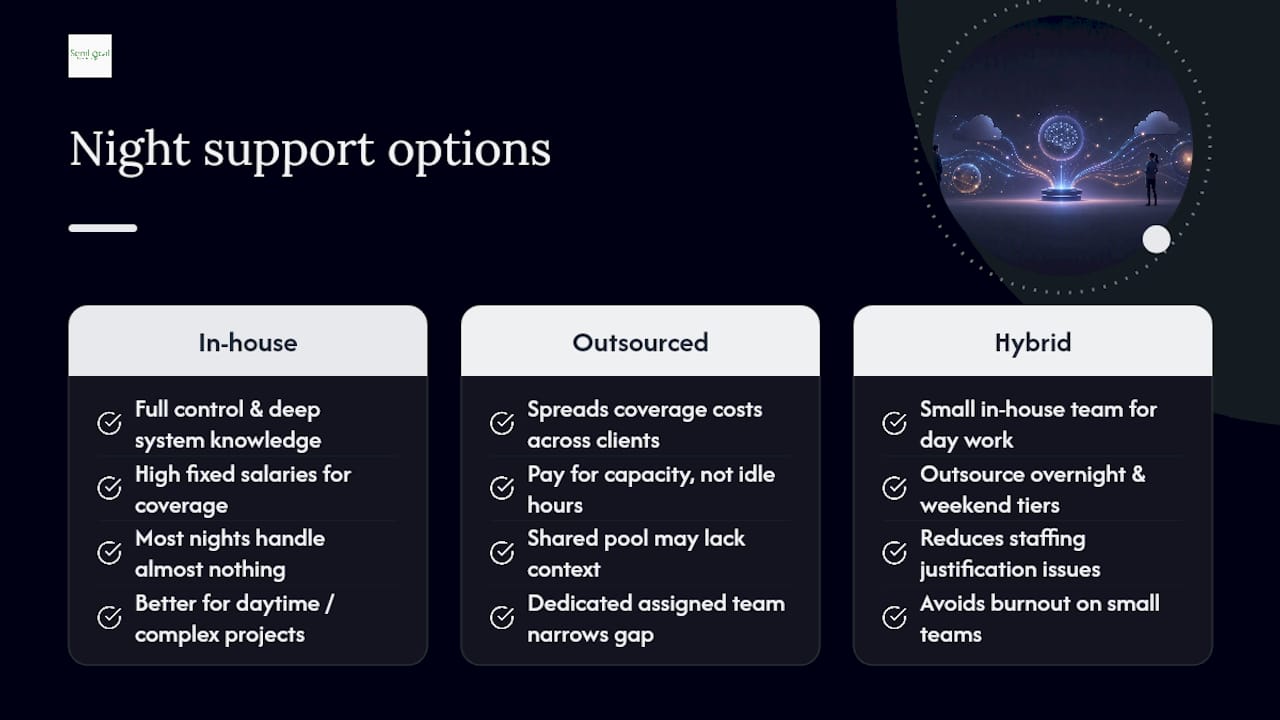
Building an in-house night desk gives you full control and staff who know your systems intimately. It also means paying full-time salaries for coverage that, most nights, handles almost nothing. For a business running a handful of overnight tickets a week, that’s an expensive way to buy peace of mind.
Outsourced providers solve the utilisation problem by spreading coverage costs across multiple clients, so you’re paying for capacity rather than idle hours. The trade-off is depth of institutional knowledge. A dedicated outsourced team assigned specifically to your account narrows that gap considerably, whereas a shared, rotating pool can mean re-explaining your environment every time you call.
A middle path many mid-sized businesses land on: keep a small in-house team for daytime work and complex projects, and outsource the overnight and weekend tiers where volume is unpredictable and staffing is hardest to justify. This also solves the burnout problem that plagues small in-house teams asked to cover nights on a rota. Nobody performs well at 3am on their fourth consecutive on-call shift.
Whichever route you choose, the deciding factor is rarely price alone. It’s whether the model actually gets a competent person looking at your critical alert within the response window you were promised, not the one that sounded good in the sales meeting.
How do you check if a provider is actually reliable?
Sales pitches all sound similar. What separates a genuinely dependable after-hours provider from one that will let you down at the worst moment comes down to verifiable evidence, not promises.
Start with independent review platforms rather than testimonials on the provider’s own site. Sites such as G2 carry unfiltered feedback on responsiveness and tool reliability from real users, which tends to be far more honest than curated case studies.
Certifications matter, but only the relevant ones. Look for evidence of security accreditation (ISO 27001 is the common benchmark in the UK), rather than generic badges that say little about overnight operational competence.
References are worth more than any brochure. Ask specifically to speak with a client running a similar technology stack to yours, and ask that client direct questions: how fast was the last critical response, and did the provider hit its own SLA? Vague or evasive answers from either party are a warning sign.
Finally, ask for a real incident history. A provider willing to walk through a recent overnight outage, including what went wrong and what they changed afterwards, is showing you far more than a polished sales deck ever will. One that only offers hypothetical scenarios probably hasn’t been tested under real pressure yet.
What contract terms should you negotiate?
The contract is where good intentions from the sales call either get locked in or quietly disappear. Read it as carefully as you’d read a lease.
Insist that SLA response times, the definition of a “critical” incident, and remediation targets are written into the contract itself, not left in a sales deck or an email. Verbal assurances mean nothing when an outage happens at midnight and the response takes four hours instead of thirty minutes.
Push for clarity on coverage scope and hidden costs. Providers should state plainly what’s included in “24/7” and what triggers an additional charge, whether that’s after-hours on-site visits, holiday cover, or work beyond a capped incident allowance.
Negotiate exit terms early, not after you’ve signed. A short initial term, or a clear off-ramp if SLAs are missed repeatedly, protects you from being locked into underperforming cover for a year. Ask about volume-based discounts if your device or user count is likely to grow, and get a fixed cap on incident hours within any blended retainer so unexpected volume doesn’t produce a surprise invoice.
Finally, confirm data handling and access terms. An after-hours provider will often need remote access to sensitive systems, so the contract should specify what access they hold, how it’s logged, and how quickly it’s revoked if the relationship ends.
How long does onboarding take?
Most after-hours support onboarding runs between two and six weeks, depending on the complexity of your infrastructure and how much documentation already exists.
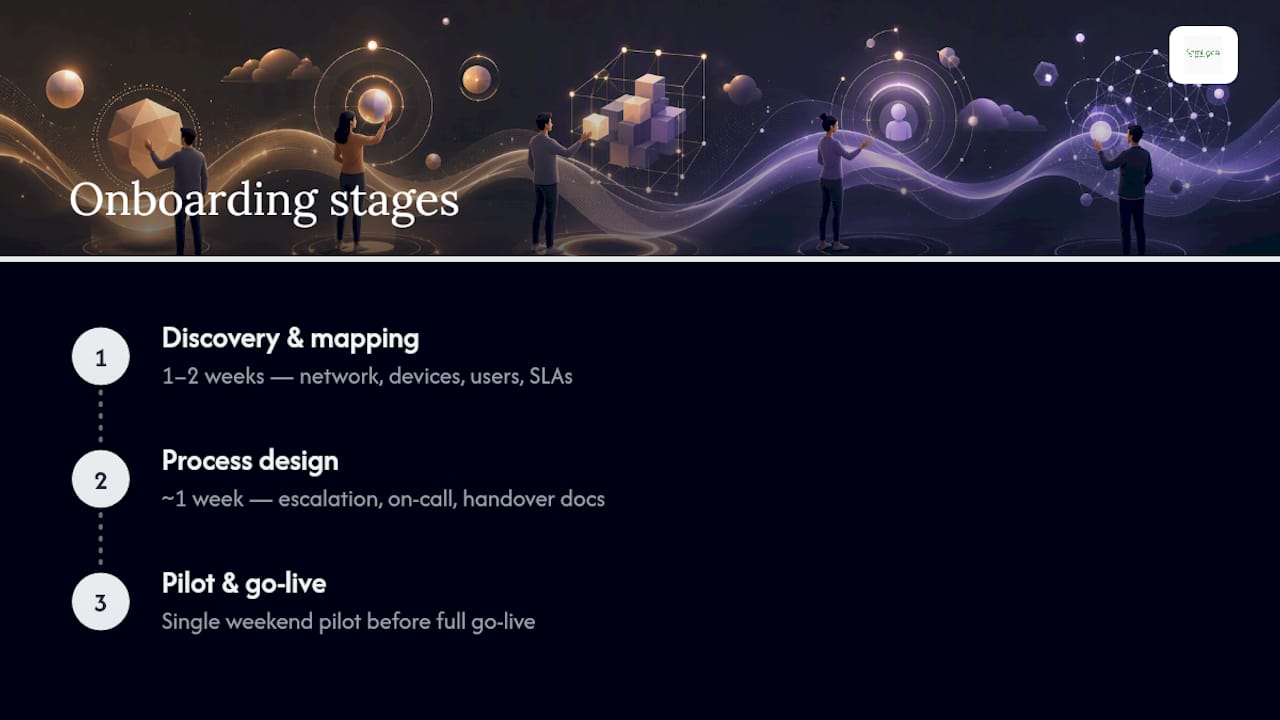
The first stage, typically a week or two, covers discovery: mapping your network, cataloguing devices and users, and agreeing which systems fall under which SLA tier. This is also when integration between your existing tools and the provider’s monitoring platform gets configured.
The second stage is process design, usually another week, where escalation paths, on-call rotas and handover procedures are documented and agreed by both teams. Skipping this stage is the single most common reason new after-hours arrangements stumble in their first month.
The final stage is the pilot, ideally run over a single weekend, to stress-test the whole setup under real alert traffic before full go-live. Businesses that skip a pilot tend to discover integration gaps during their first genuine incident, which is the worst possible moment to find them.
Will after-hours support fit your existing tools?
Integration is where after-hours support quietly succeeds or visibly fails. A provider that can’t plug into your existing stack ends up creating a second, disconnected support system rather than extending your first one.
The tools that matter most are your remote monitoring and management (RMM) platform, your ticketing system, and whatever remote access solution your daytime team already uses. If the after-hours provider runs entirely separate tools, tickets raised overnight often don’t appear in your morning queue automatically, which recreates the backlog problem you were trying to solve.
Ask specifically how alerts route from your monitoring platform to their on-call engineers, and how resolved tickets sync back into your system of record by morning. Reporting cadence matters too. You want a daily or weekly summary showing volume, response times against SLA, and any recurring issues, not just a running ticket count.
If you already use call forwarding or virtual numbers to route customer calls to different teams depending on the hour, make sure your after-hours provider’s process for managing call continuity lines up with however staff are contacted, so calls never land in a dead queue overnight.
How do you scale after-hours support as you grow?
Coverage that works for 50 staff can buckle at 200 if nobody revisits the SLA tiers, escalation paths or pricing model along the way.
The practical trigger points to review are user and device counts, since most pricing models scale directly with both, and incident volume, since a blended retainer with capped hours can quietly become expensive once you exceed the original assumptions. Renegotiate before you hit that ceiling, not after an invoice surprises you.
Growth into new locations or time zones is another natural scaling point, particularly if it means genuine 24/7 cover replaces what was previously an on-call rota covering a single region. Multilingual support becomes relevant here too, if new offices operate in a different language.
The most overlooked scaling trigger is complexity, not headcount. A business that adds a second core application, migrates to a new cloud platform, or takes on a new compliance requirement needs its SLA tiers and escalation definitions revisited, even if staff numbers haven’t moved. Schedule that review annually at minimum, and after any major infrastructure change.
When do AI agents make sense in an after-hours setup?
AI-driven agents handle call routing, first-line troubleshooting and lead capture competently, and they never call in sick at 2am. Where they fall short is deep diagnostics, system restores and genuine security incidents, all of which still need a human engineer with real judgement.
The sensible model for most businesses is AI first-line, human escalation. Let an agent triage the simple, repetitive requests and route anything genuinely critical straight to a qualified engineer. Done properly, this keeps SLA targets intact while trimming the cost of staffing every overnight hour with a person. Before committing fully, a short pilot tends to show, quickly, where AI first-line handling genuinely holds up and where it still needs a human safety net behind it.
— Geoff
Want after-hours cover without hiring a night shift?
If you’ve been weighing an in-house rota against a traditional managed service provider, there’s a third route worth a serious look: a managed AI receptionist and first-line agent handling routine calls, ticket triage and monitoring alerts around the clock, with human engineers stepping in only when something genuinely needs them.
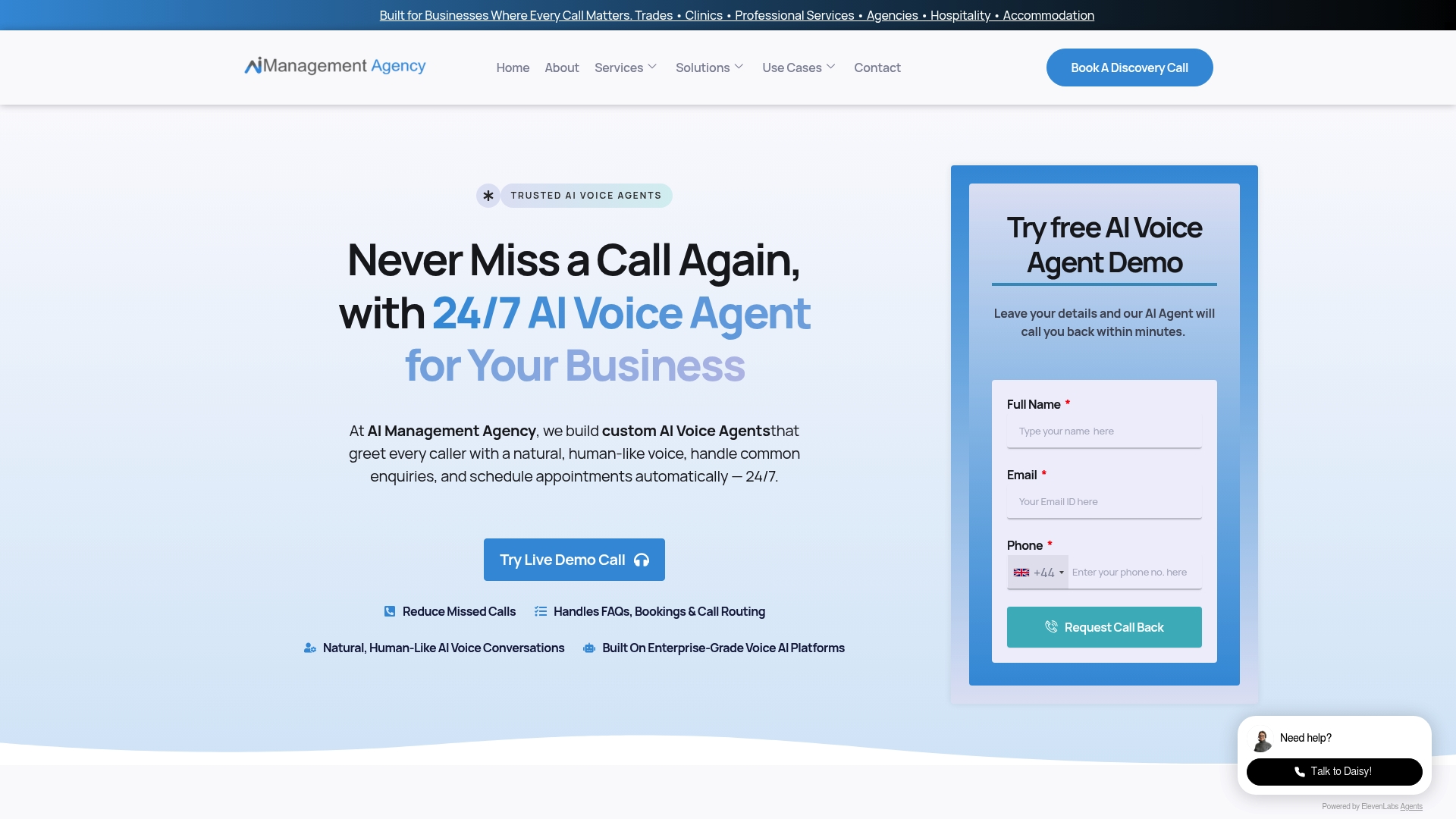
This approach suits businesses that want the continuity benefits covered earlier, faster incident containment, no morning backlog, without committing to the cost of a fully staffed overnight desk. AI Management Agency builds this exact model: 24/7 AI receptionist coverage that integrates with your existing ticketing and monitoring tools, escalating to human engineers the moment an issue crosses into genuinely urgent territory. If your business already relies on strong local visibility to bring enquiries in during the day, pairing that with reliable Google Business Profile management keeps the whole customer journey, from search to support, working around the clock. The practical next step is a short discovery call to map your current gaps against a pilot rollout, no long commitment required to see whether it fits. You can book a pilot discovery call and have a working assessment within days rather than weeks.
Sources
- 24/7 IT Support & After-Hours Help Desk Services | Buchanan
- Service Desk: How to Handle After Hours Support | IT Glue
- Fast and Reliable 24/7 IT Support | IntermixIT
- Delete and manage cookies | Microsoft support