Yes, most suspended Google Business Profiles can be reinstated, provided you fix the underlying violation and submit a properly documented appeal. Start by checking your listing for duplicates and inconsistent business details, then gather your evidence. Do this before you touch the appeal form, because once it opens you have just 60 minutes to upload everything.
TL;DR:
- Preparing all evidence and fixing listing inconsistencies must occur before opening the appeal form, as you only have 60 minutes to upload once it starts.
- Duplicate profiles, inaccurate business details, and policy violations like keyword stuffing or virtual addresses are the most common causes of suspension and rejection.
- Evidence should include registration documents, recent utility bills, well-lit photos of the storefront or equipment, and should be organized into a concise “golden folder.”
- Using the correct Google account and submitting a clear, concise appeal letter with supporting files in the proper order is essential for successful reinstatement.
- Automated and manual reviews typically resolve straightforward cases within 3 to 14 business days, but repeated rejections often stem from poorly framed appeals or unresolved policy issues.
Table of Contents
- What is GBP reinstatement and why does the 60-minute rule matter?
- What to do in the next hour and the next 72 hours
- How do I know why my profile was suspended?
- Pre-appeal audit: the checks that materially improve outcomes
- What evidence do I need, and how do I prepare it for the 60-minute window?
- How do I fill in and submit the GBP appeal form?
- What happens after you submit, and how long does reinstatement take?
- My appeal was denied. What now?
- How do you stop this happening again?
- What Semlocal sees behind the scenes of failed appeals
- Get your profile back on the map with a managed reinstatement service
- Sources
What is GBP reinstatement and why does the 60-minute rule matter?
GBP reinstatement is the formal process of appealing to Google to restore a suspended or disabled Business Profile, using the official appeal tool. It is not a support ticket you can leave half finished. Once you open the form and Google prompts for supporting documents, the clock starts, and anything uploaded after 60 minutes simply will not attach to your appeal.
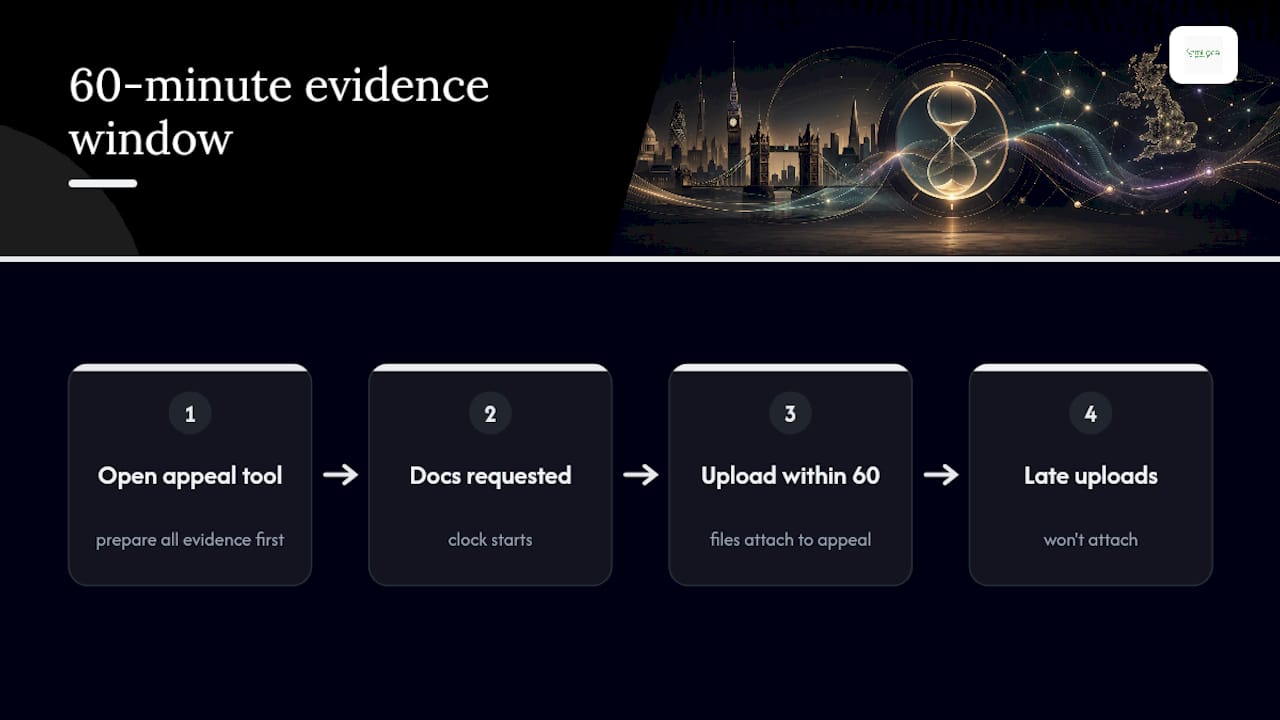
That single detail catches out more business owners than any policy technicality. You cannot go hunting for a utility bill or photograph mid-appeal. Preparation has to happen first, in full, before you click the link that starts the form.
What to do in the next hour and the next 72 hours
Do not create a replacement listing, do not edit the suspended profile while an appeal is open, and never file more than one appeal for the same case. Google’s Product Experts flag duplicate submissions as one of the most common causes of automatic rejection.
- Save every document to one folder on your desktop, named clearly (for example “GBP_Appeal_MainSt_2026”).
- Audit your name, address and phone number (NAP) across your website and directories.
- Fix anything inconsistent and merge or remove duplicate listings.
- Draft your appeal letter in a separate document, ready to paste.
- Open the appeal form, upload your files, and submit once.
Pro Tip: Keep your appeal letter on your clipboard before you open the form. Copy, paste, upload, submit. Do not draft while the timer is running.
How do I know why my profile was suspended?
Suspensions fall into two broad categories, and knowing which one you’re dealing with changes your entire approach.
- Soft suspension: your profile is hidden from search and Maps, but the dashboard is still accessible. This usually points to a specific quality issue you can fix directly.
- Hard suspension: you lose all dashboard access. This typically signals a more serious policy breach, such as a fake profile flag or repeated guideline violations.
- Common triggers: keyword stuffing in the business name, a virtual office listed as a physical address, duplicate profiles, or a category mismatch with the actual service offered.
- Where to look for clues: the appeal tool itself often shows the specific policy violated, and denial emails sometimes name the exact rule breached, according to Google’s guidance. Record this wording, because you’ll need it for your written appeal.
Pre-appeal audit: the checks that materially improve outcomes
Before you write a single word of your appeal, run through the checks Google’s own reinstatement guidance flags as high impact. Algorithmic reviews often read small inconsistencies as evidence of a fake or duplicate business, so tidying them up first removes an easy reason to reject you.
- Search your business name across Google, Bing and major directories, and check your name, address and phone number match your website exactly.
- Look for a second listing at the same address or under a slightly different name and merge or close whichever one is weaker.
- Confirm your primary category genuinely reflects your main service, not an aspirational one.
- Check your business name field contains no extra keywords, slogans or location stuffing.
- Write down every change you make, with a date, so you can reference it directly in your appeal.
Pro Tip: Screenshot your NAP details across each platform before and after the fix. Reviewers respond well to evidence of correction, not just a claim that you’ve corrected something.
Google’s reinstatement guidance treats NAP consistency as one of the clearest signals of a legitimate business, and closing duplicate listings ahead of your appeal removes a common automatic rejection trigger.
What evidence do I need, and how do I prepare it for the 60-minute window?
Google names specific evidence types on its own support pages: business registration documents, trading licences, and a recent utility bill showing your business name and address, not a personal one. A lease agreement or business bank statement can support these where applicable.
- Documents: registration certificate, licence, utility bill or lease, all in the business name, not a director’s personal name.
- Photos: clear, well-lit shots of your storefront signage, and for service-area businesses, your vehicle livery or equipment in use.
- Video (where relevant): a short walkthrough clip confirming the premises match your listed address.
- Format: PDF or high-quality JPG, named descriptively (e.g. “BusinessLicence_2026.pdf”), and kept under the file size and attachment limits Google specifies in the appeal tool.
Practitioners who prepare a “golden folder” of three to five well-labelled documents, according to step-by-step reinstatement guidance, consistently outperform those submitting long, unsorted document dumps. The 60-minute upload rule confirmed on Google’s own help pages is exactly why that preparation has to happen offline first.
How do I fill in and submit the GBP appeal form?
You access the appeal tool through Business Profile Manager, logged into the Google account that owns the suspended listing, not a personal or agency account. Using the wrong account, or the wrong form entirely (the Business Redressal Complaint Form is not for your own suspension), is a documented cause of instant rejection.
- Log in with the account that owns the profile and locates the reinstatement request option.
- Paste your prepared appeal letter: one to two short paragraphs, stating the violation cited, the fix you made, and the evidence attached.
- Upload your files in a logical order (registration first, then licence, then photos).
- Double-check every file has attached correctly before submitting.
- Copy the case ID or confirmation reference somewhere safe, and resist the urge to resubmit while it’s under review.
What happens after you submit, and how long does reinstatement take?
Google runs an initial automated check almost immediately, followed by a manual review for anything that isn’t clear-cut.
- Typical timeline: many straightforward cases resolve within 3 to 14 business days, according to practitioner-reported timelines; complex or repeat cases can take considerably longer.
- Where to check status: the appeal tool itself, which can show the moderation reason and a link to the specific policy cited.
- If Google asks for more: reply promptly, attach only what’s requested, and reference your original case ID rather than opening a new thread.
My appeal was denied. What now?
Read the denial notice carefully before doing anything else. It usually names the precise policy issue, and resubmitting the identical appeal without addressing that exact point is one of the fastest routes to a second rejection.
- Identify the specific reason given and address it directly, rather than restating your original submission.
- Add new, targeted evidence that speaks to that exact issue, not a broader restatement of your business’s legitimacy.
- Wait at least a week before reappealing to allow the review queue some time to reset.
- If a second appeal also fails, request additional review through the appeal tool, which Google offers as a formal next step after denial, per its own help centre guidance.
- Consider the GBP Community, where Product Experts sometimes escalate stuck cases, but post only your Profile ID and Case ID, never personal details, following the advice in Google’s own community video.
Pro Tip: If you’ve been denied twice for the same reason, the problem usually isn’t your evidence, it’s how you’re framing the explanation. Get a second pair of eyes on the letter before you send it a third time.
At this stage, weighing up professional help against another solo attempt is worth doing honestly. Repeated rejections often cost more in lost Maps visibility than the price of getting it right the first time.
How do you stop this happening again?
- Run a NAP consistency check across your website and major directories at least once a year.
- Never edit your profile while an appeal is active, and keep your business name and categories factually accurate at all times.
- Build a “golden folder” now, registration documents, licences, recent utility bills and dated photos, so you’re never scrambling within a 60-minute window again.
- Recheck for new duplicate listings periodically; they tend to reappear when third-party directories auto-generate entries.
What Semlocal sees behind the scenes of failed appeals
The mistakes Semlocal encounters most often are rushed appeals filed before evidence is properly gathered, documents uploaded with vague file names that reviewers struggle to match to the claim, and identical resubmissions after a denial that simply repeat the same rejected argument.
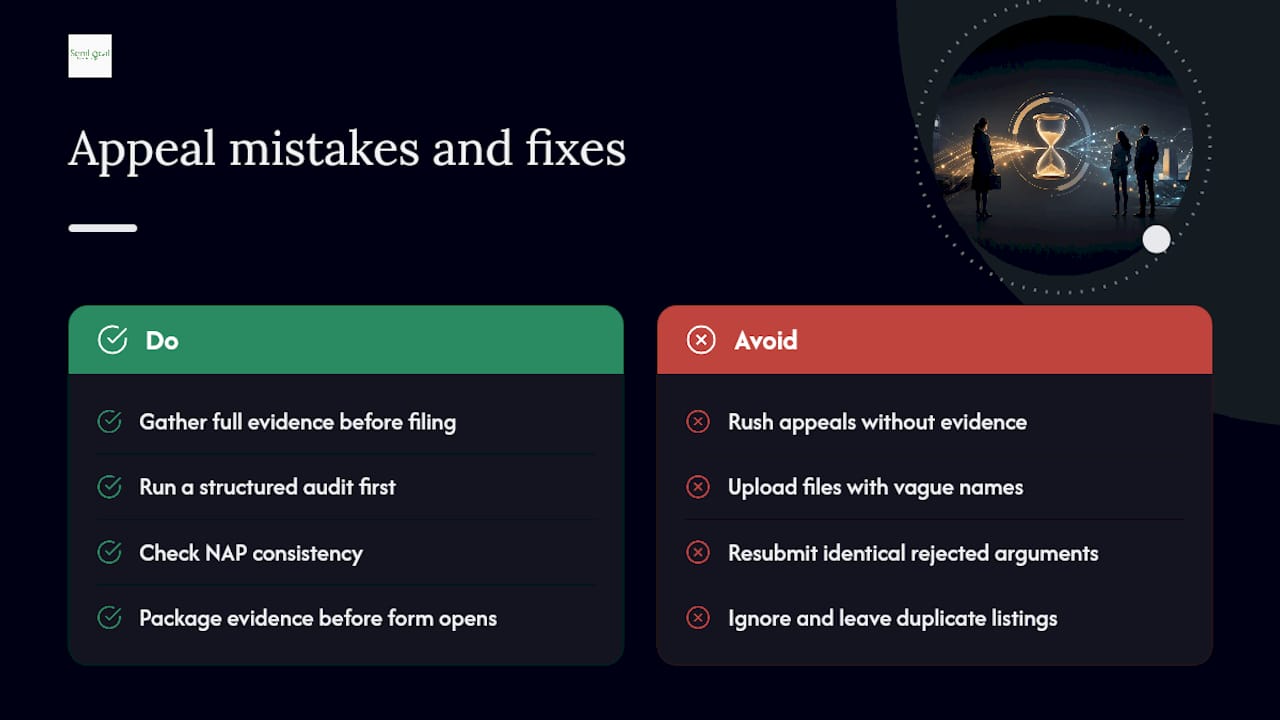
A structured audit, checking NAP consistency, closing duplicates and packaging evidence correctly before the form ever opens, tends to shorten the time to reinstatement and cut down repeat denials. That discipline is exactly what separates a clean first appeal from a business owner stuck in a three-appeal cycle.
— Geoff
Get your profile back on the map with a managed reinstatement service
There are managed audit and reinstatement services built specifically around Google’s evidence rules and the 60-minute upload window, so nothing gets lost to a technicality. Such services suit busy owners who don’t have time to draft an appeal letter, and are particularly useful for multi-location operators and service businesses that rely on Maps for the bulk of their enquiries and cannot afford weeks of invisibility.
The service covers the full pre-appeal audit, evidence packaging, appeal drafting and, where needed, escalation through additional review requests. If your profile is suspended right now, the fastest sensible move is to get a proper audit done before you touch the form again. Start with Semlocal’s Google Business Profile Manager service, or explore the full GBP optimisation guide to see how ongoing management prevents the next suspension before it happens.
Sources
For procedural detail beyond this guide, Google’s own Fix suspended or disabled profiles page covers the appeal tool and evidence rules directly, while its Business Profile quality guidance explains suspension triggers. For a practitioner’s workflow with timelines, see GBPRevive’s step-by-step guide, and for form-specific pitfalls, Google’s community video is worth watching before you file. For a wider technical check on citation consistency, BabyLoveGrowth’s SEO audit tool can flag discrepancies worth fixing first.
- Fix suspended or disabled profiles – Google Business Profile Help
- GBP Reinstatement Form: Step-by-Step Guide to Submitting Your Appeal (2026) | GBPRevive