Automated lead qualification uses rules and AI to score, enrich and route leads so sales only receives sales-ready contacts, in real time and without manual triage. The result: faster speed-to-lead, fewer wasted calls, and a measurable lift in booked meetings.
- Speed: leads get scored and routed within seconds of form submission, not hours.
- Consistency: every lead is judged against the same criteria, so sales trusts the queue.
- Efficiency: manual review disappears, freeing reps to sell instead of sort.
The numbers: top-performing revenue teams book 78% or more of their qualified leads, against a median of 62% for teams already using automation, and roughly 40% for those still relying on manual review.
Key Takeaways
| Point | Details |
|---|---|
| Speed beats manual review | Removing the manual queue and offering instant booking is the single biggest lever for conversion. |
| Start with fit and engagement scoring | Predictive AI scoring needs volume; HubSpot requires 50 contacts minimum to train a model. |
| Pilot one channel first | Prove the lift on your highest-volume lead source before expanding to others. |
| Keep human review gates | Strategic accounts and edge cases still need a manual override built into the workflow. |
| Semlocal manages the full chain | Semlocal builds and runs capture, scoring, routing and CRM writeback as a managed service. |
Table of Contents
- What is automated lead qualification?
- How does automated lead qualification work?
- Which lead scoring model should you use?
- What data and integrations does it need?
- How do you implement automated lead qualification?
- What KPIs prove automated qualification is working?
- What are the risks of automating lead qualification?
- What should you look for in a lead qualification tool?
- Managed service or self-serve: which is right for you?
- How Semlocal makes automated qualification work for your business
- Frequently asked questions
- Sources
What is automated lead qualification?
Automated lead qualification is the process of scoring, enriching and routing inbound leads through software rather than a human triaging each one by hand. It rests on a few core ideas worth defining clearly, because sales and marketing teams often use them loosely:
- Fit score: how closely a lead matches your ideal customer profile (industry, company size, role).
- Engagement score: how actively a lead interacts with your content, emails or website.
- Combined score: fit and engagement weighted together into a single number or band.
- Intent signal: third-party or behavioural data suggesting active buying research.
- Enrichment: filling in missing lead data (firmographics, job title, company revenue) automatically.
The practical difference between manual and automated qualification comes down to three things:
| Factor | Manual qualification | Automated qualification |
|---|---|---|
| Speed | Hours to days | Seconds to minutes |
| Consistency | Varies by rep judgement | Same rules applied every time |
| Auditability | Rarely documented | Logged, scored, and traceable |
A working automated system needs six components: capture, validation, enrichment, scoring, routing, and follow-up with CRM writeback. Miss one and the chain breaks somewhere between form fill and first contact.
How does automated lead qualification work?
EverWorker’s framing of AI qualification breaks the process into five linked stages, and it holds up well as an operational blueprint:
- Capture: a form, chat widget, or AI voice agent takes the initial lead detail.
- Cleanse and enrich: the system validates the email domain, deduplicates against existing records, and pulls in firmographic data.
- Score: fit, engagement and (where available) predictive signals combine into a single band or number.
- Route: the lead is assigned to the right rep, queue, or calendar based on score and territory rules.
- Trigger follow-up: an SDR alert fires, a calendar link opens, or a nurture sequence begins automatically.
Integration matters as much as logic. CRM writeback needs to happen in near real time so reps see enriched, scored leads the moment they land, not an hour later. Analytics tools need visibility into score changes for reporting, enrichment APIs need to respond within a workable SLA, and calendar or notification tools need to fire the moment a threshold is crossed. HubSpot’s scoring documentation confirms that scores can be built from associated records, such as company or deal data, not just the contact itself.
Pro Tip: Association-based scoring is powerful but fragile. If a lead’s company record updates a split second after the contact record writes back, you can end up scoring against stale company data. Build a short delay or a re-score trigger into the workflow, rather than assuming both records update in sync.
Which lead scoring model should you use?
Three model types dominate real deployments, and the right choice depends less on ambition and more on data volume.
- Rule-based (fit) scoring assigns points for demographic and firmographic attributes: job title, company size, industry. It is transparent, fast to build, and ideal for teams with limited historical data.
- Behaviour-based (engagement) scoring tracks actions such as pricing page visits, webinar attendance, or repeat website sessions. CoreMedia recommends pairing this with score decay, so a lead who went quiet six months ago stops registering as “hot”.
- Predictive or AI scoring trains a model on historical outcomes to predict conversion likelihood. It needs volume to work, and HubSpot’s own AI lead scoring requires Marketing Hub Enterprise plus a minimum of 50 contacts, 25 converted and 25 non-converted, before it will train a usable model.
High-velocity SMB motions generally do better starting with rule-based and engagement scoring combined; there simply isn’t enough historical conversion data early on to train a reliable AI model. Enterprise teams with years of CRM history and larger deal volumes are better positioned to layer in predictive scoring once the basics are proven.
A simple combined rubric you can adapt:
- Job title matches ICP: +20
- Company size within target range: +15
- Visited pricing page in last 14 days: +15
- Attended webinar or demo: +25
- No activity in 60+ days: −20
- Hot (route to SDR immediately): 60+
- Warm (nurture sequence): 30–59
- Cold (long-term nurture or disqualify): below 30
What data and integrations does it need?
Four data sources feed most automated qualification systems: form inputs, website behaviour, enrichment data (firmographics and technographics), and CRM history. Some teams add third-party intent feeds for account-level buying signals.
Integration reliability separates systems that work from ones that quietly drift out of trust:
- Use canonical identifiers, typically email and company domain, to prevent duplicate or fragmented lead records.
- Set a clear SLA for enrichment API calls; anything over a few seconds risks the lead moving before scoring completes.
- Log every scoring decision so you can audit why a lead landed in a particular band.
GDPR compliance sits underneath all of this. Any enrichment or scoring process that touches personal data needs a documented lawful basis, and notifications sent to sales (Slack alerts, SMS pings) should never expose more personal data than the rep needs to act.
Pro Tip: Strip email addresses and phone numbers out of Slack or SMS lead alerts where possible. Link through to the CRM record instead. It keeps sensitive data inside a permissioned system rather than scattered across notification channels that rarely get the same access controls.
RevenueHero’s analysis of over a million inbound form submissions found that removing the manual review queue and showing a calendar at the point of submission was one of the single biggest levers behind higher qualified-to-book conversion rates.
How do you implement automated lead qualification?
Start smaller than you think you need to. A minimum viable system needs just four elements: one capture point (a demo request form works well), one or two enrichment sources, a combined fit and engagement score, and one instant routing action, either a calendar booking link or an SDR alert.
EverWorker’s guidance on piloting a single high-volume channel first before expanding holds up in practice: prove the lift on demo requests, then extend the same logic to trial signups or content downloads.
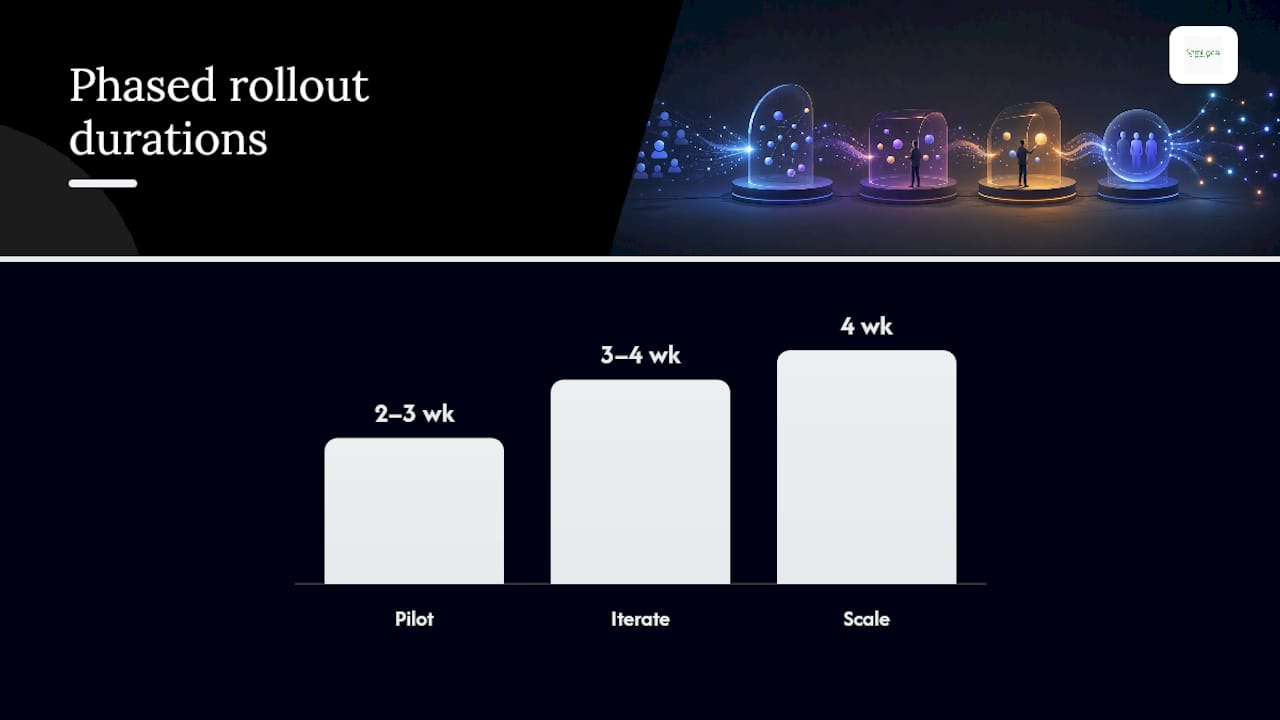
A realistic phased timeline:
| Phase | Duration | Focus |
|---|---|---|
| Pilot | 2–3 weeks | One lead source, basic scoring, manual override available |
| Iterate | 3–4 weeks | Refine thresholds, add enrichment source, connect calendar |
| Scale | 4 weeks | Extend to additional channels, automate reporting |
Rollout works best with clear ownership: RevOps builds and maintains scoring logic, sales leadership sets thresholds and SLAs, marketing owns the capture and nurture content, and a developer or automation partner handles the integration layer. Costs vary widely depending on tool stack and complexity, but most teams should expect a build-and-integrate phase measured in weeks, not months, when scope stays disciplined.
Semlocal’s case study on a managed IT services firm shows what happens when scoring thresholds are tied directly to follow-up workflows: prioritisation improved and booked meetings increased without adding headcount.
What KPIs prove automated qualification is working?
Track a small set of metrics religiously rather than a large set loosely.
- Qualified-to-book rate — the percentage of qualified leads that convert to a booked meeting. This is the number RevenueHero uses to separate top performers (78%+) from the median (62%).
- MQL to SQL velocity — how quickly a marketing-qualified lead becomes sales-qualified.
- Response SLA — time from lead capture to first meaningful contact.
- Meeting show rate — the percentage of booked meetings that actually happen.
- Pipeline coverage and win rate by score band — whether “hot” leads genuinely close faster and more often than “warm” ones.
Build a monthly feedback loop where sales dispositions (won, lost, disqualified) feed back into the scoring model. Cohort analysis by score band, alongside attribution by lead source, catches drift before it becomes a trust problem. Expect meaningful gains within the first quarter of running an automated system properly, with the biggest single jump usually coming from eliminating the manual review delay itself.
What are the risks of automating lead qualification?
Automation removes manual bottlenecks, but it introduces its own failure modes if left unmonitored.
- Biased training data can quietly favour lead types that happened to convert historically, excluding genuinely good-fit prospects that don’t match the pattern.
- Overfitting to past wins means the model chases yesterday’s ideal customer rather than today’s.
- Wrongful routing of strategic accounts happens when a large enterprise lead scores low simply because the model was trained mostly on SMB data.
- Stale enrichment data leads to scoring decisions built on outdated firmographics.
Soberan’s approach to agent-based automation keeps human approval gates in place for enterprise routing decisions and maintains audit trails for every action taken, which is worth copying regardless of which platform you use. On the compliance side, confirm a lawful basis for processing before enrichment begins, limit data use to its stated purpose, set a retention period, and keep messaging consent-aware rather than assuming blanket permission to contact.
Pro Tip: Build a manual override into every automated routing rule from day one, even if you rarely use it. The first time a strategic account gets misrouted to a junior rep because of a scoring quirk, you’ll want that override ready, not something you’re building under pressure.
What should you look for in a lead qualification tool?
Run any shortlist through this checklist before signing:
- Integration coverage: does it connect natively to your CRM, calendar, and analytics stack, or does it need custom middleware?
- Explainability: can it show why a lead scored the way it did, not just the final number?
- Audit logs: is every scoring and routing decision timestamped and traceable?
- Enrichment partners: which data providers feed the system, and how fresh is that data?
- Fallback routing: what happens when a lead doesn’t cleanly fit any threshold?
Before committing, ask four decision questions: who owns the routing rules once live, how are response SLAs enforced, what specifically triggers human review, and what reporting comes as standard versus custom-built?
- Run a proof-of-value pilot on one lead source before wider rollout.
- Set minimum acceptance criteria in advance (for example, response time under five minutes, no more than a small error rate on misrouted leads).
- Only scale once those criteria hold for a full reporting cycle.
HuperForms’ breakdown of HubSpot’s scoring configuration is a useful reference if you’re weighing whether your existing CRM’s native scoring will cover this ground, or whether you need something built specifically for the job.
Managed service or self-serve: which is right for you?
Speed versus control is the real trade-off here, not cost alone. Self-serve tools work when your routing logic is simple, your data lives in one system, and you have someone technical to maintain it. Once you’re juggling multiple integrations, regulated data, or strategic accounts that need careful handling, a managed partner gets you to a working, audited system faster than most in-house builds manage, and keeps it maintained after launch.
Businesses with a single CRM, one lead source, and straightforward scoring can reasonably self-serve. Anyone dealing with multi-system integrations, compliance-sensitive data, or complex routing across teams should lean towards managed support.
How Semlocal makes automated qualification work for your business
Semlocal is the practical alternative to a months-long, tool-led automation project. Instead of stitching together a CRM, an enrichment API, a scoring engine, and a calendar tool yourself, Semlocal builds and manages the whole chain, including AI voice and chat agents that capture leads, enrich them, apply scoring logic, and book straight into your calendar without a manual review queue slowing things down.
Semlocal’s team handles the CRM writeback, the routing rules, and the reporting layer, so you see qualified-to-book performance without building any of it internally. That mirrors the approach behind Semlocal’s managed IT services case study, where thresholds tied to follow-up workflows lifted booked meetings without adding headcount.
If you want a clear view of what a working system would look like for your business, book a discovery call and scope a pilot on your highest-volume lead source first. Start with a local page consultation to see what a managed setup would cost and how quickly it could be running.

Frequently asked questions
What is the difference between lead scoring and lead qualification?
Lead scoring assigns a numeric or banded value to a lead based on fit and behaviour. Lead qualification is the broader process, using that score alongside routing rules and follow-up triggers to decide whether and how a lead reaches sales.
Can small businesses use automated lead qualification without AI?
Yes. Rule-based and engagement scoring work well without any predictive model, and they’re often the right starting point regardless of company size, since AI scoring needs a minimum data sample most small businesses haven’t yet accumulated.
How long does it take to set up automated lead qualification?
A minimum viable pilot on one lead source typically runs 2 to 3 weeks, with iteration and scaling to additional channels adding several more weeks depending on integration complexity.
Does automated lead qualification replace sales reps?
No. It removes manual triage so reps spend time on sales-ready conversations instead of sorting through unqualified enquiries. Human review still matters for strategic accounts and edge cases.
What’s a realistic qualified-to-book conversion rate to aim for?
RevenueHero’s data puts the median for teams using automation at 62%, with top performers reaching 78% or higher.
Sources
- Understand the lead scoring tool — HubSpot Knowledge
- How to Qualify Inbound Leads Automatically — RevenueHero
- AI‑Powered Lead Qualification: Automate Scoring, Enrichment & Routing — EverWorker
- Lead qualification automation with AI — Soberan
Recommended
- From Lead to Booked: How Autonomous AI Agents for B2B Handle the “Grunt Work” While You Sleep – AI Management Agency
- Sales qualification process: the 2026 guide for B2B teams – AI Management Agency
- Stop Wasting Time on Manual Outreach: Try These 7 AI Sales Automation Hacks – AI Management Agency
- Optimize Customer Journeys: Lead Scoring Automation Tools – SemLocal