Review gating means filtering customers so only likely-positive reviewers get invited to leave a public Google review, while unhappy customers are quietly diverted elsewhere. Google prohibits this outright, and enforcement carries real teeth: removed reviews, suspended profiles, lost API access. If any part of your review request flow branches customers by sentiment before they reach a public review link, switch it off immediately and replace it with a routing flow that treats everyone equally.
TL;DR:
- Review gating involves routing only positive feedback to the public review link, which Google explicitly bans and can lead to review removal or suspension.
- Automated detection systems flag suspicious review patterns, such as sudden review spikes or uniform phrasing, risking penalties for businesses practicing gating.
- Common signs of gating include conditional links that appear only after positive responses and staff selectively requesting reviews based on perceived sentiment.
- Replacing gating with compliant routing ensures every customer has equal, easy access to review links, alongside private feedback options, within a short window after service.
- Regular audits, documentation, and staff training are crucial to maintain compliance and protect your profile’s visibility and credibility in local search results.
Table of Contents
- What is Google review gating in practice?
- What does Google’s policy actually say about gating?
- How do you spot gating hiding in your own process?
- What’s the compliant alternative to gating?
- Does review gating actually hurt your local search ranking?
- How do you audit and fix your review flow before it becomes a problem?
- Why honest reviews win in the long term
- How Semlocal keeps your reviews compliant and growing
- Sources
- FAQ
What is Google review gating in practice?
Gating almost always shows up as a two-step survey: ask “how was your experience?” first, then only route the people who tap “great” to a public Google review link. Anyone who taps “poor” gets a private feedback form instead, and their comments never reach Google Maps.
It also happens without software. A member of staff hands the review card to the customer who just paid a compliment, and quietly skips the one who complained about the wait. Several reputation-management platforms have automated this into a feature, sometimes branded as “smart routing” or “sentiment filtering,” which sorts respondents before they ever see a review invite.
The line that matters:
- Gating filters customers by predicted sentiment before offering a public review option.
- A private feedback channel is fine, but only when every customer, regardless of sentiment, also gets an equal, unfiltered path to the public review page.
That second point is the whole distinction. Offering a private feedback form is normal customer service. Using it to intercept unhappy customers before they reach Google is review gating, and it’s exactly what the policy targets.
What does Google’s policy actually say about gating?
Google’s Maps user-generated content policy bans discouraging negative reviews and selectively soliciting positive ones, alongside incentivised reviews and rating manipulation of any kind. The wording is broad by design: it doesn’t just prohibit paying for reviews, it prohibits engineering who gets asked in the first place, as set out in Google’s prohibited and restricted content policy.
Google’s detection isn’t purely manual. Automated systems flag unusual velocity (a sudden burst of five-star reviews in 48 hours), suspiciously uniform phrasing, and review patterns that don’t match a business’s typical customer volume, according to Google’s own contribution policy. Once flagged, consequences range from individual review removal to full profile suspension, and in more severe or repeated cases, loss of API access for any connected review-management tool.
Enforcement isn’t perfectly consistent. Some businesses run gated flows for months without consequence; others get flagged within weeks. That inconsistency is not a loophole, it’s a liability: Google Business Profile Help Community threads show real cases where businesses only discovered they’d been gating after a sudden batch of reviews vanished, with no warning beforehand. Scrutiny has tightened, not loosened, as automated detection has improved. Treat “we haven’t been caught yet” as no protection at all.
How do you spot gating hiding in your own process?
Most gating isn’t a deliberate scheme. It’s a vendor default nobody questioned, or a habit a front-desk team picked up because it “felt polite” to protect customers from public complaints. Check for these red flags:
- A conditional public link — the review page URL only appears after a positive answer to a pre-screening question.
- Segmented sends — your review software tags customers by sentiment score and only emails the public link to the “promoters.”
- Staff-only asks — reviews get requested verbally, at the discretion of whoever’s on shift, rather than through a system that reaches every customer.
When evaluating a review-management vendor, ask three direct questions: does every customer see the public review option regardless of their answer to any screening question; does the tool log who received an invite and when; and can sentiment-based routing be fully disabled, not just hidden. Pull your invite logs and check for spikes tied to specific staff shifts or specific customer segments, that pattern alone is often the clearest sign something’s filtering behind the scenes.
What’s the compliant alternative to gating?
The accepted replacement is routing, not gating, and the difference is structural, not cosmetic. Compliant routing has three properties: every customer gets one-tap access to the public review page, a private feedback channel exists as a genuine choice rather than a filter, and the initial request is sent without any sentiment screening, as GoodMarks outlines in its 2024 policy update.
A neutral request template works better than most businesses expect: “Thanks for choosing us. Would you leave us a review? [Public review link]. If something wasn’t right, you can also tell us directly here: [private feedback link].” Both options, same message, same footing.
Timing matters more than wording. Send the request within a few hours of the service or purchase, while the experience is fresh, and follow up once, not repeatedly. Single-tap links (built into an SMS or email rather than requiring a login) convert noticeably better than a generic “leave us a review” instruction.
- Keep every invite template, timestamp, and send list for at least 12 months.
- Screenshot your review flow whenever you update it.
- Log any vendor changes to sentiment-routing features.
Pro Tip: If you’re ever challenged over a removed review or a suspended profile, the business that keeps dated screenshots of its exact invite flow appeals far faster than one relying on memory.
Does review gating actually hurt your local search ranking?
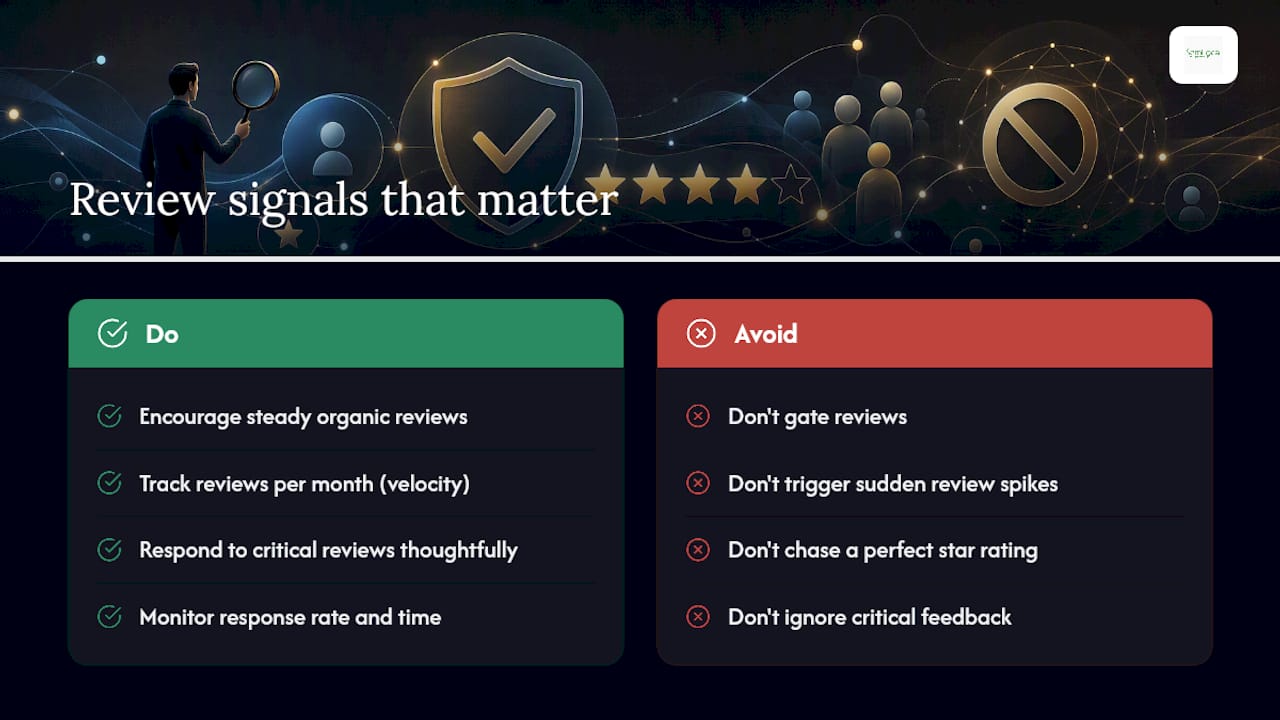
Reviews feed directly into prominence, one of the three pillars Google uses for local ranking alongside relevance and distance, as Search Engine Land explains in its Google reviews guide. Steady, organic review growth signals a genuinely popular business; a sudden spike looks like manipulation, whether or not it actually was, and can trigger the same automated flags as active gating.
A profile with occasional critical reviews, especially ones with a thoughtful business response, tends to read as more credible than one that is suspiciously spotless. Track velocity (reviews per month, not per campaign), response rate, and response time rather than chasing a perfect star rating. Consistency beats volume every time.
How do you audit and fix your review flow before it becomes a problem?
It is recommended to follow a four-step process on every Google Business Profile, which is worth running even if you’ve never touched your review settings:
- Sample the invite flow yourself. Trigger it as a real customer would, and record every branch, question, and link. If a path only appears after a positive answer, that’s gating.
- Ask vendors the three audit questions above, then pull the API logs to confirm the answers match what actually happens.
- Remediate immediately. Rewrite any conditional messaging into a neutral routing template and disable sentiment-based sends at the account level, not just in the interface.
- Train staff and roll out the compliant template, then keep dated records of the change for at least 12 months in case a review removal needs appealing.
Pro Tip: Run the sample-invite step quarterly, not once. Vendors update their software, and a “smart routing” feature can quietly re-enable itself after an update.
Why honest reviews win in the long term
Gating always looks like the smart short-term move: cleaner star rating, fewer awkward public complaints. But we’ve watched businesses recover from a profile suspension and the reviews that come back after switching to routing tend to convert better, not worse, because they read as genuine. A believable 4.6 with visible responses outperforms a suspicious 5.0 every time it’s tested against consumer trust. Durable systems beat clever ones.
— Geoff
How Semlocal keeps your reviews compliant and growing
Fixing a gated review flow is one afternoon’s work if you know exactly where to look, but most business owners don’t have the time to audit vendor logs, rewrite templates, and retrain staff on top of running the business itself. Semlocal manages that end to end as part of a fully managed Google Business Profile service: we audit your existing invite flow, strip out any sentiment-based routing, and replace it with compliant templates that still convert.
The outcome we aim for isn’t a flashy star rating, it’s steady, policy-safe review growth that keeps your profile visible in the map pack rather than flagged for removal. That’s paired with ongoing local SEO work so the reviews you do earn actually contribute to ranking rather than sitting on a profile Google has quietly deprioritised. If you’re not sure whether your current review flow is compliant, get an audit through Aimagency and we’ll show you exactly what’s happening behind your invite links.
Sources
For the policy text itself, read Google’s Maps user-generated content policy and Search Engine Land’s guide to winning at Google reviews. For a broader reputation-management workflow, see this step-by-step SMB reputation guide.
- Prohibited & restricted content – Maps User Generated Content Policy Help
- How to win at Google reviews | Search Engine Land
- Review gating vs. review routing: what changed in 2024 (and why it matters) | GoodMarks
FAQ
What is review gating?
Review gating is filtering customers by predicted sentiment before deciding who gets invited to leave a public Google review, typically by routing only likely-positive respondents to the review link. It violates Google’s contribution policy and can result in review removal or profile suspension.
Is there a “20% rule” for Google reviews?
The genuine rules are the prohibitions on gating, incentivised reviews, and selective solicitation set out in Google’s own content policy.
What are the current rules for Google reviews?
Google prohibits discouraging negative reviews, selectively soliciting positive ones, offering incentives for reviews, and any form of rating manipulation, as stated in its prohibited and restricted content policy. Compliant businesses use routing instead: every customer gets equal access to the public review link, with a private feedback option offered alongside it, not instead of it.
Can enough five-star reviews cancel out a one-star review?
No single volume of five-star reviews erases a one-star review; each rating counts independently towards your average, and Google doesn’t offer a mechanism to “outweigh” a poor review with positive ones. The better approach is responding professionally to the critical review and maintaining steady, honest review growth, which tends to build more consumer trust than a suspiciously perfect score.
How can I check if my business is gating reviews without realising it?
Trigger your own review request flow as a customer would and check whether a negative response still reaches a public review link. If your software or staff only surface that link after a positive screening question, you’re gating, and Semlocal’s Google Business Profile audits are built specifically to catch this.