An FAQ response workflow is the end-to-end system that takes an incoming customer question, matches it to a verified answer, and delivers that reply through the right channel with the right action attached. The two metrics to watch first are ticket deflection rate (the share of questions resolved without a human agent) and first-contact resolution (FCR) rate. Get those two moving in the right direction and everything else — CSAT, handle time, agent occupancy — tends to follow. Automating your ten most common questions alone can remove a significant chunk of repeated ticket volume from your queue, freeing agents for the conversations that genuinely need a human.
- Ticket deflection rate: the percentage of inbound questions resolved by the automated system without agent involvement.
- First-contact resolution (FCR): the share of queries fully resolved in a single interaction, whether automated or human.
Key takeaways
A well-designed FAQ response workflow reduces repeated ticket volume, improves first-contact resolution, and delivers consistent answers across every channel — provided the Review stage is enforced and KB topics are built from real ticket data.
| Point | Details |
|---|---|
| Start with ticket data | Mine the last 60–90 days of tickets to identify your top FAQ topics before building anything. |
| Enforce the Review stage | Schedule a weekly human review of automated replies; it prevents recurring failures and protects CSAT. |
| Keep answers short | Most FAQ answers should be 2–5 sentences; link to procedure articles for multi-step processes. |
| Set a confidence threshold | Configure your KB search node with a relevance threshold to prevent low-quality context reaching the LLM. |
| Semlocal for managed rollout | Semlocal designs, builds, and manages FAQ automation workflows for UK service businesses, from pilot to production. |
Table of Contents
- What does an FAQ response workflow actually include?
- How to design prompt and response templates that actually work
- How do you configure workflow steps and conditional logic?
- How do you combine a knowledge base with AI retrieval safely?
- What should your test plan and Review stage look like?
- Copyable recipes for common FAQ scenarios
- Your rollout checklist and timeline
- Common failure modes and UK GDPR reminders
- The honest truth about FAQ automation for UK service businesses
- How Semlocal helps UK teams build FAQ response workflows
- Sources
What does an FAQ response workflow actually include?
Every effective customer support workflow shares the same five-stage spine: intake, triage, answer or handoff, resolution, and review. The components below sit within that spine. Design each one before you touch any automation tooling.
- Trigger: the event that starts the workflow — a chat message, an inbound call, a web form submission, or an email keyword match.
- Intake filter: a classifier that separates FAQ-eligible queries from complex or sensitive ones that need immediate human routing.
- KB/FAQ topics: the curated question-and-answer pairs or document sources the system searches. Build these from real support ticket data, organised by persona and journey stage, and review them quarterly.
- Reply templates: pre-approved answer text, including tone, phrasing constraints, and any required disclaimers.
- Actions and handoffs: what happens after the answer — a refund trigger, a calendar booking, an agent transfer, or a case closure.
- Escalation points: explicit conditions under which the workflow stops and a human takes over (sentiment threshold, topic sensitivity, repeated failed matches).
- Provenance logging: a record of which KB source produced each automated reply, essential for audit and UK GDPR compliance.
- Review stage: a scheduled human check of automated replies, CSAT scores, and resolution verification.
Ownership matters as much as architecture. The support manager owns trigger design and escalation policy. A knowledge manager or content lead owns KB topics and templates. The technical team owns integration and provenance logging. At runtime, the automation handles intake through answer delivery; a human reviewer owns the Review stage.
Pro Tip: The Review stage is the most commonly skipped step in FAQ automation — and the one that prevents the same failure modes from recurring week after week. Build it into your sprint cadence, not as an afterthought.
How to design prompt and response templates that actually work
Consistent, safe answers come from templates with a fixed internal structure. Each template should contain:
- Role summary: one sentence defining what the agent or bot is, what it can help with, and what it cannot do.
- Concise answer lead: the direct answer in the first sentence. No preamble, no “great question.”
- Supporting detail: two to four sentences of context, conditions, or next steps. Keep most answers between 2 and 5 sentences so AI retrieval can surface them reliably.
- Actions or handoffs: a clear instruction for what happens next (“Your refund will be processed within 5 working days” or “I’m transferring you to our billing team now”).
- Allowed phrasing and policy constraints: a short list of phrases the agent must use or avoid — critical for regulated industries and brand consistency.
On answer length: keep FAQ answers to what and why. If a customer needs to follow a multi-step process, link to a separate procedure article rather than embedding the steps in the FAQ reply. Mixing procedural how-to content with FAQ answers in the same template creates maintenance debt and confuses AI retrieval.
Three copyable template starters
Template 1 — Email or live chat (billing query)
Template 2 — IVR or voice agent (opening hours)
Template 3 — Short chatbot reply (password reset)
How do you configure workflow steps and conditional logic?
The step sequence for a well-designed FAQ handling process runs: intake → triage → answer or handoff → review. Each step has a defined input, a defined output, and a clear owner.
- Intake: capture the query text, channel, and customer identifier. Log the timestamp and session ID for provenance.
- Triage: run the intake filter. If the query matches a known FAQ topic above the confidence threshold, proceed to answer. If it matches a sensitive category (complaints, legal, safeguarding), route immediately to a human. If it matches nothing, trigger the default fallback.
- Answer or handoff: retrieve the matched KB topic, populate the reply template, and deliver via the appropriate channel. If the answer triggers an action (refund, booking, SMS), execute one action per turn only.
- Review: a human reviewer checks a sample of automated replies, verifies CSAT scores, and flags any recurring mismatches for KB update.
Conditional logic rules
Conditional responses are evaluated in order, so sequence matters. Order conditions from most specific to least specific, with channel-specific responses taking priority over generic ones. Always define a default fallback — a reply that acknowledges the query and offers a human handoff — so no customer hits a dead end.
Common failure modes to design against:
- Loops: a query that matches no topic triggers the fallback, which re-asks the question, which matches no topic again. Fix by limiting re-prompts to two attempts before routing to a human.
- Unclear ownership: automation delivers an answer but no one owns the Review stage, so errors compound silently. Assign a named reviewer.
- Over-automation: routing complaints or emotionally charged queries through the FAQ bot damages trust. Build sentiment detection into your triage filter.
- Missing channel variants: a reply formatted for email renders poorly in a voice IVR. Maintain channel-specific template variants for chat, email, and voice.
How do you combine a knowledge base with AI retrieval safely?
The most reliable approach pairs a curated KB search node with a large language model (LLM) in a retrieval-augmented generation (RAG) pattern. The KB search retrieves the most relevant content; the LLM drafts a natural-language reply using only that retrieved content as context.
Use curated FAQ topics when a reply must trigger an action or when you need precise control over phrasing. Use broader document sources when you need to expose large content sets — product manuals, policy libraries — without curating each topic individually.
KB search node configuration
KB search nodes should expose three parameters: the search query (derived from the user’s message), the top-k value (how many candidate results to retrieve, typically 3–5), and a relevance threshold (the minimum similarity score a result must reach to be passed to the LLM). Setting the threshold too low floods the LLM with irrelevant context and increases hallucination risk.
A minimal RAG prompt snippet:
System: You are a customer support assistant for [Company].
Answer the customer's question using ONLY the context below.
If the context does not contain a clear answer, respond with:
"I don't have enough information to answer that — let me connect you with a team member."

Context: {{kb_search_results}}

Customer question: {{user_message}}
Provenance and “I don’t know” strategies
Log the KB source reference for every automated reply. If no result clears the relevance threshold, the LLM must say so explicitly rather than generating a plausible-sounding but unsourced answer. You can validate your FAQ copy’s AI retrieval performance using a tool like the LLM SEO Checker before going live. For UK teams, keep personal data out of LLM prompts where possible and obtain legal sign-off before any automated channel processes personalised customer data.
What should your test plan and Review stage look like?
Testing an automated FAQ system before full rollout prevents the kind of silent failures that erode customer trust over weeks. A practical test plan covers four areas:
- Sampling: test at least 50 real queries drawn from the last 60–90 days of ticket data, covering your top 10 FAQ topics plus a set of out-of-scope queries to verify fallback behaviour.
- A/B variants: run two template variants for your highest-volume topic and compare CSAT and deflection rate after one week.
- Rollback criteria: define in advance the conditions that trigger a pause — for example, CSAT dropping below a set threshold or FCR falling more than a defined number of percentage points from baseline.
- Acceptance thresholds: agree the minimum deflection rate and CSAT score the pilot must achieve before you expand to additional topics.
Pro Tip: Teams that enforce the Review stage avoid the most common failure pattern: an automated reply that was accurate at launch but drifts out of date as policies change. Schedule a 30-minute weekly review slot and assign it to a named owner.
Metrics to track
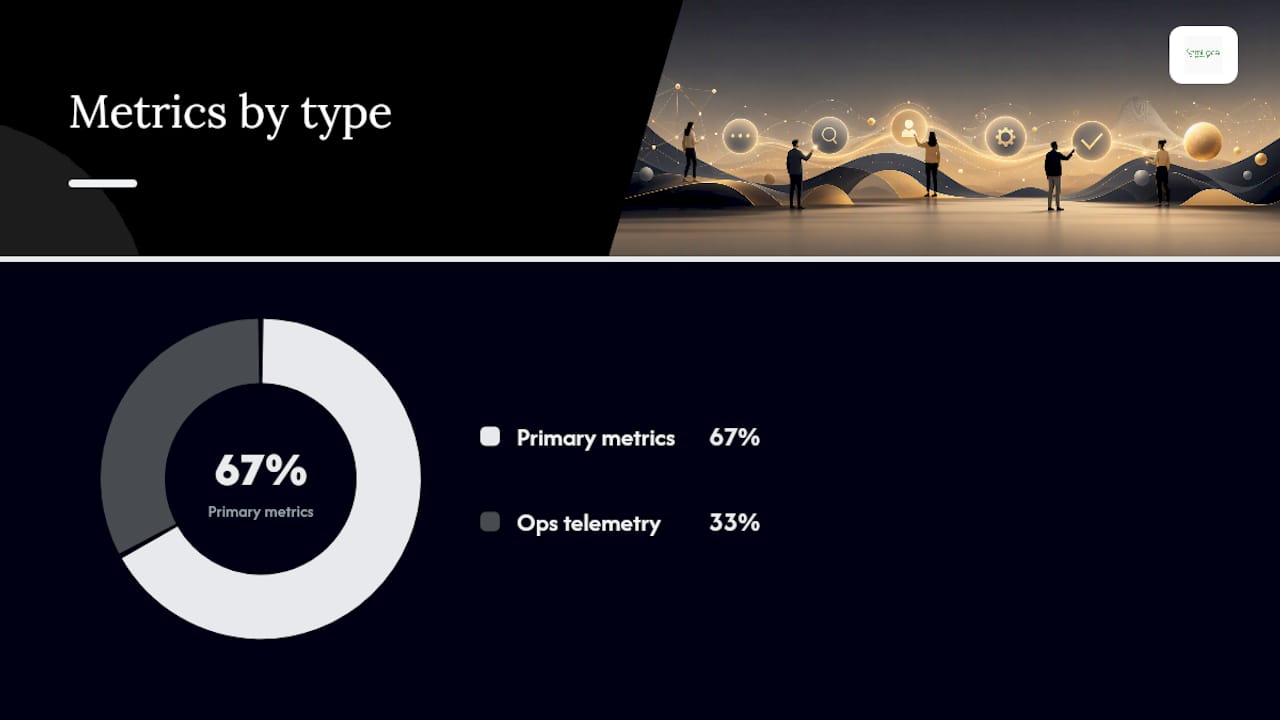
| Metric | Type | What it tells you |
|---|---|---|
| Ticket deflection rate | Primary | Share of queries resolved without agent involvement |
| CSAT score | Primary | Customer satisfaction with the automated reply |
| First-contact resolution (FCR) | Primary | Queries fully resolved in one interaction |
| Time to resolution | Primary | Average time from query receipt to closure |
| Model confidence score | Operational telemetry | How certain the LLM is about each reply |
| KB match rate | Operational telemetry | Share of queries matched to a KB topic above threshold |
Track the primary metrics weekly. Review operational telemetry daily during the first two weeks of any new topic launch.
Copyable recipes for common FAQ scenarios
These recipes follow the complaint resolution, refund, and onboarding templates widely used across support literature. Adapt the configuration snippets to your platform.
-
Billing FAQ with automatic refund check
Trigger: message contains “refund”, “charge”, or “invoice error”
Flow steps: intake → identity check (account number or email) → KB lookup: refund policy → if eligible: trigger refund action → confirm via email → close
Template lead: “Your refund request has been received. Eligible refunds are processed within 5 working days to your original payment method.”
Test assertion: confirm refund action fires only when eligibility condition is met; verify fallback routes ineligible cases to billing agent.
Channel variants: chat and email use the full template; voice IVR reads the lead sentence only and transfers for confirmation. -
Opening hours with agent handoff
Trigger: message contains “open”, “hours”, or “when are you”
Flow steps: intake → KB lookup: opening hours → deliver answer → offer booking or transfer
Template lead: “We are open Monday to Friday, 9 AM to 5:30 PM.”
Test assertion: verify the correct hours display for bank holidays; confirm handoff fires when customer says “book.” -
Password reset with identity check
Trigger: message contains “password”, “locked out”, or “can’t log in”
Flow steps: intake → KB lookup: reset procedure → deliver self-service link → if unresolved after 2 attempts: route to technical support
Template lead: “Visit [reset URL] and click ‘Forgot password’ to receive a reset link within 2 minutes.”
Test assertion: confirm escalation fires after two failed attempts; verify reset link URL is current. -
Onboarding FAQ
Trigger: new customer tag or message contains “getting started”, “set up”, or “how do I begin”
Flow steps: intake → KB lookup: onboarding guide → deliver welcome message + link to procedure article → schedule follow-up check-in
Template lead: “Welcome. Your account is ready — here is how to get started: [link to onboarding guide].”
Test assertion: confirm procedure link is valid; verify follow-up check-in is scheduled in CRM. -
Complaint acknowledgement
Trigger: sentiment score below threshold or message contains “complaint”, “unhappy”, or “unacceptable”
Flow steps: intake → sentiment check → if negative: skip FAQ matching entirely → route to human agent with full conversation context
Template lead: “I’m sorry to hear you’ve had a poor experience. I’m connecting you with a team member now who can help.”
Test assertion: confirm no FAQ reply fires for negative-sentiment queries; verify agent receives full context.
For hospitality teams, the AI for guest FAQs guide covers sector-specific recipe variations for hotels.
Your rollout checklist and timeline
A pilot to first measurable return on investment typically runs 4–12 weeks for UK small and medium-sized teams. The customer enquiry workflow guide covers intake and triage design in detail if you need more depth on those phases.
- Discovery (weeks 1–2): mine the last 60–90 days of tickets; identify the top 10 FAQ topics by volume; map triggers, owners, and escalation conditions for each.
- Design (weeks 2–3): draft KB topics (5–15 questions per topic), reply templates, and conditional logic rules; obtain legal sign-off on any personal data processing.
- Build and integrate (weeks 3–5): configure KB search nodes, LLM prompt, and channel variants; connect to your CRM and ticketing platform; set up provenance logging.
- Pilot (weeks 5–7): launch with your single highest-volume FAQ topic; run A/B template variants; monitor deflection rate, CSAT, and FCR daily.
- Review and iterate (weeks 7–9): hold weekly Review stage sessions; update KB topics where match rate is low; adjust confidence thresholds.
- Phased rollout (weeks 9–12): add topics in batches of three to five; re-run acceptance threshold checks before each batch.
Role matrix
| Phase | Support manager | Knowledge manager | Technical lead |
|---|---|---|---|
| Discovery | Owns ticket mining and topic selection | Reviews KB gaps | Scopes integration effort |
| Design | Approves escalation policy | Authors KB topics and templates | Designs data flow |
| Build | Signs off on test plan | Reviews template phrasing | Configures nodes and logging |
| Pilot | Reviews CSAT and deflection daily | Updates KB topics | Monitors error logs |
| Rollout | Approves each topic batch | Maintains quarterly review cadence | Manages platform updates |
Typical costs for UK teams: tooling ranges from no-cost open-source options to enterprise platform licences. Integration effort for a CRM connection typically runs one to three days of developer time. Budget for ongoing knowledge management — quarterly KB reviews are not optional if you want deflection rates to hold.
Common failure modes and UK GDPR reminders
Most FAQ automation problems fall into a short list of diagnosable patterns.
- Low KB match rate: queries are not matching topics above the confidence threshold. Check whether your KB topics reflect the actual language customers use, not internal jargon. Mine recent tickets for phrasing and update topic questions accordingly.
- Hallucinations: the LLM generates an answer not grounded in the KB. Tighten the relevance threshold on your KB search node, reduce top-k, and reinforce the “I don’t know” instruction in your system prompt.
- Loops: the fallback re-prompts indefinitely. Cap re-prompts at two and route to a human on the third failed match.
- User frustration signals: CSAT drops or customers repeatedly type “agent” or “human.” Review the last 50 automated replies for tone, accuracy, and escalation timing.
Red flags that warrant disabling automation: a topic where FCR drops below your agreed threshold for two consecutive weeks; any query type involving complaints, legal matters, or safeguarding; any automated reply that has generated a formal complaint.
UK GDPR reminder: keep personal data out of LLM prompts where possible. Log the KB source reference for every automated reply. Before any automated channel processes personalised customer data, obtain legal sign-off. The UK Information Commissioner’s Office (ICO) provides guidance on automated decision-making that applies directly to AI-enabled support workflows. This article is general information, not legal advice — confirm your specific data processing arrangements with a qualified legal professional.

The honest truth about FAQ automation for UK service businesses
Most UK service businesses approach FAQ automation the wrong way. They start with the technology and work backwards to the use case. The result is a bot that handles three questions adequately and frustrates customers on everything else.
The smarter sequence is the reverse: start with your ticket data, pick the single highest-volume repeatable question, and build one workflow end to end — trigger, KB topic, template, action, Review stage, metrics. Get that working properly before you add a second topic. The teams that see the fastest return are not the ones with the most sophisticated platforms; they are the ones with the tightest scope and the most disciplined Review stage.
There is also a persistent myth that automation and human oversight are in tension. They are not. Automation handles the repeatable; humans handle the edge cases and own the Review stage. The ratio shifts over time as your KB matures, but the human layer never disappears entirely — nor should it. For UK service businesses in regulated sectors (financial services, healthcare, legal), the human review requirement is not optional; it is a compliance necessity.
When Semlocal works with clients on FAQ automation, the first conversation is always about what not to automate. Complaints, emotionally sensitive queries, and anything touching personal financial or health data should route to a human from the start. Build the automation around what is genuinely repeatable and low-risk, and you will see deflection rates climb without the CSAT damage that comes from over-automation.
How Semlocal helps UK teams build FAQ response workflows
Semlocal designs and deploys custom AI-enabled FAQ and customer support workflows for UK service businesses — from the initial discovery session through to a fully managed, optimised system. The difference from a generic platform is that every workflow is built around your actual ticket data, your CRM, and your compliance requirements, not a one-size-fits-all template.
A typical engagement covers discovery and ticket mining, KB topic design, prompt and template authoring, CRM and channel integration, a two-week pilot, and ongoing Review stage management. You get measurable deflection and CSAT improvements without the internal resource overhead of building and maintaining it yourself.
If you want to see what a managed FAQ automation setup looks like for your business, book a discovery call with Semlocal and we will map out a pilot scoped to your highest-volume FAQ topics.
Sources
The sources below underpin the guidance in this article. Check your platform’s own documentation for exact configuration steps, as node names and parameter labels vary between tools.
- Customer service workflows: Complete guide 2026 – Dashly blog
- FAQ Structuring Best Practices – NiCE Knowledge Success Center
- How to create an FAQ section that deflects tickets 2026
- Customer support workflow: step‑by‑step guide – GigaBPO