For most UK small and medium businesses, a managed AI receptionist, or a blended AI-plus-human answering model, beats both a pure outsourced call centre and a voicemail box for handling calls outside business hours. It answers every call instantly, books appointments straight into your calendar, and costs less than staffing a night shift or paying per-minute rates for a human team you rarely need at 2am. Pure outsourcing still wins for businesses with genuinely complex or high-emotion calls; voicemail wins for nobody.
Here’s the quick comparison:
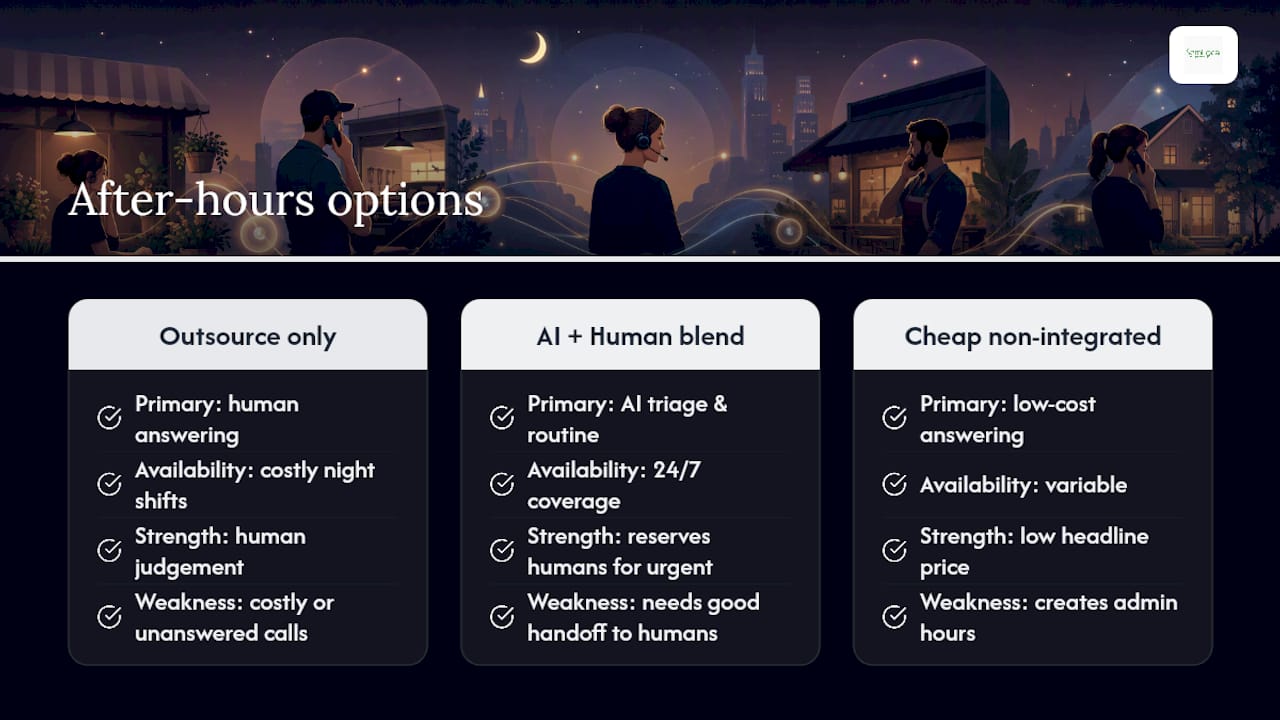
- Outsourced human answering: strong for empathy-heavy calls (healthcare, bereavement services) but pricier per minute and slower to scale.
- Managed AI receptionist: instant answer, books jobs and appointments, integrates with your CRM, and scales without extra headcount.
- Blended model: AI handles routine calls and triage; a human takes over for anything flagged as urgent or sensitive.
Pro Tip: Before comparing prices, check whether a provider integrates directly with your calendar or CRM. An after-hours service that can’t book straight into your existing system just creates more admin for you the next morning.
Key Takeaways
A managed AI receptionist, or a blended AI-plus-human model, gives most UK small businesses the best balance of availability, lead capture and cost for handling calls after hours.
| Point | Details |
|---|---|
| Choose blended over binary | Combine AI for triage and booking with human escalation for genuine emergencies. |
| Integration beats price | Prioritise CRM and calendar integration over the cheapest per-minute rate. |
| Demand a written SLA | Insist on a published average speed of answer and escalation process before signing. |
| Measure outcomes, not deflection | Track containment rate and satisfaction, not just how many calls were diverted. |
| Semlocal for AI-managed reception | Semlocal’s partner AI receptionist builds, integrates, and manages after-hours cover tailored to your business. |
Table of Contents
- What is after hours call handling?
- Which features actually matter in an after-hours service?
- Who actually needs out-of-hours call cover?
- How does out-of-hours call handling work day to day?
- What does after-hours call handling typically cost?
- How do you choose the right after-hours provider?
- Can call deflection reduce your after-hours workload?
- What’s the smartest way to think about after-hours cover?
- How Semlocal helps you win back after-hours enquiries
- Frequently asked questions
- Sources
What is after hours call handling?
After hours call handling is a system, human, AI, or both, that answers, triages, and actions calls once your team has gone home. Unlike voicemail, it captures leads live, books appointments, and flags emergencies for immediate escalation rather than leaving a caller to hang up.
Businesses use it to stop losing enquiries overnight, manage genuine emergencies (a burst pipe, a locked-out tenant), keep continuity during weekends and bank holidays, and protect their reputation, since a missed call is often a lost customer for good.
Look for these when comparing providers:
- A published SLA with a stated average speed of answer (ASA), ideally under 20 seconds.
- GDPR-compliant data handling as standard.
- PCI DSS compliance if the service will ever take payment details over the phone, a strict requirement confirmed by the PCI Security Standards Council.
Which features actually matter in an after-hours service?
Most providers offer a similar feature list, but not every feature carries equal weight for a small business budget.
- 24/7 or scheduled coverage: evenings, weekends, and bank holidays, priced separately in most packages.
- Call transfers and escalation: routing urgent calls to an on-call manager or engineer.
- Appointment and job booking: syncing directly into your calendar.
- Order taking: useful for e-commerce and hospitality.
- Emergency callouts: for trades, property, and utilities.
- CRM and calendar integration: the single highest-impact feature for most SMBs, since it removes manual re-entry the next morning.
- API or webhook access: lets the service talk to your existing tools automatically.
- Dashboards and reporting: real-time visibility into missed calls, bookings, and outcomes.
- Call recording and data security: for training, disputes, and compliance.
Providers positioning themselves for lead capture typically bundle qualification and appointment booking as core, not optional, live answering features. Proactive SMS confirmations and deeper API integrations usually cost extra but often pay for themselves by cutting no-shows and admin time.
Who actually needs out-of-hours call cover?
- Hospitality: booking confirmations and late cancellations don’t stop at 6pm.
- Home services and trades: emergency repair calls (a burst boiler, a break-in) need same-night response.
- Healthcare: patients call outside clinic hours with urgent, sensitive questions.
- Property and lettings: locked-out tenants and maintenance emergencies happen at all hours.
- Professional services: overnight leads convert better with a fast callback the next morning.
- E-commerce and utilities: order queries and outage reports arrive around the clock.
Once you’re missing more than a handful of calls a week outside office hours, outsourcing or automating usually costs less than the leads you’re losing.
How does out-of-hours call handling work day to day?
A call typically moves through the same operational flow, whether it’s answered by a human team or an AI voice agent:
- Routing: the call hits an IVR or AI agent that identifies the caller’s need.
- Qualification: a script (or trained AI model) asks the right questions to establish urgency.
- Triage: the call is coded by priority, routine enquiry, booking, or genuine emergency.
- Escalation: urgent cases route immediately to an on-call human contact.
- Logging: details are captured into your CRM or ticketing system in real time.
- Callback or dispatch: non-urgent matters get scheduled for the next working day.
Onboarding a provider usually involves building your scripts and escalation matrix, connecting your CRM and calendar, and training the AI model or human team on your specific processes and tone of voice. Good call automation setups make this integration nearly invisible to the caller.
Good handover to your daytime team looks like complete call notes, a recording where relevant, and an automatically created CRM ticket, not a scribbled message on a sticky note. Sprinklr’s research on channel switching stresses that transitions between channels or teams need full visibility into prior interactions, or the customer ends up repeating themselves and losing patience.
What does after-hours call handling typically cost?
Pricing usually follows one of a few models: per-minute, per-call, a flat monthly subscription, or a tiered package with a setup fee for scripting and integration work. Some providers layer in additional charges for CRM integration, call recording, or advanced reporting.
The biggest cost drivers are:
- Hours of coverage (evenings only versus full 24/7/365).
- Call complexity, simple message-taking costs less than full appointment booking.
- Feature set, particularly booking, CRM sync, and reporting.
- Required SLAs and whether call recording is mandatory for your sector.
Package tiers commonly run from basic message-taking through to fully CRM-integrated booking and emergency escalation, so compare like for like.
Pro Tip: Normalise every quote by minutes of talk time and the number of actions required per call, not just the headline price. A cheap per-minute rate can cost more overall if it excludes booking or CRM sync as standard.
How do you choose the right after-hours provider?
Work through this checklist before signing anything:
- Coverage hours: does it match your actual need, evenings, weekends, bank holidays, or full 24/7?
- Core features: call transfers, appointment booking, order taking, emergency callouts, all confirmed in writing.
- Integrations: does it connect natively to your CRM, calendar, and any booking tools you already use?
- Pricing model: per-minute, per-call, or monthly, and what triggers extra charges?
- SLAs and ASA targets: what’s the guaranteed average speed of answer, and is it written into the contract?
- Escalation process: how, and how fast, does an emergency reach a real person on your team?
- Onboarding timeline: how long from signup to live coverage, and what’s involved in monitoring performance once live?
- Reporting and dashboards: can you see call outcomes in real time, or only in a monthly PDF?
- Security and compliance: GDPR as standard, PCI DSS if payments are involved.
- Evidence: case studies, client testimonials, or reference sites in your sector.
Ask providers directly: “How do you escalate an emergency outside hours?”, “Can you integrate with [your CRM]?”, and “What are your ASA targets and reporting cadence?”
Red flags include no clearly written SLA, opaque or shifting pricing, no UK-based agents where local coverage genuinely matters to your customers, and an inability to connect with the systems you already run. Trust signals work the other way: published SLAs, a real-time client portal, ISO or GDPR statements, and case studies with named outcomes.
Weigh vendors against what matters most to your business specifically, lead capture, incident response, or straightforward cost control, rather than picking the provider with the longest feature list.
Can call deflection reduce your after-hours workload?
Call deflection routes routine enquiries to self-service or digital channels before they ever become a phone call, and it can meaningfully cut cost-to-serve when it’s built around genuinely appropriate channels, according to Qualtrics’ summary of industry findings, which cites McKinsey estimates of savings of up to around 40%.
The catch: deflection only works if you measure outcomes like containment rate and customer satisfaction, not just how many calls you diverted, a distinction Dialpad’s analysis makes clear. Proactive SMS or email updates can resolve many queries before the phone even rings, but any deferred callbacks need proper forecasting and staffing, or you simply move the backlog rather than removing it.
Pro Tip: Track callback volume as a forecastable metric, not overflow. A provider that treats callbacks as an afterthought will let your response times slip exactly when customers notice most.
What’s the smartest way to think about after-hours cover?
Most guidance on this topic treats after-hours call handling as a binary choice: outsource it or don’t. That framing misses the real decision, which is how much of the routine work can be automated so that human attention (yours or an outsourced agent’s) is reserved for the calls that actually need judgement.
A managed AI receptionist earns its place here because it removes the false trade-off between cost and availability. You’re no longer choosing between an expensive night shift and an unanswered phone. Where conventional advice falls short is in treating AI and human answering as competitors; the strongest setups I’ve seen described in practice blend both, AI for triage, booking and routine questions, a human on call for anything genuinely urgent.
If you take one thing from this, prioritise integration over headline price. A cheap answering service that can’t write straight into your calendar or CRM will cost you more in admin hours than it saves in fees. Get that right first, and the rest of the checklist falls into place far more easily.
Watch: the after-hours booking problem
How Semlocal helps you win back after-hours enquiries
Semlocal is the practical route to fixing missed calls without hiring a night shift or gambling on a generic call centre script. We design, build, and manage AI voice agents that answer instantly, qualify leads, book appointments straight into your calendar, and hand genuine emergencies to a real person, all tuned to your business rather than a one-size-fits-all script.
A typical engagement starts with a discovery call to map your call types, scripts, and escalation needs, followed by mobilisation (building the AI agent, connecting your CRM and calendar), agent training on your specific processes, and dashboard access so you can see every call outcome in real time. Most businesses are live within a few weeks.
- Case studies showing predictable growth from AI reception turning missed calls into booked contracts.
- Sector experience across trades, hospitality, property, and professional services.
- Direct CRM and calendar integration, so nothing needs re-entering the next morning.
- Ongoing performance monitoring and optimisation, not a set-and-forget install.
If missed calls are costing you bookings, book a discovery call about our AI receptionist and see what a tailored pilot would look like for your business. And if those same customers are searching for you on Google before they ever pick up the phone, pairing this with a properly optimised Google Business Profile closes the loop from search to booked job.
Frequently asked questions
What is after hours call handling?
It’s a service, human or AI, that answers, qualifies, and actions calls once your business has closed, capturing leads and escalating emergencies rather than leaving callers to voicemail.
Is an AI receptionist better than an outsourced call centre for after-hours cover?
For most routine enquiries and bookings, yes, an AI receptionist answers faster and integrates directly with your systems. Outsourced human teams still suit highly sensitive or complex calls.
How much does out of hours call service typically cost?
Pricing ranges from per-minute and per-call rates to flat monthly subscriptions, with setup fees for scripting and integration. Cost depends heavily on coverage hours and feature complexity.
Do I need PCI compliance for after-hours call handling?
Only if the service will take payment card details over the phone. Any provider handling payments must operate within PCI DSS requirements.
What SLA should I expect from a provider?
Look for a published average speed of answer, ideally under 20 seconds, along with a clear escalation process for genuine emergencies.
Sources
- Call Deflection: Reduce Customer Calls For Increased Efficiency
- Call Deflection: Strategies, Metrics, and AI Agent Best Practices | Dialpad
- Call deflection is a strategy to reroute some of your customer support calls to other digital channels like SMS, live chat, email or messaging platforms like WhatsApp. | Sprinklr
- Pcisecuritystandards