Yes, SMS appointment booking reliably cuts wasted slots when it uses two-way confirmations and proper calendar integration. Text-only reminders with no reply option help, but they leave money on the table. The recommended next step: run a short pilot combining calendar sync, a confirm/reschedule/cancel workflow and clear measurement before you roll it out across the business. Compliance and calendar accuracy aren’t optional extras. They’re launch essentials.
TL;DR:
- Proper calendar sync is essential to avoid double bookings and ensure appointment slots are accurately reflected in the system.
- Two-way SMS with explicit confirm, cancel, and change commands significantly reduces no-shows and recaptured lost slots compared to one-way reminders.
- Testing appointment workflows, message timing, and wording before going live is vital to maximize attendance and minimize errors.
- Costs extend beyond per-message fees to include setup, number rental, and staff handling, especially when integrating multiple calendars or locations.
- Maintaining strict compliance with data regulations and separating transactional messages from marketing communications prevents legal issues.
Table of Contents
- How does SMS appointment booking actually work?
- Step-by-step setup: platform, calendar sync and numbers
- Getting the message right: timing, wording and testing
- Why two-way SMS recovers slots that one-way reminders lose
- What to measure: KPIs, baselines and testing
- What SMS appointment booking really costs, and staying compliant
- Semlocal’s launch checklist and ready-to-use templates
- When to pilot it yourself and when to bring in help
- Let Semlocal handle your SMS booking rollout
- Sources
- FAQ
How does SMS appointment booking actually work?
SMS appointment booking ranges from a member of staff manually texting a customer to a fully automated conversational system that books, confirms, reschedules and cancels without anyone touching a keyboard. Most service businesses sit somewhere in between: automated reminders paired with manual handling of replies.
Whichever version you run, the workflow needs to capture the same core data every time:
- The service booked (so a haircut isn’t confused with a colour appointment)
- Date, time and duration, including buffer time between bookings
- The staff member or resource assigned
- Location, if you operate from more than one site
- An explicit confirmation state — the customer has actually said yes, not just failed to say no
That last point matters more than most businesses realise. A booking that sits as “sent, no reply” is not a confirmed booking. It’s a guess. Treating it as confirmed is how double bookings and awkward front-desk conversations happen.
Calendar integration is what separates a working SMS booking system from a liability. Without a live, accurate calendar feed, your SMS platform is confirming slots that might already be taken, or reminding customers about appointments that were cancelled hours earlier. A pragmatic study of SMS reminders across nearly 78,000 scheduled visits found real gains in attendance, but also flagged implementation problems caused by inconsistent use of the scheduling system itself. The message technology worked, although the calendar discipline around it sometimes did not.
Step-by-step setup: platform, calendar sync and numbers
Getting text message appointment scheduling right is less about picking flashy software and more about getting the boring parts correct first.
- Choose a platform on capability, not price alone. Look for genuine two-way SMS, an API or webhook layer for your booking system, UK message routing, and delivery reporting so you know what actually landed.
- Sync your calendar properly. Google Calendar, Outlook and most booking platforms support two-way sync, but test it under load. A slot marked “free” needs to disappear the instant it’s booked, not five minutes later.
- Pick your number type deliberately. A dedicated local long number supports two-way replies and feels more trustworthy to customers than a shared short code, which is often locked to one-way marketing blasts.
- Model your availability rules. Buffers between appointments, staff-specific hours, and multi-location logic all need to live in the calendar feed, not bolted on inside the SMS platform.
- Run integration tests before go-live. Try overlapping bookings, back-to-back appointments with no buffer, different time zones if you serve remote customers, and two people attempting to book the same slot simultaneously.
Pro Tip: Book a test appointment from your own phone during your busiest trading hour. If the confirmation doesn’t arrive within a minute or two, your customers are experiencing the same delay, and some will simply call instead.
Vendor platforms aimed at UK small businesses increasingly bundle two-way messaging and delivery reports as standard, which makes this stage faster than it used to be.
Getting the message right: timing, wording and testing
Cadence matters as much as content. A sensible default is three touches: an immediate confirmation when the booking is made, one reminder several days ahead for longer lead times, and a short final reminder a couple of hours before the appointment. Adjust the gap based on how far out the booking sits. A same-day appointment doesn’t need a 72-hour reminder.
Every message should carry the same anatomy:
- The service and exact date/time
- Staff member or location, where relevant
- Clear, one-word reply instructions (Confirm, Cancel, Change)
- An opt-out line for anything that could be read as marketing
Wording changes outcomes more than most business owners expect. A field experiment covering over 161,000 scheduled appointments tested nine different SMS formats and found that the best-performing wording reduced no-shows substantially compared with weaker versions.
Statistic Callout: That same study is a warning as much as a promise. The strongest results came from messaging framing tested specifically in healthcare settings, often using guilt-based language. Such framing may not be appropriate as a default for commercial customer appointments like car services or beauty treatments. Test your own wording on a small batch before rolling it out.
Why two-way SMS recovers slots that one-way reminders lose
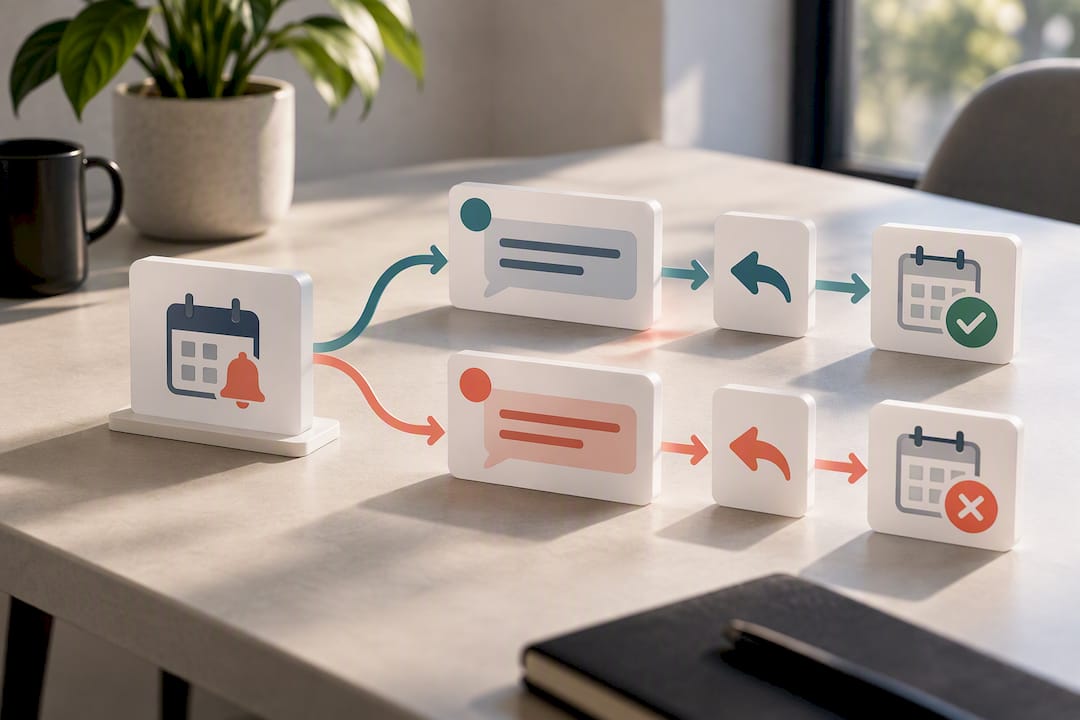
A reminder that only pushes information out misses half the value. Two-way SMS lets a customer who can’t make it tell you days in advance, turning a no-show into a reschedulable slot instead of a silent gap in the diary. That recovery effect is arguably more valuable than persuading a reluctant customer to attend.
Design your reply commands so there’s no ambiguity:
- Confirm locks the booking in as attended
- Cancel releases the slot immediately for waitlist or gap-fill offers
- Change triggers a short follow-up asking for a preferred new time
Anything outside those three words, a garbled reply, a question, silence past a set window, should escalate to a human rather than sit unresolved. Set a clear rule: no reply within your chosen window means the slot stays provisional, not confirmed.
What to measure: KPIs, baselines and testing
Delivery rates tell you almost nothing useful on their own. Track the metrics that reflect actual business outcomes:
- Confirmed-to-attended rate
- No-show rate against your pre-SMS baseline
- Cancellation lead time (early cancellations are recoverable; last-minute ones rarely are)
- Rescheduled-slot fill rate
- Average response time to inbound replies
Set your baseline using at least a few weeks of historical no-show data before switching anything on, then run your new SMS workflow as a defined test period against it. Segment results by service type and by staff member. A trial comparing SMS against telephone reminders found broadly similar missed-appointment rates between channels, which is a useful reminder to compare against your own baseline rather than assume a fixed improvement.
Inaccurate calendar feeds are the single biggest bias risk here. If double-booked slots or stale availability data are corrupting your numbers, you’ll misread genuine SMS performance either way.
What SMS appointment booking really costs, and staying compliant
The per-SMS price you see advertised is rarely the whole cost. Budget for outbound message segments (longer texts split into multiple segments and multiple charges), inbound replies, number rental, integration or setup work, and the staff time needed to handle escalations that the system can’t resolve itself.
- Outbound and inbound message volume, priced per segment
- Dedicated number rental, typically a modest monthly fee
- One-off integration and calendar-sync setup costs
- Ongoing staff time for exceptions and escalations
On delivery, UK-based routing with proper sender ID configuration and delivery reports lets you spot failures fast rather than assuming a silent customer got the message. Some UK messaging providers offer ISO27001 accreditation or NHS DSP Toolkit compliance where sensitive data is involved.
On compliance, the ICO’s PECR guidance draws a firm line between transactional service messages (an appointment confirmation) and marketing messages, which need explicit, recorded consent. Keep transactional templates entirely separate from promotional ones from day one.
Semlocal’s launch checklist and ready-to-use templates
Before switching SMS booking on, confirm calendar governance rules, test overlapping and back-to-back bookings, set buffer times, and have a manual fallback ready if the system goes down.
- Confirmation: “Booked: [Service] with [Staff] on [Date] at [Time], [Location]. Reply YES to confirm or CHANGE to reschedule.”
- 48 to 72 hour reminder: “Reminder: [Service] on [Date] at [Time] with [Staff]. Reply CANCEL if you can no longer make it.”
- Final 2 hour reminder: “See you soon: [Service] at [Time] today, [Location]. Reply CHANGE if plans have shifted.”
Test each template for delivery speed, correct field population and reply handling before go-live.
When to pilot it yourself and when to bring in help
Run a DIY pilot if you have one location and basic technical confidence. Bring in a managed partner once you’re juggling multiple calendars, staff rotas or locations. Never promise a fixed percentage drop in no-shows. Test it. Calendar accuracy will beat clever copywriting every time.
— Geoff
Let Semlocal handle your SMS booking rollout
A practical route for service businesses is to use a managed SMS booking service rather than building and testing it themselves. Rather than juggling platform settings, calendar webhooks and reply logic in-house, you get an AI SMS agent built around your actual calendar, tested for the overlaps and edge cases this guide covers, and connected to your existing booking system from day one.
This route makes the most sense when your integrations are genuinely complex (multiple staff, multiple locations, several calendar systems) or when you simply don’t have the internal capacity to test and maintain the workflow yourself. An AI call handling service can also cover the human handoff moments this article flags, helping ensure ambiguous replies do not get left unanswered. If you’d rather have this running properly within weeks than spend months testing it piece by piece, book a demo through Aimagency and see how the AI receptionist and SMS agent work against your own calendar.
Sources
For the original evidence behind this guide, read the pragmatic SMS reminder study, the PLOS One field experiment on message framing, and the ICO’s PECR guidance on consent and marketing rules. For measurement and scaling once your SMS channel is live, BabyLoveGrowth covers automation approaches worth comparing against.
- Appointment reminders by text message in a safety net health care system: a pragmatic investigation
- Effect of message framing on attendance at scheduled appointments: a large field experiment
- A trial comparing text reminders with telephone reminders for scheduled appointments
- Guide to PECR: electronic and telephone marketing — ICO
FAQ
Does the NHS send text messages for appointments?
Yes, many NHS trusts and GP practices use SMS for appointment reminders and confirmations, and studies of similar safety net healthcare systems have shown SMS reminders improve attendance rates when calendar data stays accurate.
How do you book an appointment through text?
Most systems work by texting a booking link or reply keyword to a business number, then confirming service, date and time back to the customer for an explicit yes. A correctly built text-based appointment system always ends on that confirmed state rather than an unanswered message.
How do I set up text message reminders for appointments?
Choose a platform with two-way messaging and calendar integration, sync it to your existing booking calendar, then set a reminder cadence: an immediate confirmation, a reminder several days out, and a short final reminder before the appointment. Test overlapping bookings and buffer times before going live.
How do I confirm an appointment via text message?
The customer replies with a clear keyword such as “YES” or “Confirm” to a message stating the service, date, time and location. Anything less explicit, silence, a vague reply, shouldn’t be treated as confirmed; it should trigger a follow-up or human check instead.
What does SMS appointment booking cost a small business?
Costs include per-message charges for outbound and inbound texts, number rental, one-off setup for calendar integration, and staff time for handling escalations. Pricing for managed AI SMS agents and receptionist services is available on request through Aimagency.