Yes — Local Services Ads are a strong, pay-per-lead channel for most UK trades and professional services, and if your category is eligible, you should start verification today. You’ll pay only for leads that actually contact you, carry the Google Verified badge once approved, and need no website to get going. The next move is simple: check your category’s eligibility and start gathering your registration, licence and insurance documents now.
TL;DR:
- Most UK trades qualify only if they are in eligible categories like plumbing, electrical work, or legal services, so verifying category eligibility is essential before starting.
- Achieving full verification may take three to four weeks due to documentation match issues or incomplete profiles, making thorough preparation crucial.
- Success hinges on collecting reviews and responding promptly, with speed in contact often surpassing review ratings in influencing lead conversion.
- Managing multiple locations or trade types often justifies outsourcing verification and profile optimization to maintain lead quality and response times.
- Setting precise service areas and job types improves lead relevance, savings budget by excluding non-convertible areas and uninterested inquiries.
Table of Contents
- What are Local Services Ads and why do they matter for UK businesses?
- Who qualifies for the Google Verified badge in the UK?
- How do you set up a Local Services Ads account?
- How does service area and job type targeting work?
- How do you improve Local Services Ads rankings and lead quality?
- Why is my Local Services Ads account taking so long to verify?
- When should you manage Local Services Ads yourself, and when is it worth handing over?
- Get started with Local Services Ads
- Sources
What are Local Services Ads and why do they matter for UK businesses?
Local Services Ads sit at the very top of Google Search results, above the standard paid ads and organic listings, showing your business name, star rating, opening hours and a “Google Guaranteed” or “Google Screened” badge. Customers call or message you directly from that box.
The billing model is the real draw. Instead of paying per click, whether the searcher becomes a customer or not, you pay per lead: a phone call, a message, or a booking request. That shifts risk away from you and puts it on Google to deliver a genuine enquiry, which makes budgeting far easier to reason about than a standard pay-per-click campaign.
This suits small trades and solo professionals particularly well because you don’t need a website to run one. Your profile and reviews do the selling.
Eligible categories in the UK include:
- Plumbers, electricians and heating engineers
- Locksmiths, cleaners and pest controllers
- House movers, appliance repair and garage door specialists
- Certain financial and legal services, depending on location
Check the full eligibility list before assuming your trade qualifies.
Who qualifies for the Google Verified badge in the UK?
Verification is where most businesses either sail through or stall for weeks, so treat it as a project, not a formality. Google’s screening for UK advertisers typically checks business registration, relevant trade licences, public liability insurance, and background checks on the business owner and any staff who’ll attend jobs.

Some categories can run as “pre-badge” ads while the remaining checks complete, letting you take leads earlier, though fully Google Verified profiles are prioritised in results and generally earn more trust from searchers. Pre-badge is a head start, not a substitute for finishing the process.
A handful of professional service categories are piloted only in Greater London rather than nationwide, so confirm your category’s coverage area before building a national strategy around it.
Before you apply, gather:
- Certificate of incorporation or sole trader registration
- Trade licences and professional certifications
- Public liability insurance documents
- Photo ID and DBS-style background check consent for relevant staff
Pro Tip: Assign one named person to own the verification paperwork end to end. Businesses that treat this as “someone will get to it” almost always see documents rejected for mismatched names or expired dates, which restarts the clock.
How do you set up a Local Services Ads account?
Setting up the account itself is straightforward if you follow the sequence in order rather than jumping between tabs.
- Access the portal. Go to the Local Services Ads sign-up page and link the Google account you’ll use to manage the profile.
- Build the profile. Add your business name, service areas, job types, photos and a short bio describing your work.
- Set your monthly budget. Choose a weekly spend cap. Remember this controls lead volume, not clicks.
- Enable messaging and call forwarding. Route leads to a phone line and inbox someone actually monitors.
- Upload verification documents. Submit registration, insurance and licence files, and start pre-badge screening if your category offers it.
A few things worth getting right the first time:
- Use real job photos, not stock images. Searchers can tell.
- Write job types precisely (“boiler repair” rather than just “plumbing”) so you match specific searches.
- Double check your service area radius before going live. It’s easy to accidentally cover a city you can’t service properly.
How does service area and job type targeting work?
Targeting in Local Services Ads runs on city, district and postcode level, and the granularity matters more than most advertisers assume. A Manchester-based electrician covering the whole conurbation should still exclude postcodes outside a realistic drive time, because Google will happily match you to a searcher forty minutes away if your area includes them.
Job type selection works the same way: the more precisely you select the services you actually offer, the more relevant your leads. A general “handyman” listing pulling in requests for jobs you don’t do wastes budget and drags down your response rate.
Practical adjustments to make once you’re live:
- Add or exclude specific postcodes if certain areas consistently produce poor-quality leads
- Narrow job types if you’re getting enquiries for work outside your specialism
- Increase your weekly budget cap gradually if you’re converting leads faster than they arrive
- Pause specific service areas temporarily if you’re overbooked, rather than switching the whole account off
How do you improve Local Services Ads rankings and lead quality?
Two factors do most of the heavy lifting on where and how often your ad appears: proximity, reviews and responsiveness. You can’t control proximity, but reviews and responsiveness are entirely within your grasp, and they compound over time.
Ask every satisfied customer for a review immediately after the job, not weeks later when the memory has faded. Set an internal response SLA, aiming to answer phone leads within fifteen minutes where possible, and log every lead outcome so patterns in lead quality become visible. Google also lets you dispute or request credit for genuinely invalid leads, such as wrong numbers or spam, so don’t simply absorb the cost.
- Request reviews via text message straight after job completion
- Set a maximum response time internally and track adherence
- Mark leads as booked, not booked, or invalid in your lead dashboard
- Connect call tracking or a CRM so no enquiry falls through the cracks
- Test small changes: adjust operating hours, refine job types, or shift budget between service areas
Pro Tip: A five-minute response beats a five-star review most of the time. Speed to first contact is one of the strongest predictors of whether a lead converts into a booked job.
Why is my Local Services Ads account taking so long to verify?
Plan for three to four weeks from document submission to full verification, though pre-badge can get you receiving leads sooner in eligible categories. The most common causes of delay are mismatched names between insurance documents and business registration, applying under a category with location restrictions you didn’t spot, and profiles left incomplete with missing photos or service details.
To keep things moving:
- Submit clean, correctly named documents on the first attempt rather than iterating
- Confirm your category and location eligibility before applying, not after rejection
- Complete every profile field, even optional ones, before submission
- Contact Google support directly if verification stalls past four weeks with no update
When should you manage Local Services Ads yourself, and when is it worth handing over?
Running Local Services Ads yourself works well if you have one location, a bit of spare time each week, and the patience to chase documents through screening. It stops working the moment you’re managing multiple sites, juggling job types across several trades, or simply too busy doing the work to answer leads within the response window that actually wins jobs.
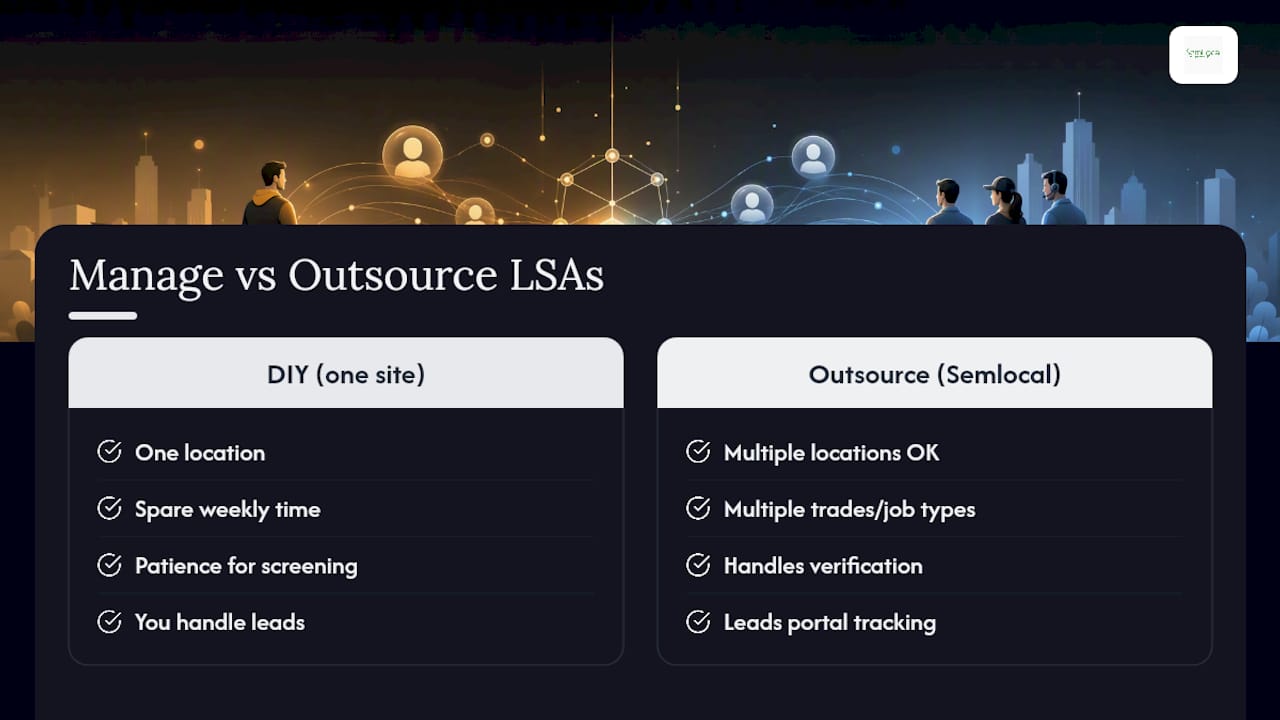
That’s where a managed approach earns its keep. Semlocal handles the document chasing, verification workflow, and ongoing profile optimisation so leads don’t sit unanswered while you’re on a job. Our leads portal tracks every enquiry, our WhatsApp integration speeds up first contact, and our team knows which service area and job type adjustments actually move the needle for UK trades.
If you’re scaling across several locations or simply don’t have the hours to babysit verification, that’s the scenario where outsourcing this pays for itself fastest.
— Geoff
Get started with Local Services Ads
Start with Google’s own UK setup guide and eligible category list. For budgeting context alongside standard paid search, this Google Ads guide for local business is worth a read. When you’re ready for hands-on help, explore Semlocal’s Local Service Ads support.