Your Google Maps ranking comes down to three factors Google names explicitly: relevance, distance and prominence. You cannot change distance for a searcher standing two streets away, but you can control the other two, and the single highest-impact lever is a fully completed and verified Google Business Profile with the correct primary category set.
Before anything else, work through this:
- Verify your Google Business Profile if you haven’t already
- Set the most specific, accurate primary category available
- Confirm your address, hours and a local phone number are correct
- Start requesting reviews on a steady, ongoing basis
Everything below explains why these five actions are important and what to do after completing them.
Key Takeaways
Google Maps ranking is driven by relevance, distance and prominence, and a complete, verified, correctly categorised Google Business Profile is the highest-impact factor you control.
| Point | Details |
|---|---|
| Prioritise the primary category | Choose the most specific accurate category; it’s rated the single most important relevance signal. |
| Build steady review velocity | Aim for 4.0+ ratings (4.5+ in competitive markets) with consistent, non-incentivised requests. |
| Use a local phone number | Local area codes support prominence; centralised or toll-free numbers can suppress ranking. |
| Measure with geo-grid testing | Run a 5×5 or larger grid fortnightly to separate distance problems from profile problems. |
| Get a managed audit | Semlocal reviews category accuracy, reviews and NAP consistency as a practical next step. |
Table of Contents
- Verify and complete your Google Business Profile
- Reviews and reputation: the prominence engine
- Categories, services and on-profile keywords
- Photos, posts, products and attributes
- Measuring your Google Maps ranking properly
- Timelines, common problems and a 90-day plan
- How Semlocal helps businesses win the map pack
- Building and managing backlinks relevant to local search
- Optimising your website for local SEO
- User engagement signals: clicks, calls and directions
- Fixing duplicate or incorrect Google Business Profiles
- Using Q&A and messaging to boost engagement
- What actually moves rankings, and what’s overrated
- Get your Google Business Profile working harder
- Sources
Verify and complete your Google Business Profile
Verification is the gatekeeper. An unverified profile can still appear on Maps, but Google treats it with less trust, and you lose the ability to respond to reviews, post updates or correct false information. Verification usually happens by postcard, phone or email, depending on your business category, and it typically takes a few days once requested.
Completeness matters just as much as verification. Google’s own guidance states that a complete Business Profile improves local ranking, and “complete” means more than a name and address.
- Business name: use your real trading name exactly as it appears on signage and invoices. Adding keywords like “Best Plumber London” breaches Google’s policy and risks suspension.
- Address and service area: physical retail locations need an exact address; service area businesses (mobile plumbers, cleaners, electricians) should hide their address and define an honest service radius instead.
- Phone number: use a local number with the area code matching your town or city, not a national or toll-free line.
- Hours, website and booking links: keep these current, especially around holidays, since stale hours are a common trust killer.
- Attributes: tick every one that genuinely applies. Google uses these for filtered searches.
Pro Tip: Set a quarterly reminder to re-check every field. Businesses change hours, phone lines and service areas more often than they update the profile to match.
Reviews and reputation: the prominence engine
Reviews are the clearest signal of prominence Google has, and their weight in local ranking has grown, with recent industry surveys pointing to review recency, count, and owner response rate carrying increasing influence. A rating below 4.0 puts you at a real disadvantage; in competitive city-centre categories, aim for 4.5 or above just to stay in contention.
Volume and recency matter more than most owners assume. A profile with 200 reviews from three years ago reads as less active than one with 40 reviews from the last quarter.
- Ask at the moment of highest satisfaction, not days later by email
- Put a direct review link on receipts, invoices and booking confirmation emails
- Use a QR code at the till or on a job sheet for in-person requests
- Never offer discounts or incentives for reviews. It breaches Google’s policy and risks removal
- Reply to every review, good or bad, within 48 hours where possible
Review text now does more than boost your star average. When customers mention the service they bought or the area you worked in, that language acts as a relevance signal too. A simple ask like “What did we help you with, and where?” in your review request can shape the language customers use.
Pro Tip: Keep a spreadsheet tracking monthly review count, average rating and response rate. A dip in velocity often shows up in rankings before it shows up anywhere else.
Categories, services and on-profile keywords
Primary category selection is, by most practitioner surveys, the single most important GBP relevance signal you control. “Plumber” beats “Contractor” if plumbing is genuinely your main trade, because Google matches category to search intent directly.
- Choose the most specific accurate primary category, then add secondary categories for services you also offer
- Map every real service into the Services section using the terms customers actually search, not internal jargon
- Write your business description in plain language that mentions your specialisms and locations naturally, never stuffed
- Search your top three competitors and note which categories and services they list that you don’t. Gaps are quick wins
Photos, posts, products and attributes
Profiles that stay active tend to outperform static ones on prominence. Google reads posts, fresh photos and product listings as signs the business is genuinely operating, not abandoned.
- Upload a mix of exterior, interior, team and completed-work photos monthly, plus a short video if you can manage it
- Publish a post roughly weekly: an offer, a completed job, a seasonal update
- List services or products with prices where practical; these appear directly in the profile
- Set attributes that match real filters people search, such as wheelchair access, free parking or Wi-Fi
A simple monthly calendar works: week one, new photos; week two, a post; week three, a product/service update; week four, review responses and attribute check.
Measuring your Google Maps ranking properly
Ranking looks different depending on where the search happens, which is why a single “am I ranking?” check from your own office is close to useless. Geo-grid testing solves this by searching your target keyword from dozens of simulated points across your service area and mapping where you appear at each one.
This method exposes distance ceilings that no amount of profile polishing will fix. If you rank first two streets from your address but drop off a mile out, that’s a distance problem, not a relevance problem, and it tells you exactly where to focus effort.
- Google’s own Business Profile dashboard shows basic search and view metrics, but not location-by-location rank
- Tools like a geo-grid rank tracker, a Local Business Rank Tracker spreadsheet add-on, or a free single-point rank checker each trade off depth against cost
- Track a rank heatmap, review velocity, profile completeness score, and clicks, calls and direction requests together
- Run the same grid weekly or fortnightly so trends are visible rather than one-off snapshots
A geo-grid using a 5×5 point layout or larger across your service area gives a practical, comparable measurement you can repeat month after month.
Timelines, common problems and a 90-day plan
Ranking changes rarely happen overnight, but they do follow a rough pattern. Category corrections tend to shift rankings within 2 to 4 weeks; citation cleanup takes 4 to 8 weeks; sustained review velocity shows measurable effect at 6 to 12 weeks; and website changes need 4 to 8 weeks to register. Most businesses see meaningful cumulative movement after a couple of months of consistent work.
Three suppressors account for most stuck rankings:
- Centralised or toll-free phone numbers, which read as non-local and can suppress ranking
- NAP inconsistencies across directories, where an old address or wrong phone number lingers on a listings site
- Policy suspensions, often triggered by keyword-stuffed names or an incorrect service-area setting
A workable 90-day plan: weeks 1 to 2, verify, complete every field and correct the category; weeks 3 to 6, clean up citations and start review requests; weeks 7 to 12, maintain posting cadence and measure with a geo-grid every fortnight. To isolate what actually caused a rank shift, change one variable at a time, category or review velocity, and re-run the same grid before and after.
How Semlocal helps businesses win the map pack
Agencies that manage Google Business Profiles day in, day out see patterns individual owners rarely spot. Author Geoff, whose background covers local search strategy and profile management for UK service businesses, has watched the same fixable errors, wrong categories, stale photos, dead review pipelines, recur across dozens of sectors.
Semlocal manages the full stack: Google Business Profile completion and verification, ongoing Local SEO, and AI Optimisation so businesses also surface when customers ask ChatGPT or Gemini for a recommendation. The work is measured against real enquiries, not vanity metrics.
- Full profile audit against Google’s own ranking criteria
- Geo-grid measurement before and after changes
- Ongoing review generation and response management
- Citation cleanup across major directories
A free audit typically measures category accuracy, review velocity, NAP consistency and current geo-grid position, giving a clear starting point before committing to ongoing management.
Most owners get further with structured management than with occasional DIY fixes squeezed between other jobs, which is exactly the gap Semlocal’s next step below addresses.
Building and managing backlinks relevant to local search
Backlinks matter for Maps ranking mainly through the website signals they feed into your wider local presence, not as a direct Maps ranking input in the way reviews or category are. A profile with a well-linked website behind it tends to carry more authority into local search overall.
The links worth chasing are local and relevant, not high-volume and generic. A mention from your regional chamber of commerce, a local newspaper covering a community event you sponsored, or a trade association directory carries more weight for local intent than a random guest post on an unrelated blog.
Practical routes to build these:
- Join and get listed on your local chamber of commerce or business improvement district site
- Sponsor a local sports team, school event or charity fundraiser; most will link back from their website
- Offer expert comment to local news outlets covering your trade or industry
- Get listed on relevant trade body directories (a heating engineer through Gas Safe, an electrician through NICEIC, for example)
- Ask satisfied commercial clients if they’ll add a supplier link on their own site
Avoid link-buying schemes and mass directory submissions promising hundreds of links quickly. These tend to look unnatural to Google and rarely convert into ranking gains, while a handful of genuinely local, relevant links compound over months.
Optimising your website for local SEO
Your website supports Maps ranking rather than driving it directly, but a weak site can still hold back an otherwise strong profile, particularly when Google cross-references consistency between the two.
Local pages need to say where you operate, plainly. A single generic “Contact Us” page won’t do it if you serve six towns; dedicated location pages, each with unique content about that specific area, its landmarks, and the services you offer there, give Google (and readers) far clearer signals than one page trying to cover everywhere at once.
Schema markup, specifically LocalBusiness schema, gives search engines a structured version of your name, address, phone number, hours and service area. It won’t move rankings on its own, but it removes ambiguity that could otherwise work against you.
Page speed and mobile usability matter too, since most local searches happen on a phone while someone is out and about, often deciding within seconds whether to call. A slow-loading contact page loses that customer before they ever reach your number.
Keep your NAP details on the website identical to the Google Business Profile, right down to abbreviations like “St” versus “Street.” Mismatches here are one of the quieter causes of stalled rankings, because they undermine the consistency signal Google relies on when deciding how much to trust a listing.
User engagement signals: clicks, calls and directions
Google tracks what happens after someone finds your profile, and those actions, clicks through to your website, phone calls placed directly from the listing, and requests for directions, feed back into how prominent your business appears over time.
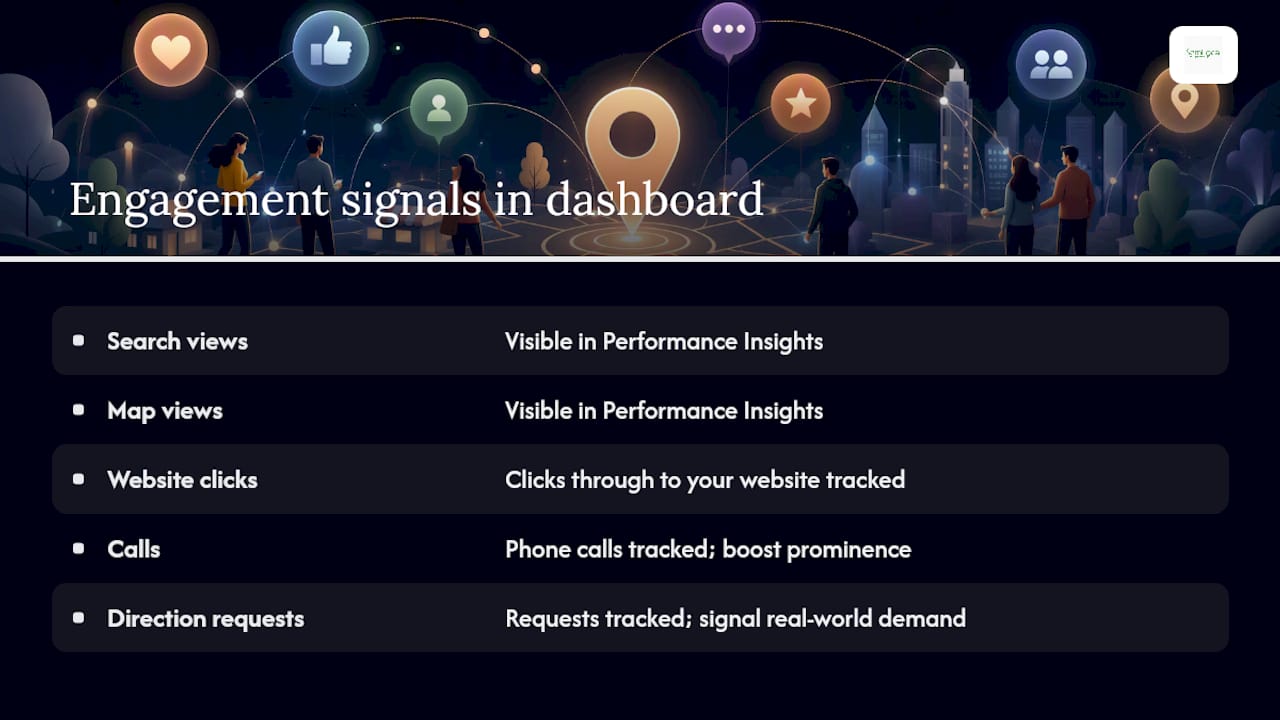
A profile that generates consistent calls and direction requests signals real-world demand in a way a static, rarely-clicked listing cannot. This is part of why an active, complete profile with fresh photos and current information tends to outperform a bare-bones one even when both have similar review counts.
You can view these engagement figures directly in your Business Profile dashboard under performance insights, broken down by search views, map views, calls, and direction requests. Watching the trend over several months tells you more than any single week’s snapshot; a steady rise usually follows closely behind category corrections, review growth or a fresh run of photos.
Making it easy for someone to act matters as much as being found in the first place. A working “Call” button, an accurate address that opens correctly in navigation apps, and a website link that loads quickly all remove friction between discovery and the enquiry you actually want.
Fixing duplicate or incorrect Google Business Profiles
Duplicate listings are one of the quieter reasons a business underperforms on Maps, often splitting reviews, views and engagement across two or more profiles instead of consolidating them into one strong signal.
These duplicates usually appear from a house move without properly updating the old listing, a rebrand that left the previous name live, or a data aggregator pushing an old record back into Google’s system after you thought it was gone.
To resolve one:
- Search your business name and category on Google Maps to spot every version that exists
- Claim or request ownership of the duplicate if you don’t already control it
- Use Google’s “Suggest an edit” or the Business Profile support flow to report it for merging or removal
- Wait for Google to process the request, which can take anywhere from a few days to several weeks
- Recheck your Maps listing afterwards to confirm reviews and photos transferred to the correct, single profile
Incorrect information from third parties, an old phone number on a directory site, a former address still live on an aggregator, causes the same kind of confusion even without a full duplicate. Regularly searching your own business name and checking what appears across the first two pages of results catches most of these before they do lasting damage.
Using Q&A and messaging to boost engagement
The Q&A section sits just below your reviews on the Business Profile, and it’s easy to forget it exists until a competitor, or worse, a member of the public, posts a misleading answer to a genuine customer question.

Seed it yourself. Add the questions customers actually ask, do you take card payments, is there parking nearby, do you work weekends, and answer them clearly as the business owner. This does two things: it removes ambiguity for future customers, and it adds naturally relevant content to your profile that echoes real search language.
Monitor the section weekly. An unanswered question sitting for months looks neglected, and an incorrect public answer left uncorrected can cost you a booking before a customer even calls.
Messaging, where enabled, lets customers contact you directly from the Maps listing without dialling a number. Responding quickly, ideally within an hour during business hours, matters here in the same way it does for reviews: a fast, helpful reply signals an active, trustworthy business, while a message left on read for days pushes a warm enquiry towards a competitor instead.
What actually moves rankings, and what’s overrated
Most Google Maps advice treats every factor as equally urgent, and that’s where owners waste time. Category selection and review velocity do far more heavy lifting than posting frequency or attribute ticking, yet the internet is full of guides obsessing over posting schedules while ignoring a wrong primary category sitting untouched for years.
The conventional advice also underrates distance as a genuine ceiling. Plenty of owners chase profile perfection for months, convinced they’re doing something wrong, when a geo-grid test would show them they’re simply too far from the searcher to compete on that query. That’s not a failure of effort; it’s a fact about geography that no amount of photo uploads will change.
What should come first is unglamorous: verify, categorise correctly, fix your phone number, and start asking for reviews on a schedule you actually keep. Everything else, posts, Q&A, attributes, compounds on top of that foundation rather than replacing it. Owners who skip the boring baseline and jump straight to advanced tactics are usually the ones who message agencies six months later asking why nothing’s working.
— Geoff
Watch: staying competitive on Google Maps
Get your Google Business Profile working harder
If you’ve read this far, you already know what needs fixing, the question is whether you have the hours each month to actually do it properly. Semlocal manages the whole cycle for you: profile completion and verification, category and service audits, review generation, and the geo-grid tracking that shows whether changes are actually working, without you having to become a part-time local SEO specialist.
Where a DIY approach means squeezing profile updates between jobs and hoping reviews trickle in, Semlocal runs it as an ongoing discipline: Google Business Profile management that keeps every field current, plus Local SEO support that ties your website signals to your Maps presence. The starting point is a straightforward audit, category accuracy, review velocity, NAP consistency and your current geo-grid position, so you know exactly where you stand before committing to anything. Request your Google Business Profile audit and get a clear view of what’s holding your ranking back.
Sources
Start with Google’s own local ranking guidance, the Ahrefs Google Maps SEO guide, and a geo-grid testing tool for ongoing measurement. For an independent GBP walkthrough, see Jarvis & Co’s guide for UK SMEs.
- Tips to improve your local ranking on Google – Google Business Profile Help
- Google Maps ranking factors that move the map pin
- Google Maps SEO (WordStream)