TL;DR:
- AI appointment booking automates scheduling conversations, providing round-the-clock bookings with minimal staff involvement. It integrates intent detection, calendar lookup, and confirmation across voice and chat channels, improving efficiency and reducing no-shows for UK service businesses. Success depends on proper rule mapping, bidirectional system integration, and a hybrid approach combining language models with rule-based constraint engines.
AI appointment booking automates the full scheduling conversation, from understanding the caller’s request to writing the confirmed slot into your calendar, so your business takes bookings around the clock with no staff involvement. The industry term for this is automated appointment scheduling, and it covers both voice agents (phone calls handled by AI) and conversational agents (web chat, SMS, WhatsApp).
The fastest benefits for a UK service business:
- 24/7 booking without a receptionist on duty
- Fewer no-shows through automated reminders sent before each appointment
- Faster call handling, with the full booking completed in under two minutes on a well-configured system
For any UK service business losing bookings after hours or spending staff time on scheduling calls, automated appointment scheduling is the most direct fix available.
Table of Contents
- How AI appointment booking works end to end
- The key technologies that power AI booking
- How to implement AI booking in your UK service business
- What systems need to connect, and what UK GDPR requires
- What outcomes and metrics should you expect?
- Where AI appointment booking struggles
- Questions to ask when evaluating an AI booking vendor
- Why hybrid systems outperform LLM-only booking for complex schedules
- Key takeaways
- A candid view on where most AI booking projects go wrong
- Semlocal builds AI booking agents for UK service businesses
- Useful sources
How AI appointment booking works end to end
The booking pipeline follows a consistent sequence whether the channel is voice or chat. AI appointment booking uses conversational AI to understand caller intent and cross-reference a live calendar system to present, select, and confirm time slots in real time.
| Stage | What happens | Input | Output | Systems involved |
|---|---|---|---|---|
| Greeting | Agent identifies itself and the purpose | Incoming call or chat | Welcome prompt | Telephony / chat widget |
| Intent detection | NLU classifies the request (book, reschedule, cancel) | Caller utterance | Intent + confidence score | NLU engine |
| Clarification | Agent collects service type, date preference, provider | Follow-up questions | Structured slot data | Dialog manager |
| Calendar lookup | Agent queries live availability | Slot data | Available times | Calendar API |
| Slot offer | Agent presents one or two options | Available times | Confirmed choice | Dialog manager |
| Confirmation | Agent reads back details and confirms | User agreement | Booking record | Scheduler engine |
| Write-back + notifications | Appointment written to calendar; SMS/email sent | Booking record | Confirmed entry + reminder | Calendar, SMS/email gateway |
Voice vs chat. Voice agents must handle latency carefully: a pause longer than two seconds feels like a dropped call. Confirmation is typically spoken back and then followed by an SMS summary. Chat agents can display options as buttons, which reduces clarification turns and speeds up the flow. Error handling also differs: a voice agent that mishears a date must ask again verbally, while a chat agent can re-render the question with a date picker.
The key technologies that power AI booking
AI scheduling pipelines commonly include intent detection, provider matching, slot selection and booking confirmation as standard stages. Here is what each component actually does.
- Automatic speech recognition (ASR) converts spoken audio to text. Quality varies significantly by accent, which matters in the UK where regional variation is wide.
- Natural language understanding (NLU) classifies intent and extracts entities: service type, preferred date, provider name. This is where “I need a haircut on Thursday afternoon” becomes structured data.
- Dialog manager runs the booking script, decides which question to ask next, and triggers fallbacks when confidence is low. Think of it as the conductor of the conversation.
- Scheduler engine applies your business rules: buffer times, staff-to-service pairings, room availability, travel time between jobs. Without this layer, the agent will create infeasible bookings.
- Calendar API (bidirectional) reads availability and writes confirmed appointments back. One-way read-only connections are a common failure point.
- Telephony/SIP and channel connectors route inbound calls to the voice agent and connect web chat, SMS, and WhatsApp to the same underlying logic.
- CRM/EHR connectors pull customer history and push new booking records so your team sees everything in one place.
Pro Tip: When a vendor claims their system is “AI-only scheduling”, ask specifically whether slot selection and constraint checking are handled by the language model or by a separate rule-based engine. A pure LLM approach often struggles with complex constraints at scale; a hybrid system is more reliable for multi-resource or multi-step bookings.
How to implement AI booking in your UK service business
A structured rollout avoids the most common failure modes: stale availability, missed edge cases, and staff distrust of the new system.
-
Map your appointment types and rules. List every service, its duration, required staff or room, buffer time, and any constraints (e.g. a consultation must precede a treatment). This is the single most overlooked step, and skipping it guarantees infeasible bookings.
-
Audit your data sources. Identify your canonical calendar (Google Calendar, Outlook, a PMS, or an EHR), your CRM, and your telephony provider. Confirm API access is available and that credentials can be shared with the AI platform.
-
Connect and configure integrations. Set up bidirectional calendar sync, CRM read/write, and your SMS/email gateway. Test write-back before any live traffic touches the system.
-
Train the NLU for your context. Upload sample phrases your customers actually use, including regional expressions and service names specific to your business. For UK deployments, test with a range of accents: Scottish, Northern English, Welsh, and South Asian British are the most common sources of misrecognition.
-
Build and test dialogue flows. Script the main booking path, then build edge-case branches: fully booked days, requests for unavailable services, callers who change their mind mid-conversation, and cancellation requests.
-
Run scripted simulations before going live. Test every branch with recorded or synthetic calls. Measure intent accuracy, slot-fill rate, and successful write-back rate. Set a minimum threshold (intent accuracy above 90% is a reasonable starting point) before proceeding.
-
Pilot in overflow or after-hours mode first. The AI takes calls only when staff are unavailable or outside business hours. This captures immediate value, limits exposure during early testing, and gives your team time to review transcripts before full deployment.
-
Monitor KPIs from day one. Track booked appointments per enquiry, no-show rate, time-to-book, after-hours booking volume, and human handoff rate. Review weekly for the first month.
For a practical small business walkthrough, this AI scheduling setup guide covers configuration steps in plain language.
What systems need to connect, and what UK GDPR requires
Production-grade AI booking requires bidirectional sync: the agent must both read availability and write confirmed appointments back into the scheduling system instantly to avoid double-booking. That single requirement drives most of the integration work.
Core integrations:
- Calendar (Google Calendar, Microsoft Outlook, a property management system, or an EHR): must support real-time read and write via API
- CRM (to pull existing customer records and push new bookings): reduces duplicate data entry and enables personalised confirmations
- Telephony/SIP or VoIP provider: routes inbound calls to the AI agent; must support call transfer for human handoffs
- SMS and email gateway: sends confirmations and reminders; requires explicit consent records under UK GDPR
Data flow in brief. The agent reads availability, locks the offered slot temporarily to prevent a concurrent booking, receives the caller’s confirmation, writes the appointment, releases the lock, and dispatches notifications. That lock-and-write sequence is where poorly built integrations fail under concurrent load.
UK GDPR obligations. Under the UK GDPR, callers’ names, phone numbers, and appointment details are personal data. Your AI booking system is a data processor. You must: capture consent before sending marketing-related SMS or email; store call recordings only as long as operationally necessary; document your data retention policy; and ensure your vendor signs a Data Processing Agreement. The Information Commissioner’s Office publishes guidance on data processor responsibilities that applies directly here.
Pro Tip: Build slot-locking into your integration from the start. A 30-second lock on any offered slot, released on confirmation or timeout, prevents the race condition where two callers are offered the same time simultaneously.
What outcomes and metrics should you expect?
The business case for automated appointment scheduling is built on three measurable outcomes.
Vendor pilot data point: Pilot reports include vendor-reported reductions in no-shows and high fill rates in healthcare deployments — these figures vary by sector and configuration but provide a credible benchmark for ROI modelling.
Primary KPIs to track:
- Booked appointments per enquiry: the conversion rate of the AI agent itself
- No-show rate: compare pre- and post-deployment; automated reminders reduce this significantly for service businesses
- Time-to-book: how many seconds from call answer to confirmed booking
- After-hours booking volume: the clearest measure of incremental revenue the AI generates
- Fill rate: percentage of available slots that are booked
- Human handoff rate: the proportion of calls the AI cannot complete alone; a high rate signals a training or configuration gap
Beyond the initial booking, AI systems handle rescheduling, waitlist outreach and no-show recovery automatically, extending value across the full appointment lifecycle. Many businesses recover platform costs quickly through extra after-hours bookings and lower no-show losses. For hospitality-specific figures, AI booking deployments in UK hotels have reported booking uplifts worth tracking as a sector benchmark.
Where AI appointment booking struggles
Knowing the limitations before you deploy saves time and protects your reputation.
- Complex multi-resource scheduling. Booking a procedure that requires a specific clinician, a particular room, and a piece of equipment simultaneously is a combinatorial problem. A plain language model often fails here without a dedicated constraint solver.
- Stale availability. If your calendar sync has any lag, the agent will offer slots that are already taken. Real-time API connections are non-negotiable; polling-based syncs introduce risk.
- Incomplete identity verification. For regulated services (financial advice, certain healthcare appointments), the AI must verify caller identity before booking. This requires additional integration with your CRM or identity verification service.
- Accent and dialect misrecognition. UK regional accents remain a genuine challenge for many ASR systems. Without accent-specific training data, misrecognition rates rise and callers repeat themselves, which damages trust.
- Long clarification loops. If the agent asks more than three or four clarifying questions, callers disengage. Dialogue design must minimise turns, not maximise thoroughness.
- Privacy and consent gaps. Storing call audio without a clear retention policy, or sending SMS reminders without explicit consent, creates ICO compliance risk.
Pro Tip: Test your edge-case data flows before launch: simulate a caller who gives a name that does not match any CRM record, a request for a service you no longer offer, and a booking attempt on a fully blocked day. These three scenarios expose most integration and dialogue gaps.
Questions to ask when evaluating an AI booking vendor
A good vendor demo should answer most of these in under an hour.
- Which calendar systems do you support, and is the sync bidirectional?
- Which CRM and telephony platforms are you pre-integrated with?
- How are buffer times, staff-to-service pairings, and travel time configured?
- Can you demonstrate a live booking against a real (or sandboxed) calendar?
- How does the system handle a fully booked day, a cancellation mid-call, and a caller who wants to reschedule?
- What is your SLA for write-back latency, and what happens if the write fails?
- How do you handle slot-locking under concurrent load?
- What accent and language variants have you tested, and can we run our own accent tests?
- What are your data retention defaults, and will you sign a UK GDPR Data Processing Agreement?
- Is call audio stored, and if so, where and for how long?
Additional checks for your shortlist:
- Ask for a simulated surge test: 10 concurrent booking attempts on the same day
- Request a sample transcript showing a human handoff trigger
- Confirm whether the NLU model is shared across clients or fine-tuned per deployment
- Verify that the system logs every write-back attempt and its outcome for audit purposes
For sales appointment use cases, this guide to booking sales appointments with AI covers additional evaluation criteria specific to lead qualification flows.
Why hybrid systems outperform LLM-only booking for complex schedules
Research from the ACL Anthology evaluating LLMs on multitask scheduling finds that large language models handle semantic understanding well but struggle with strict, large-scale scheduling constraints. A separate evaluation framework, R-ConstraintBench, tests LLM reliability under high-constraint scheduling conditions and confirms that reliability drops as constraint complexity increases.
The practical implication: an LLM alone is not sufficient for any booking scenario involving multiple resources, conditional rules, or high concurrency. A dedicated GenAI system for complex scheduling can match the optimisation quality of traditional solvers while modelling schedules far more rapidly, but only when the architecture separates language tasks from constraint tasks.
How the hybrid approach works:
- The LLM layer handles intent detection, entity extraction, clarification dialogue, and confirmation phrasing. This is where natural language fluency matters.
- The rule-based solver or optimisation engine handles slot selection, constraint checking (buffers, pairings, resource availability), and write-back sequencing. Deterministic logic here prevents infeasible bookings.
- The two layers communicate via structured data: the LLM passes extracted slot parameters to the solver, which returns valid options the LLM then presents in natural language.
Practical benefits of this architecture:
- Constraint violations (double-booking, missing buffers) become near-impossible because the solver enforces rules deterministically
- Optimisation for complex schedules (multi-provider, multi-room) runs faster than an LLM reasoning through the same problem
- Write-back guarantees are stronger because the solver controls the final confirmation step
Pro Tip: When designing an agentic booking workflow, route all deterministic decisions (slot validation, constraint checking, write-back) through the rule engine, and keep the LLM strictly on language tasks. Mixing the two responsibilities in one model is the most common cause of booking errors in production.
Key takeaways
Automated appointment scheduling delivers measurable results only when the integration is bidirectional, the dialogue is trained for your specific context, and a rule-based constraint layer handles complex scheduling logic.
| Point | Details |
|---|---|
| Bidirectional sync is non-negotiable | The AI must read availability AND write confirmed bookings back instantly to prevent double-booking. |
| Map your rules before you build | Buffer times, staff pairings, and service constraints must be formalised before configuration begins. |
| Hybrid architecture outperforms LLM-only | Combine an LLM for language with a rule-based solver for constraints to get reliable, scalable booking. |
| Measure the right KPIs | Track booked appointments per enquiry, no-show rate, after-hours volume, and human handoff rate from day one. |
| Semlocal builds and manages this end to end | Semlocal designs, integrates, and operates custom AI booking agents for UK service businesses, including full UK GDPR compliance. |
A candid view on where most AI booking projects go wrong
Most AI booking failures are not AI failures. They are integration failures and configuration failures dressed up as AI problems.
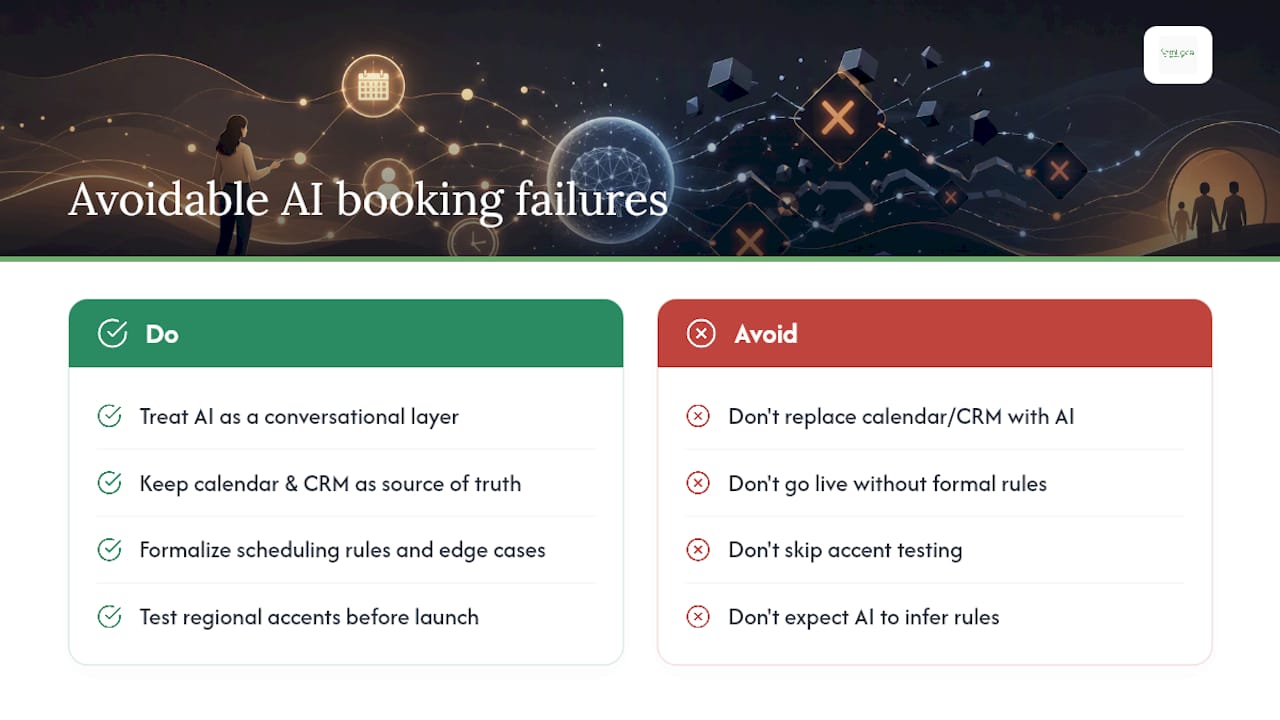
The businesses that get the best results treat the AI agent as a conversational layer sitting on top of their existing calendar and CRM, not as a replacement for those systems. That framing matters because it keeps the project grounded: the calendar is still the source of truth, the CRM still owns the customer record, and the AI’s job is to handle the conversation that fills those systems with data.
What consistently goes wrong is the rule configuration step. Businesses go live without formalising their own scheduling logic. They have never written down that a junior therapist cannot take a new client’s first appointment, or that Room 3 is unavailable on Tuesdays, or that a 90-minute treatment needs a 15-minute buffer on each side. The AI cannot infer those rules. It books what the calendar shows as available, and the result is a schedule that looks full but is operationally broken.
The second failure mode is accent testing. UK businesses routinely skip this because the vendor’s demo sounds fine in a London accent. Then the system goes live and a caller from Glasgow or Bradford gets misrecognised twice in a row and hangs up. That is a recoverable problem, but only if you test for it before launch, not after.
The businesses that get this right spend more time on discovery than on the technology. They map every appointment type, every constraint, every edge case. The AI build itself is often the fastest part of the project.
Semlocal builds AI booking agents for UK service businesses
If you want a booking system that actually works in production, not just in a vendor demo, Semlocal designs, builds, and manages custom AI voice and chat agents for UK service businesses. The difference from a generic platform is the discovery work: every deployment starts with a full mapping of your appointment types, constraints, and data sources before a single line of configuration is written.
Semlocal handles the full stack: calendar and CRM integration, telephony setup, NLU training for UK accents, UK GDPR compliance documentation, and ongoing performance monitoring. You get a system tuned to your business, not a template pointed at your calendar. For UK service businesses looking to capture after-hours bookings and reduce no-show losses, the AI management and local services page is the right starting point. Book a discovery call and we will run a live demo against your actual calendar so you can see exactly how it performs before committing.
Useful sources
- NL ⇒ Schedule: Evaluate Multitask Scheduling Capability of Large Language Models (ACL Anthology) — primary research on LLM scheduling limitations
- R-ConstraintBench: Evaluating LLMs on NP-Complete Scheduling (arXiv/ar5iv) — constraint-complexity evaluation framework
- The Complete Guide to AI Appointment Booking (Reapdat) — practical guide covering no-show reduction
- Information Commissioner’s Office — Data processor guidance — UK GDPR obligations for AI booking deployments
- AI booking for UK hospitality (Semlocal internal) — UK sector-specific booking uplift data
- AI for appointment scheduling: small business guide (Semlocal internal) — practical setup reference for UK service businesses
Recommended
- AI appointment booking defined: UK business guide – AI Management Agency
- AI appointment setting: a guide for UK small businesses – AI Management Agency
- AI appointment examples to streamline your UK hotel – AI Management Agency
- AI hotel appointment scheduling: boost efficiency 40%+ – AI Management Agency