TL;DR:
- FAQ automation uses AI to answer customer questions instantly across various channels, reducing response times significantly. Well-implemented systems resolve 40-60% of queries, saving support costs while increasing reliability and customer satisfaction. Success depends on data-driven setup, strict grounding in an approved knowledge base, and ongoing testing and updates.
FAQ automation is the use of AI-powered systems to answer common customer questions instantly, without human involvement. Well-implemented systems resolve 40–60% of inbound queries the moment they arrive, cutting response times from hours to seconds. For UK business owners managing lean teams, that shift is significant. This guide explains how the technology works, what it delivers in practice, and how to implement it without the common mistakes that undermine results.
What is FAQ automation and how does it differ from a static FAQ page?
FAQ automation is the industry term for AI-driven systems that detect a customer’s question, match it to a known answer, and respond in natural language without a human agent. The standard industry term is conversational AI, and it sits beneath the broader category of intelligent automation. A static FAQ page requires the customer to search, scroll, and self-serve. An automated FAQ system meets the customer where they are, whether that is a website chat window, an email inbox, or a phone call, and delivers the answer directly.
The distinction matters because static FAQ pages have a high abandonment rate. Customers who cannot find an answer quickly give up and contact your team anyway. FAQ automation removes that friction entirely. Aimagency builds AI agents that handle this process across voice and text channels, responding in a natural tone that feels nothing like a scripted bot.
How does FAQ automation work?
The core technology is Natural Language Processing, or NLP. NLP allows the system to recognise varied customer phrasing and map it to a consistent intent. A customer asking “when will my order arrive?” and another asking “what’s my delivery status?” are expressing the same intent. A keyword-based system would treat these as different queries. An NLP-powered system maps both to the same answer without any manual configuration.
The process works in three stages:
- Intent recognition: The system reads the customer’s message and identifies what they are actually asking, not just the words they used.
- Knowledge base matching: The system searches an approved set of answers and retrieves the most relevant response.
- Response delivery: The answer is sent back in natural language, through whichever channel the customer used.
FAQ automation deploys across three main channels: AI chatbots on websites, email auto-response systems, and help desk integrations such as Zendesk or Freshdesk. Each channel uses the same underlying knowledge base, so answers stay consistent regardless of where the question arrives. When the system cannot match a query with sufficient confidence, it escalates to a human agent automatically. That escalation trigger is what separates a well-built system from one that frustrates customers with wrong answers.
Pro Tip: Set your escalation confidence threshold conservatively at first. A system that escalates 30% of queries and gets the rest right builds far more trust than one that answers everything and gets 15% wrong.

What are the key benefits of FAQ automation for UK businesses?
The operational case for automating customer support is straightforward. Effective FAQ automation resolves 40–60% of support queries without any human involvement. That means your support team spends less time answering the same questions repeatedly and more time on the complex issues that genuinely need human judgement.
The benefits break down into four practical areas:
- Faster response times. Customers receive answers in seconds rather than waiting hours for an email reply or queuing for a phone agent. Speed directly affects customer satisfaction scores.
- Reduced support workload. When automation handles the high-volume, low-complexity queries, your team’s capacity effectively increases without adding headcount.
- 24/7 availability. FAQ chatbots deliver instant responses around the clock, including evenings, weekends, and bank holidays when your team is offline. For UK businesses with customers in different time zones, this is particularly valuable.
- Query data and insight. Every question the system receives is logged. Over time, that data reveals patterns in what customers are confused about, which is intelligence you can use to improve your product, your website, or your onboarding process.
The cost argument is equally clear. Hiring an additional support agent in the UK carries salary, National Insurance, and training costs. An AI system handles a comparable volume of queries at a fraction of that cost, and it scales instantly during busy periods without overtime.
How to implement FAQ automation: a practical, data-driven approach
The most common mistake businesses make is building their FAQ system from assumptions. They sit in a meeting room, brainstorm questions customers might ask, and build answers around those guesses. The result is a system that covers hypothetical queries rather than real ones.
The correct approach starts with your data:
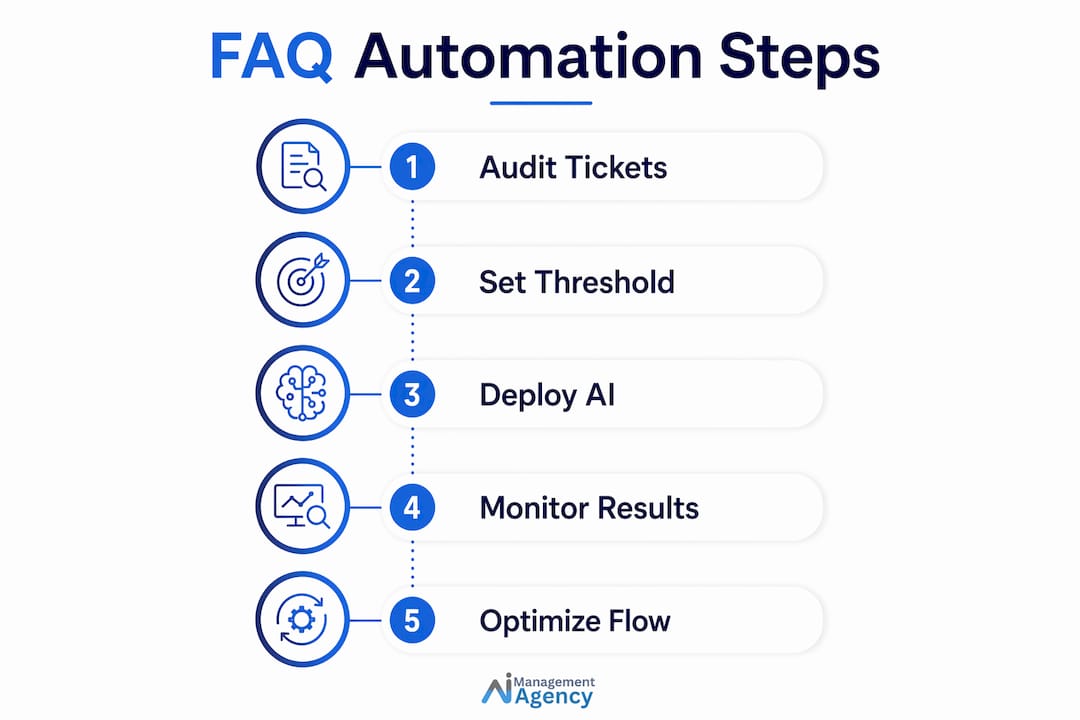
- Audit 90 days of support tickets. Pull every customer query from the past three months. Cluster them by intent to identify the genuine patterns. This is the foundation of everything that follows.
- Identify your top 10 intents. Prioritising the top 10 customer intents typically covers 60–70% of your total inquiry volume. Start there, not with a list of 200 questions.
- Write answers in customer language. Use the exact phrasing your customers use, not internal terminology. If customers ask about “getting a refund,” do not write an answer titled “Returns Policy.”
- Build and ground your knowledge base. Load your approved answers into the system. The AI must be constrained to this knowledge base only. Anything outside it should trigger escalation, not a guess.
- Test against real conversations. Run the system against at least 20 actual customer conversations before going live. Testing with real customer queries before full deployment is the single most reliable way to catch gaps and errors.
- Review and update monthly. Customer questions evolve. A knowledge base that is not maintained becomes stale and starts producing wrong answers.
Pro Tip: Use your support ticket audit to find the queries that take your team the longest to answer, not just the most frequent ones. Automating a time-consuming query saves more capacity than automating a quick one.
What are the common pitfalls in FAQ automation deployment?
The biggest risk in FAQ automation is an AI system that makes things up. This is known as hallucination, and it occurs when the AI generates a response that sounds plausible but is factually wrong. Grounding AI in an approved knowledge base is the only reliable defence against this. An ungrounded system will confidently give a customer incorrect information about your pricing, your returns policy, or your service terms. That damages trust in a way that is very difficult to recover from.
Other pitfalls to avoid:
- Building too broad, too fast. A system trying to answer 500 questions poorly is worse than one answering 10 questions well. Start narrow and expand based on performance data.
- Using internal jargon. If your system uses terminology your customers do not recognise, they will not understand the answer even when it is technically correct.
- Ignoring escalation design. Every FAQ system needs a clear, fast path to a human agent. Customers who feel trapped in a loop with a bot become significantly more frustrated than customers who never had automation at all.
- Neglecting data privacy. Any system handling customer queries must comply with UK GDPR. Be clear about what data is stored, for how long, and who can access it.
“The primary differentiator between a trustworthy and a harmful FAQ bot is strict grounding. AI constrained to approved knowledge bases enhances trust and accuracy. AI left to generate its own answers introduces risk that no business should accept.”
Key takeaways
FAQ automation resolves the majority of routine customer queries instantly, but only when it is built on real intent data, grounded in an approved knowledge base, and tested against actual customer conversations before launch.
| Point | Details |
|---|---|
| Definition and scope | FAQ automation uses conversational AI to answer common queries instantly, across chat, email, and voice channels. |
| Performance benchmark | Well-built systems resolve 40–60% of inbound queries without human involvement, cutting response times from hours to seconds. |
| Implementation foundation | Start with a 90-day audit of real support tickets, not assumptions, to identify the top 10 customer intents. |
| Critical safety measure | Ground the AI strictly in an approved knowledge base to prevent hallucinations and protect customer trust. |
| Ongoing maintenance | Review and update the knowledge base monthly to keep answers accurate as your business and customer questions evolve. |
Why I think most UK businesses are implementing FAQ automation backwards
I have seen a consistent pattern with businesses that come to us after a failed first attempt at FAQ automation. They built the system from the inside out. They started with what they wanted to say, not with what customers were actually asking. The result was a polished-looking system that missed the real queries entirely.
The businesses that get this right treat the 90-day ticket audit as non-negotiable. They are often surprised by what they find. The questions customers ask most frequently are rarely the ones the business expected. A plumbing firm might expect questions about pricing, but find that 40% of queries are about booking availability. An estate agent might expect questions about fees, but find that most callers want to know how long a sale typically takes. That gap between assumption and reality is exactly why data has to come first.
The other thing I would push back on is the idea that FAQ automation is a “set and forget” system. The businesses seeing the best results treat it as a living product. They review query logs monthly, spot new patterns, and update their knowledge base accordingly. The customer satisfaction gains compound over time when you do this well.
In 2026, customer expectations for instant responses are not a trend. They are the baseline. A business that makes customers wait hours for an answer to a simple question is losing ground to one that answers in seconds. FAQ automation is not about replacing your team. It is about making sure your team’s time goes where it genuinely matters.
— Geoff
How Aimagency helps UK businesses get FAQ automation right
Aimagency specialises in building AI agents that handle customer queries across voice and text, 24 hours a day, seven days a week. The approach is grounded in the same data-first methodology described in this guide: real intent analysis, approved knowledge bases, and thorough testing before any system goes live.
For UK small businesses, the advantages of a well-deployed AI agent go beyond answering FAQs. Aimagency’s AI receptionist speaks in a natural tone, books qualified sales appointments, and handles calls at any hour without adding to your payroll. If you want to see what a properly built FAQ automation system looks like in practice, the AI agent best practices guide for 2026 is a good place to start.
FAQ
What is FAQ automation in simple terms?
FAQ automation is an AI-powered system that reads a customer’s question and replies with the correct answer instantly, without a human agent. It works across chat, email, and voice channels.
What are FAQ bots and how do they differ from live chat?
FAQ bots are automated systems that handle common queries using pre-approved answers and NLP. Unlike live chat, they respond immediately at any hour and do not require a human to be present.
How does FAQ automation work with existing help desk software?
Most FAQ automation systems integrate directly with help desk platforms, pulling from a shared knowledge base and escalating unresolved queries to human agents within the same workflow.
What percentage of queries can FAQ automation handle?
Effective FAQ automation resolves 40–60% of inbound support queries without human involvement, depending on how well the knowledge base is built and maintained.
How long does it take to implement FAQ automation?
A properly built system, starting from a 90-day ticket audit through to live testing, typically takes four to eight weeks. Rushing this process is the most common cause of poor results.
Recommended
- Small business automation checklist for UK owners – AI Management Agency
- Step-by-step task automation guide for UK small businesses – AI Management Agency
- Call answering process guide for UK small businesses – AI Management Agency
- What is business automation? A guide for small businesses – AI Management Agency